How to Generate Salary Slip Online in India (Step-by-Step Guide with Free Tool)
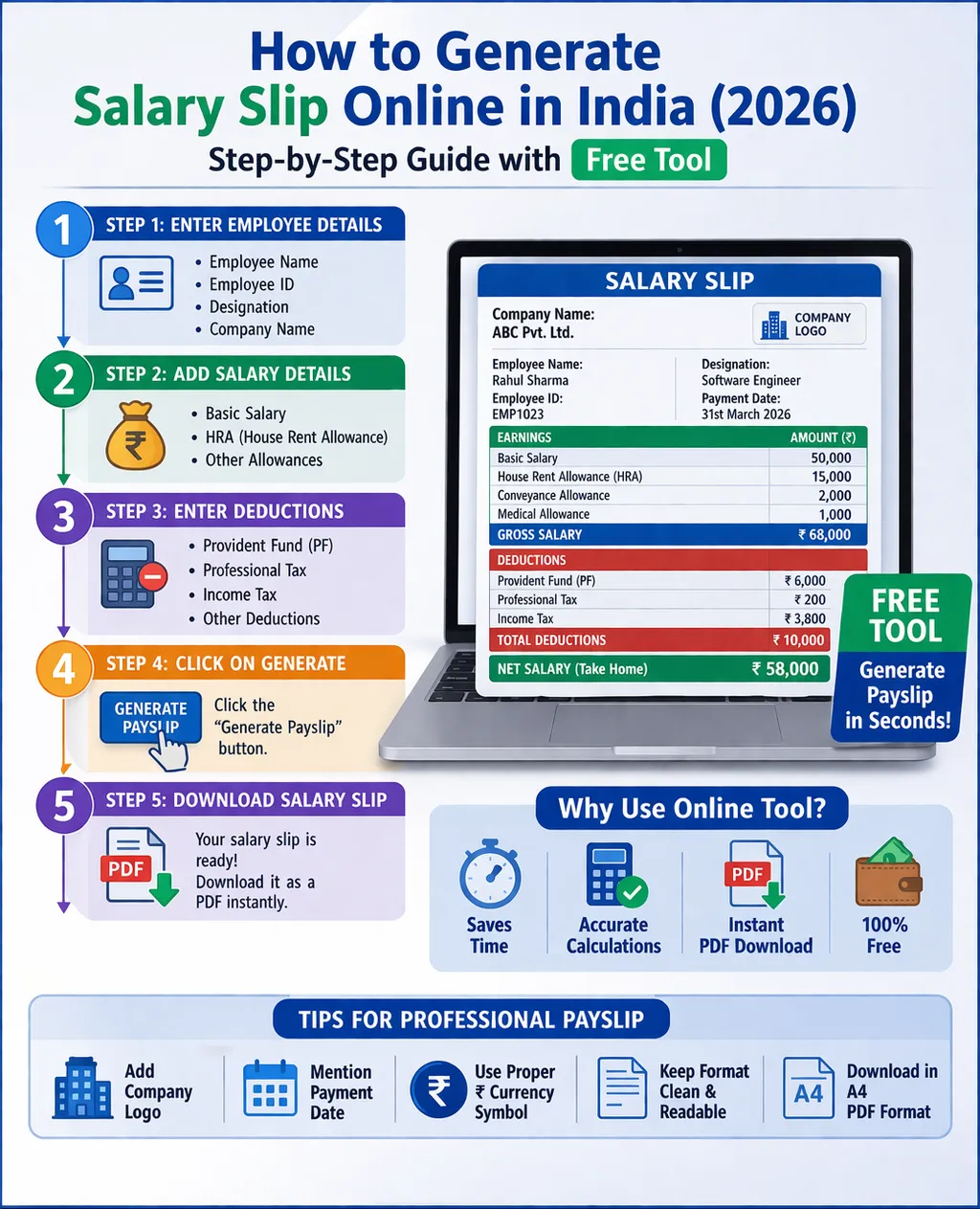
Creating a salary slip might sound like a complicated task, especially if you don’t have access to payroll software or an HR system. But in reality, it’s much simpler than most people think.
Today, you can generate a complete and professional salary slip online in just a few minutes—without any technical knowledge.
In this guide, you’ll learn exactly how to create a salary slip step by step using a free online tool, along with everything you need to know about payslips in India.
📌 What is a Salary Slip?
A salary slip (also called a payslip) is an official document that shows a detailed breakdown of an employee’s salary.
It includes:
- Earnings (basic salary + allowances)
- Deductions (PF, tax, etc.)
- Final take-home salary
It is usually issued monthly by employers.
📌 Why You Need a Salary Slip in India
In India, salary slips are widely used for multiple purposes:
🔹 Income Proof
Required for loans, credit cards, and rentals.
🔹 Tax Filing
Helps in calculating and filing income tax properly.
🔹 Financial Planning
Gives clarity about earnings and deductions.
🔹 Job Verification
Used as proof of employment and salary history.
📌 What is an Online Salary Slip Generator?
An online salary slip generator is a tool that helps you create payslips instantly by entering basic salary details.
Instead of manually designing or calculating, the tool does everything automatically.
💡 Benefits:
- Fast and easy
- No calculations needed
- Instant PDF download
- Professional design
- Accessible anywhere
📌 Step-by-Step Guide to Generate Salary Slip Online in India
Follow these simple steps:
🟢 Step 1: Enter Employee Details
Start by filling in basic information:
- Employee Name
- Employee ID
- Designation
- Company Name
🟢 Step 2: Add Salary Details
Enter the salary components:
- Basic Salary
- HRA (House Rent Allowance)
- Other Allowances
🟢 Step 3: Enter Deductions
Now add deductions such as:
- Provident Fund (PF)
- Professional Tax
- Income Tax
- Other deductions
🟢 Step 4: Click on Generate
Once all details are entered, click on the Generate Payslip button.
🟢 Step 5: Download Salary Slip
Your payslip will be ready instantly. Download it as a PDF in A4 format.
📌 Salary Slip Format in India (2026)
A standard Indian salary slip includes:
🔹 Earnings Section
- Basic Salary
- HRA
- Conveyance Allowance
- Medical Allowance
🔹 Deductions Section
- PF (Provident Fund)
- Professional Tax
- Income Tax
🔹 Net Salary
Final amount after deductions.
📌 Key Tips While Creating Salary Slip
- Always double-check entered values
- Use proper ₹ currency symbol
- Keep the format clean and readable
- Include payment date
- Add company logo for professionalism
📌 Common Mistakes to Avoid
❌ Entering wrong salary details
❌ Missing deductions
❌ Incorrect employee information
❌ Poor formatting
Avoiding these ensures your payslip looks professional and accurate.
📌 Who Can Use This Tool?
This tool is useful for:
- Small business owners
- Freelancers
- Startups
- HR professionals
- Employees
📌 Why Use a Free Online Tool?
A free tool is perfect because:
- No cost involved
- Quick results
- No installation needed
- Easy to use
For most individuals and small businesses, it’s more than enough.
FAQs
Can I generate a salary slip for free?
Yes, you can use a free online tool without any cost.
Is it valid in India?
Yes, as long as the details are correct, it can be used as proof.
Can I download it as a PDF?
Yes, most tools provide instant PDF download.
Do I need technical knowledge?
No, anyone can use it easily.
📌 Final Thoughts
Generating a salary slip online in India is no longer a complicated task. With the help of a free tool, you can create a professional and accurate payslip in just a few minutes.
Whether you’re managing employees, working as a freelancer, or simply need proof of income, this step-by-step method makes the entire process simple and hassle-free.
Start using a salary slip generator today and save your time and effort. 🚀
Your email address will not be published. Comments are moderated.
0 Comments on This Post
Leave a Reply
Comments (0)
Spread the Word!
Join Our Developer Community!
Get weekly coding tips, tool updates, and exclusive tutorials straight to your inbox.
Request a Tool
×