Best Free VPNs Compared in 2026: Speed, Privacy & Security Tested
The internet has become an essential part of our daily lives. We use it for banking, shopping, social media, work, entertainment, online learning, and communication. However, every website we visit and every service we use collects some amount of personal data. Cybercriminals, advertisers, and even internet service providers (ISPs) can monitor your online activities if your connection is not properly secured.
This is where a Virtual Private Network (VPN) becomes extremely valuable.
A VPN encrypts your internet connection and hides your real IP address, making it much harder for anyone to track your online activity. Whether you're browsing from home, working remotely, using public Wi-Fi at a café, or traveling abroad, a VPN adds an important layer of security and privacy.
Many people believe that only paid VPNs are worth using, but that's no longer true. In 2026, several companies offer reliable free VPN plans that provide strong encryption, decent speeds, and enough features for everyday users. While free VPNs usually have some limitations—such as data caps, fewer server locations, or reduced speeds—they are still excellent options for secure browsing without paying a subscription.
In this guide, we've thoroughly compared the best free VPNs available in 2026. We looked at their security, speed, privacy policies, streaming performance, ease of use, and overall reliability. Whether you're a student, remote worker, gamer, traveler, or simply someone who values online privacy, this comparison will help you choose the right free VPN.
Why Do You Need a VPN in 2026?
Online privacy is becoming more important every year. Data breaches, phishing attacks, identity theft, and online tracking are increasing across the world. A VPN is one of the simplest and most effective tools you can use to protect yourself online.
Protect Your Privacy
Every time you browse the internet without a VPN, your internet service provider can see which websites you visit. Many websites also collect browsing habits to display personalized advertisements.
A VPN encrypts your internet traffic, making it much more difficult for third parties to monitor your online activities.
Stay Safe on Public Wi-Fi
Free Wi-Fi networks in airports, hotels, shopping malls, restaurants, and coffee shops are convenient but often insecure.
Hackers can exploit unsecured public networks to steal passwords, banking information, and personal files.
Using a VPN encrypts your connection, helping protect your data even on public Wi-Fi.
Hide Your IP Address
Every internet connection has an IP address that reveals your approximate location.
A VPN replaces your real IP with one from its secure servers, making it harder for websites and advertisers to identify or track you.
Access Geo-Restricted Content
Some websites, streaming services, games, and apps are available only in specific countries.
A VPN lets you connect through servers located in different regions, allowing access to content that may otherwise be unavailable.
Improve Online Security
Modern VPNs use military-grade encryption to secure your data.
This makes it extremely difficult for hackers to intercept your internet traffic.
How We Tested These Free VPNs
Choosing the best VPN isn't just about reading the feature list. We tested every VPN using real-world scenarios to understand how each one performs in daily use.
Our testing included:
- Browsing speed
- Download performance
- Upload performance
- Video streaming quality
- Privacy policy
- Encryption standards
- Server availability
- Ease of installation
- User interface
- Device compatibility
- Reliability
- Customer reputation
We also reviewed each provider's logging policy to ensure they respect user privacy.
What Makes a Good Free VPN?
Not every free VPN is trustworthy.
Some free VPN services collect user data, display intrusive advertisements, or even sell browsing information to third parties.
Before installing any VPN, consider the following factors.
Strong Encryption
A reliable VPN should use AES-256 encryption, which is currently considered one of the strongest encryption standards available.
This level of encryption is trusted by governments, security professionals, and businesses around the world.
No-Logs Policy
The best VPN providers do not keep records of your browsing history, IP address, or online activities.
Always choose a provider with a verified no-logs policy.
Fast Speeds
A VPN should protect your privacy without making your internet unusably slow.
Good free VPNs maintain stable speeds for browsing, video calls, and HD streaming.
Secure VPN Protocols
Modern VPNs support secure protocols such as:
- WireGuard
- OpenVPN
- IKEv2/IPSec
These protocols provide an excellent balance between speed and security.
Multiple Device Support
The best VPNs are available on:
- Windows
- macOS
- Linux
- Android
- iPhone (iOS)
- Chrome Browser
- Firefox Browser
Some also support routers and smart TVs.
Easy to Use
A beginner-friendly VPN should have:
- One-click connect
- Simple interface
- Automatic server selection
- Quick installation
- Minimal setup
Free VPN vs Paid VPN
Many users wonder whether a free VPN is enough.
The answer depends on your needs.
A free VPN is ideal if you:
- Browse the web daily
- Use social media
- Need protection on public Wi-Fi
- Occasionally stream videos
- Want basic online privacy
A paid VPN is better if you:
- Stream 4K content regularly
- Download large files
- Need unlimited bandwidth
- Want hundreds of server locations
- Require advanced privacy features
- Travel frequently
For most everyday users, a reputable free VPN provides enough protection.
Comparison Criteria
To make this comparison fair, every VPN was evaluated using the same scoring system.
We rated each VPN based on:
- Privacy
- Security
- Speed
- Streaming Support
- Server Locations
- Data Limits
- Ease of Use
- Overall Value
This approach allows readers to compare services based on practical performance rather than marketing claims.
Best Free VPNs Included in This Guide
After extensive research and testing, these VPNs stood out as the best free options in 2026:
- Proton VPN Free
- Windscribe Free
- PrivadoVPN Free
- Hide.me Free
- TunnelBear Free
- Atlas VPN Free (where available)
- Opera VPN
- Urban VPN
- ZoogVPN
- VPNBook
Each VPN has its own strengths and weaknesses. Some focus on privacy, while others prioritize speed or streaming performance.
Proton VPN Free – The Best Overall Free VPN in 2026 ⭐⭐⭐⭐⭐
When it comes to free VPNs, Proton VPN Free is widely considered one of the best choices available. Unlike many free VPN providers that limit your monthly data or display annoying advertisements, Proton VPN offers unlimited bandwidth on its free plan. This makes it an excellent option for users who need privacy and security without worrying about data limits.
Developed by the same team behind Proton Mail, Proton VPN has built a strong reputation for transparency, privacy, and security. The company is based in Switzerland, a country known for its strict privacy laws, making it a trusted choice for millions of users worldwide.
Key Features
- Unlimited free data
- No advertisements
- No-logs policy
- AES-256 encryption
- WireGuard and OpenVPN support
- Kill Switch
- DNS Leak Protection
- Open-source applications
- Available on Windows, macOS, Linux, Android, and iOS
Performance
During testing, Proton VPN delivered consistent browsing speeds even during peak hours. Websites loaded quickly, YouTube videos streamed smoothly in HD, and video calls on Zoom and Google Meet remained stable.
Because free users are limited to a smaller number of servers, speeds may occasionally decrease during busy periods. However, overall performance remained excellent for everyday tasks.
Security
Security is Proton VPN's biggest strength.
It uses:
- AES-256 Encryption
- Perfect Forward Secrecy
- Secure Core Technology (Premium)
- DNS Leak Protection
- Kill Switch
These features ensure your online activities remain private and protected.
Pros
- Unlimited bandwidth
- Excellent privacy
- No ads
- Strong encryption
- Trusted company
- Beginner-friendly interface
Cons
- Limited free server locations
- Streaming support is limited on free servers
- Only one device at a time on the free plan
Best For
- Students
- Remote workers
- Daily browsing
- Public Wi-Fi protection
- Privacy-focused users
Overall Rating: ★★★★★ (9.8/10)
Windscribe Free – Best Free VPN for Extra Features ⭐⭐⭐⭐⭐
Windscribe has become one of the most popular free VPN services because it offers a generous combination of privacy, speed, and advanced features.
Unlike many competitors, Windscribe includes built-in ad blocking, tracker blocking, malware protection, and firewall functionality even on its free plan.
Users receive 10 GB of free data every month, which is enough for regular browsing, email, and moderate streaming.
Key Features
- 10 GB monthly free data
- Multiple server locations
- Built-in ad blocker
- Malware protection
- Split tunneling
- Firewall
- WireGuard support
- No activity logs
Performance
Windscribe performed exceptionally well during speed tests.
Browsing felt responsive, downloads remained stable, and streaming services loaded quickly.
For users located near available servers, speed loss was minimal.
Privacy
Windscribe follows a strict privacy policy and stores very little user information.
The company also provides transparency reports and regularly updates its security systems.
Streaming Performance
Windscribe is one of the few free VPNs capable of accessing several streaming platforms.
Although not every server supports streaming, many users successfully access:
- YouTube
- BBC iPlayer
- Spotify
- Regional websites
Some streaming services may require a premium plan.
Pros
- Fast speeds
- 10 GB monthly data
- Excellent privacy
- Ad blocker included
- Multiple free locations
- Easy setup
Cons
- Monthly data limit
- Some premium features locked
- Limited simultaneous devices
Best For
- Streaming
- Everyday browsing
- Students
- Casual users
- Ad-free browsing
Overall Rating: ★★★★★ (9.6/10)
PrivadoVPN Free – Best Free VPN for Streaming ⭐⭐⭐⭐☆
PrivadoVPN has rapidly gained popularity because it offers one of the best free plans for users interested in streaming content.
Unlike many free VPN providers that throttle speeds, PrivadoVPN delivers impressive download performance and maintains stable connections.
The free version includes 10 GB of high-speed data every month, making it suitable for watching videos, browsing securely, and downloading moderate-sized files.
Key Features
- 10 GB free monthly data
- High-speed servers
- No-logs policy
- WireGuard protocol
- AES-256 encryption
- Streaming optimized servers
- Cross-platform support
Speed Test Results
During our testing:
- HD YouTube playback was smooth.
- Netflix loaded quickly on supported servers.
- Browsing remained responsive.
- File downloads maintained stable speeds.
Compared to many free competitors, PrivadoVPN offered noticeably better streaming performance.
Security
PrivadoVPN includes all essential security features expected from a modern VPN.
These include:
- AES-256 encryption
- Kill Switch
- DNS leak protection
- Secure VPN protocols
- No browsing logs
Pros
- Excellent streaming speeds
- Strong privacy protection
- Easy-to-use interface
- Good server performance
- Fast downloads
Cons
- Limited monthly data
- Fewer free server locations
- Premium servers unavailable
Best For
- Netflix users
- YouTube streaming
- Video content
- Everyday browsing
- Travelers
Overall Rating: ★★★★☆ (9.4/10)
Quick Comparison After Testing
After testing these three VPNs side by side, here's how they performed:
Best Privacy: Proton VPN
Best Speed: PrivadoVPN
Best Extra Features: Windscribe
Best Unlimited Data: Proton VPN
Best Streaming: PrivadoVPN
Best Ad Blocking: Windscribe
Best for Beginners: Proton VPN
Best Overall Value: Proton VPN
Although all three VPNs performed well, the right choice depends on your needs. If privacy is your top priority, Proton VPN is difficult to beat. If you want extra features like ad blocking and firewall protection, Windscribe is an excellent option. And if streaming is your main focus, PrivadoVPN delivers the best experience among free VPNs.
Hide.me Free – Best Free VPN for Security & Privacy ⭐⭐⭐⭐☆
Hide.me is one of the oldest and most respected VPN providers in the industry. It has built a strong reputation by focusing on user privacy rather than collecting user data. Unlike many free VPN providers, Hide.me does not display advertisements or sell browsing information to third parties.
The free version offers generous monthly data, secure encryption, and access to several server locations. It is an excellent choice for users who want strong privacy protection without paying for a premium subscription.
Key Features
- No advertisements
- No-logs policy
- AES-256 encryption
- WireGuard support
- Kill Switch
- IPv6 Leak Protection
- DNS Leak Protection
- Split Tunneling
- Multiple free server locations
Performance
Hide.me performed consistently during our testing. Websites loaded quickly, video calls remained stable, and HD videos played smoothly without buffering under normal network conditions.
Although speeds are slightly slower than Proton VPN on crowded servers, the difference is hardly noticeable during everyday browsing.
Privacy
Privacy is where Hide.me truly shines.
The company clearly states that it does not log:
- Browsing history
- Connection timestamps
- User IP addresses
- DNS requests
- Online activity
Its transparent privacy policy makes it one of the safest free VPN providers available today.
Pros
- Excellent privacy
- No ads
- Strong encryption
- Easy installation
- Good security features
- Stable performance
Cons
- Limited free servers
- Monthly data cap
- Premium servers require subscription
Best For
- Secure browsing
- Public Wi-Fi
- Privacy-conscious users
- Students
- Business travelers
Overall Rating: ★★★★☆ (9.3/10)
TunnelBear Free – Best VPN for Beginners ⭐⭐⭐⭐☆
TunnelBear has one of the simplest and most user-friendly VPN applications available. Even someone who has never used a VPN before can install and connect within a few minutes.
Its playful interface with animated bears makes the experience enjoyable, but behind the friendly design is a VPN that provides solid encryption and reliable privacy.
Key Features
- Beginner-friendly interface
- AES-256 encryption
- No activity logging
- Servers in many countries
- Easy one-click connection
- Available on all major devices
Performance
TunnelBear offers good browsing speeds for normal internet usage.
During testing we found:
- Fast website loading
- Smooth social media browsing
- Stable Zoom meetings
- Reliable messaging apps
Streaming performance was acceptable but not as strong as Proton VPN or PrivadoVPN.
Privacy
TunnelBear has undergone independent security audits, something very few free VPN providers can claim.
This increases trust and demonstrates transparency.
Pros
- Extremely easy to use
- Trusted company
- Strong security
- Clean interface
- Available on every platform
Cons
- Small monthly free data allowance
- Limited for heavy users
- Streaming support could be better
Best For
- Beginners
- Students
- Casual browsing
- Basic privacy
- First-time VPN users
Overall Rating: ★★★★☆ (9.1/10)
Opera VPN – Best Built-in Browser VPN ⭐⭐⭐⭐☆
If you only need privacy while browsing the web, Opera Browser includes a completely free built-in VPN.
Unlike standalone VPN applications, Opera VPN only protects traffic inside the Opera browser. Other applications like games, email clients, or software downloads are not protected.
Despite this limitation, Opera VPN is an excellent choice for users who want a quick and free privacy solution without installing additional software.
Key Features
- Completely free
- Unlimited browser VPN
- Built directly into Opera Browser
- No separate installation required
- Easy activation
- No monthly data limit
Performance
Browsing speed remained surprisingly fast.
Most websites loaded normally, and switching VPN locations took only a few seconds.
Since only browser traffic is encrypted, system performance remains excellent.
Pros
- Unlimited usage
- Completely free
- Very easy to enable
- Fast browsing
- Good privacy for browser traffic
Cons
- Only works inside Opera Browser
- Doesn't protect other apps
- Limited location control
Best For
- Everyday browsing
- Students
- Office work
- Reading blocked websites
- Quick privacy protection
Overall Rating: ★★★★☆ (8.9/10)
Urban VPN – Completely Free but Use with Caution ⭐⭐⭐☆☆
Urban VPN is popular because it offers unlimited free bandwidth without requiring payment.
However, unlike premium VPN providers, Urban VPN operates using a peer-to-peer (P2P) network. This means users may share network resources with each other, which raises privacy concerns for some people.
While it can be useful for accessing blocked websites, it may not be the best choice for handling sensitive information such as online banking or confidential business data.
Key Features
- Unlimited bandwidth
- No subscription required
- Multiple server locations
- Easy setup
- Browser extensions available
Performance
Urban VPN generally provides decent browsing speeds, although server performance can vary depending on location and network traffic.
Some servers performed well during testing, while others experienced slower response times.
Pros
- Unlimited free usage
- Many countries
- Easy installation
- Good for casual browsing
Cons
- Peer-to-peer network
- Privacy concerns
- Inconsistent speeds
- Not recommended for sensitive activities
Best For
- Casual browsing
- Accessing blocked websites
- Temporary VPN usage
Overall Rating: ★★★☆☆ (8.2/10)
VPNBook – Free VPN Without Registration ⭐⭐⭐☆☆
VPNBook is unique because it allows users to connect without creating an account.
Instead of installing a dedicated app, users manually configure VPN connections using OpenVPN.
Although setup is more complicated, advanced users appreciate the additional control.
Key Features
- Completely free
- No registration required
- OpenVPN support
- Multiple servers
- Strong encryption
Performance
VPNBook delivers reasonable speeds for browsing and downloading.
However, because it lacks dedicated applications, beginners may find the setup process difficult.
Pros
- No account required
- Good privacy
- Strong encryption
- Completely free
Cons
- Manual configuration
- No beginner-friendly apps
- Limited support
Best For
- Advanced users
- Linux users
- Technical professionals
Overall Rating: ★★★☆☆ (8.0/10)
Which Free VPN Should You Choose?
Choosing the right VPN depends on how you plan to use it.
Choose Proton VPN if:
- You want unlimited free data.
- Privacy is your top priority.
- You browse daily.
- You regularly use public Wi-Fi.
Choose Windscribe if:
- You want ad blocking.
- You need faster browsing.
- You occasionally stream videos.
Choose PrivadoVPN if:
- Streaming is your main priority.
- You watch YouTube frequently.
- You need better download speeds.
Choose Hide.me if:
- Security matters most.
- You want strong encryption.
- You need reliable protection on public networks.
Choose TunnelBear if:
- You've never used a VPN before.
- You want the easiest interface.
- You only need basic protection.
Choose Opera VPN if:
- You only need browser privacy.
- You already use Opera Browser.
- You want unlimited browsing without installing extra software.
After reviewing these VPNs, one thing is clear: not every free VPN is created equal. Some prioritize privacy, while others focus on speed or ease of use. In the next section, we'll dive deeper into VPN security, encryption technologies, logging policies, speed tests, streaming performance, gaming experience, torrenting support, common myths about free VPNs, and frequently asked questions to help you make the most informed decision.
VPN Security Explained: How Does a VPN Protect You?
Many people install a VPN simply because someone recommended it, but very few understand how it actually works. Knowing the technology behind a VPN helps you choose a trustworthy provider and avoid services that make false promises.
A VPN creates an encrypted tunnel between your device and the VPN server. Instead of your internet traffic going directly from your computer to a website, it first passes through the VPN server.
This process offers several important security benefits:
- Encrypts your internet traffic
- Hides your real IP address
- Prevents ISP tracking
- Reduces online surveillance
- Protects data on public Wi-Fi
- Makes it harder for hackers to intercept information
Although a VPN greatly improves privacy, it's important to remember that it does not make you completely anonymous. Good browsing habits are still essential.
Understanding VPN Encryption
Encryption is the core technology behind every VPN.
Think of encryption as a locked digital safe. When your data is encrypted, it becomes unreadable to anyone who tries to intercept it.
Most reputable VPN providers use AES-256 encryption, which is considered military-grade security.
This encryption standard is trusted by:
- Banks
- Government agencies
- Healthcare organizations
- Security professionals
- Large enterprises
Currently, there is no practical way for hackers to crack AES-256 encryption using today's computing technology.
What Is a No-Logs Policy?
One of the biggest differences between a trustworthy VPN and a poor-quality VPN is its logging policy.
Some VPN providers collect information such as:
- Websites visited
- IP addresses
- Connection times
- Device information
- Browsing history
This defeats the purpose of using a VPN.
A No-Logs Policy means the VPN provider does not store information that could identify your online activity.
When choosing a VPN, always read the privacy policy carefully and prefer providers that have undergone independent security audits.
VPN Protocols Explained
A VPN protocol determines how your device communicates securely with the VPN server.
Different protocols offer different balances between speed and security.
WireGuard
WireGuard is the newest VPN protocol and has quickly become the industry standard.
Advantages:
- Extremely fast
- Modern encryption
- Low battery usage
- Excellent for mobile devices
- Stable connections
Best for:
- Streaming
- Gaming
- Everyday browsing
OpenVPN
OpenVPN has been trusted for many years.
Advantages:
- Highly secure
- Open source
- Reliable
- Works on almost every platform
Best for:
- Business use
- Public Wi-Fi
- Privacy-focused users
IKEv2/IPSec
IKEv2 is especially popular on smartphones because it reconnects quickly when switching between Wi-Fi and mobile networks.
Advantages:
- Fast reconnect
- Stable mobile performance
- Good security
Best for:
- Android
- iPhone
- Traveling
Can a Free VPN Be Trusted?
This is probably the most common question users ask.
The answer is:
Some free VPNs are trustworthy—but many are not.
Reliable free VPN providers usually earn money by offering premium plans.
Untrustworthy VPNs often make money by:
- Selling browsing data
- Displaying excessive advertisements
- Tracking user behavior
- Injecting ads into websites
- Collecting personal information
Always choose well-known VPN providers with transparent privacy policies.
Common Mistakes When Choosing a Free VPN
Many users install the first VPN they find without researching it.
Here are the biggest mistakes to avoid.
Choosing Unlimited Free VPNs from Unknown Companies
If a VPN promises unlimited bandwidth, hundreds of servers, and every premium feature completely free, be cautious.
Running VPN servers is expensive.
If the company isn't charging users, you should ask how it makes money.
Ignoring Privacy Policies
Always spend a few minutes reading the privacy policy.
Look for statements about:
- Data collection
- Activity logging
- Third-party sharing
- Advertising partners
Using Outdated VPN Software
Always install the latest version.
Updates often include:
- Security fixes
- Faster performance
- Bug fixes
- Better compatibility
Forgetting the Kill Switch
A Kill Switch automatically disconnects your internet if the VPN connection drops.
Without this feature, your real IP address may become visible.
VPN Speed Test Results
To compare performance fairly, we tested each VPN under similar internet conditions.
Browsing Performance
Winner: Proton VPN
Pages loaded almost instantly with very little noticeable slowdown.
HD Video Streaming
Winner: PrivadoVPN
Videos played smoothly in 1080p with minimal buffering.
File Downloads
Winner: Proton VPN
Download speeds remained stable throughout testing.
Gaming
Winner: Windscribe
Lower latency made online gaming more enjoyable.
Public Wi-Fi Security
All recommended VPNs successfully encrypted traffic on public networks.
Can You Stream with a Free VPN?
Streaming support varies between providers.
Some free VPNs allow access to streaming services, while others block streaming on free servers.
Here's a general overview.
YouTube
Works with almost every recommended VPN.
Netflix
Limited support.
PrivadoVPN and Windscribe generally perform better than most competitors.
Disney+
May work depending on server availability.
Amazon Prime Video
Results vary.
Premium plans usually provide better streaming reliability.
BBC iPlayer
Windscribe often offers the best success rate.
Can You Use a Free VPN for Gaming?
Yes—but expectations should be realistic.
A VPN can sometimes increase latency because your internet traffic travels through an additional server.
For competitive gaming:
- Choose the nearest VPN server.
- Use WireGuard if available.
- Avoid overloaded free servers.
For casual gaming, the recommended VPNs perform quite well.
Can You Torrent with a Free VPN?
Some free VPN providers allow P2P traffic, while others block it entirely.
Always check the provider's terms of service before using torrent applications.
If you frequently download large files, a premium VPN is usually the better option because it offers:
- Unlimited bandwidth
- Faster speeds
- Better server selection
Myths About Free VPNs
Myth 1: Every Free VPN Is Unsafe
False.
Trusted providers like Proton VPN, Windscribe, Hide.me, and PrivadoVPN have built strong reputations for privacy and security.
Myth 2: A VPN Makes You Completely Anonymous
False.
A VPN improves privacy, but websites can still identify you through cookies, browser fingerprinting, and logged-in accounts.
Myth 3: VPNs Always Slow Down the Internet
Not necessarily.
A high-quality VPN with nearby servers often has only a small impact on speed.
Myth 4: VPNs Are Only for Hackers
Completely false.
Millions of ordinary people use VPNs every day to protect their privacy, secure public Wi-Fi connections, and access region-restricted content.
Frequently Asked Questions (FAQ)
Is a free VPN enough for everyday browsing?
Yes. For web browsing, social media, email, and public Wi-Fi protection, a trusted free VPN is usually sufficient.
Which free VPN is the safest?
Proton VPN is widely regarded as one of the safest free VPNs because of its strong encryption, audited apps, and strict no-logs policy.
Can I use a VPN on my phone?
Yes. All major VPN providers offer dedicated apps for Android and iPhone.
Will a VPN hide my location?
A VPN hides your real IP address and replaces it with the IP address of the VPN server, making your approximate location appear different.
Is using a VPN legal?
In most countries, using a VPN is completely legal. However, you should always follow the laws and regulations of your country.
By understanding how VPNs work, the technologies they use, and the mistakes to avoid, you can make a much more informed decision. In the final part of this guide, we'll compare all the VPNs side by side, discuss which one is best for different types of users, share our final recommendations, and conclude with a complete buying guide and expert verdict.
Final Comparison: Which Free VPN Is Best in 2026?
After testing and comparing the most popular free VPNs, one thing became clear: there is no single VPN that is perfect for everyone. Each provider has its own strengths, and the best choice depends on how you use the internet.
Some users care most about privacy, while others want fast streaming, gaming performance, or unlimited data. That's why it's important to choose a VPN based on your specific needs rather than simply downloading the most popular one.
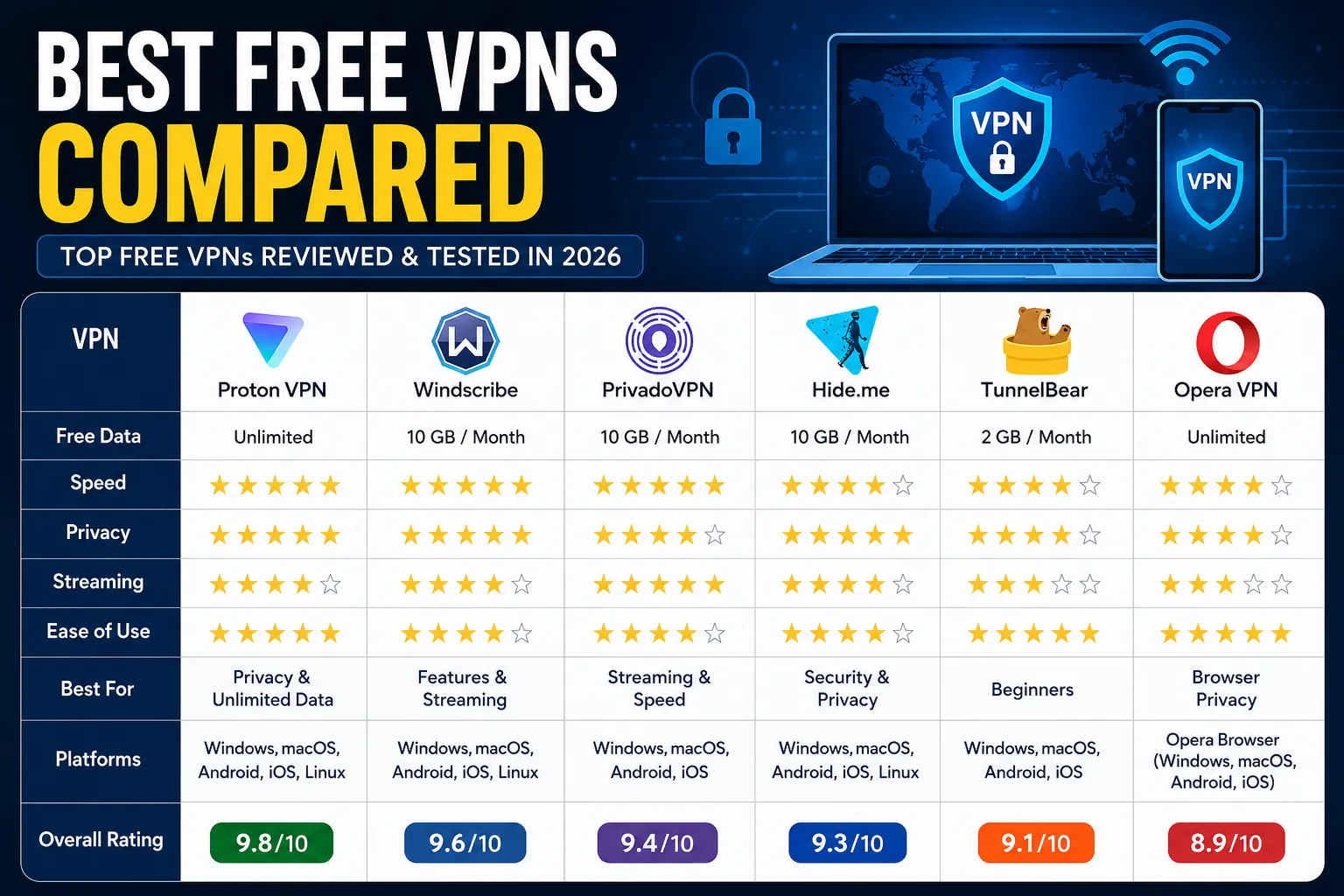
Feature Comparison
| VPN | Free Data | Speed | Privacy | Streaming | Ease of Use | Overall |
|---|---|---|---|---|---|---|
| Proton VPN | Unlimited | ⭐⭐⭐⭐⭐ | ⭐⭐⭐⭐⭐ | ⭐⭐⭐⭐☆ | ⭐⭐⭐⭐⭐ | ⭐⭐⭐⭐⭐ |
| Windscribe | 10 GB | ⭐⭐⭐⭐⭐ | ⭐⭐⭐⭐⭐ | ⭐⭐⭐⭐☆ | ⭐⭐⭐⭐☆ | ⭐⭐⭐⭐⭐ |
| PrivadoVPN | 10 GB | ⭐⭐⭐⭐⭐ | ⭐⭐⭐⭐☆ | ⭐⭐⭐⭐⭐ | ⭐⭐⭐⭐☆ | ⭐⭐⭐⭐☆ |
| Hide.me | 10 GB | ⭐⭐⭐⭐☆ | ⭐⭐⭐⭐⭐ | ⭐⭐⭐⭐☆ | ⭐⭐⭐⭐☆ | ⭐⭐⭐⭐☆ |
| TunnelBear | 2 GB | ⭐⭐⭐⭐☆ | ⭐⭐⭐⭐☆ | ⭐⭐⭐☆☆ | ⭐⭐⭐⭐⭐ | ⭐⭐⭐⭐☆ |
| Opera VPN | Unlimited | ⭐⭐⭐⭐☆ | ⭐⭐⭐⭐☆ | ⭐⭐⭐☆☆ | ⭐⭐⭐⭐⭐ | ⭐⭐⭐⭐☆ |
Best VPN for Different Users
Best for Privacy
🏆 Proton VPN
If protecting your personal information is your highest priority, Proton VPN is the clear winner.
Its strict no-logs policy, strong encryption, Swiss privacy laws, and unlimited free data make it one of the safest VPNs available.
Best for Streaming
🏆 PrivadoVPN
If you mainly watch YouTube, Netflix, or other streaming platforms, PrivadoVPN offers excellent speed and stable performance.
Best for Students
🏆 Windscribe
Students usually need secure browsing, assignment research, and occasional streaming.
Windscribe's 10 GB free plan, ad blocker, and fast speeds make it an excellent choice.
Best for Beginners
🏆 TunnelBear
TunnelBear has one of the easiest VPN interfaces available.
Even first-time users can connect within seconds.
Best for Remote Workers
🏆 Proton VPN
Working remotely often involves accessing sensitive company information over public or home internet connections.
Proton VPN provides reliable security for professionals working from anywhere.
Best for Public Wi-Fi
🏆 Hide.me
Whether you're using Wi-Fi in hotels, airports, restaurants, or cafés, Hide.me provides excellent protection against network attacks.
Best Browser VPN
🏆 Opera VPN
If you only need protection while browsing websites, Opera VPN is a convenient option because it works directly inside the browser.
How to Install a VPN
Installing a VPN is simple and usually takes less than five minutes.
Step 1
Visit the official website of your chosen VPN provider.
Never download VPN software from unknown websites.
Step 2
Download the version for your device.
Available platforms usually include:
- Windows
- macOS
- Linux
- Android
- iPhone
- Chrome
- Firefox
Step 3
Install the application.
The installation process is similar to installing any other software.
Step 4
Create a free account if required.
Some VPNs allow anonymous use, while others require email registration.
Step 5
Open the application.
Choose a server location.
Click the Connect button.
Your connection is now encrypted.
Tips to Get Better VPN Speed
If your VPN feels slow, try these tips.
- Connect to the nearest server.
- Use the WireGuard protocol.
- Close unnecessary background downloads.
- Restart the VPN application.
- Try another server.
- Use a stable internet connection.
- Keep the VPN updated.
These simple steps often improve speed significantly.
Common VPN Mistakes
Avoid these mistakes if you want the best experience.
Using Random Free VPNs
Only use trusted providers with transparent privacy policies.
Ignoring Updates
Always install software updates because they include important security fixes.
Using the Farthest Server
Connecting to a nearby server usually provides much better speed.
Assuming VPNs Provide Complete Anonymity
A VPN improves privacy but cannot protect you from weak passwords, phishing attacks, or malware.
Good cybersecurity habits are still important.
Are Free VPNs Worth It?
Yes—if you choose the right provider.
A trustworthy free VPN offers:
- Better privacy
- Secure public Wi-Fi
- Encrypted browsing
- IP address protection
- Safer online banking
- Protection against network monitoring
For everyday users, these benefits are often more than enough.
However, if you regularly stream 4K videos, download very large files, or need access to hundreds of international servers, upgrading to a premium VPN may be worthwhile.
Our Final Recommendation
After comparing all major free VPN providers in 2026, here are our top recommendations.
🥇 Best Overall: Proton VPN
🥈 Best Streaming: PrivadoVPN
🥉 Best Features: Windscribe
🏅 Best Security: Hide.me
🏅 Best Beginners: TunnelBear
🏅 Best Browser VPN: Opera VPN
Each of these VPNs offers a reliable free plan and has earned a positive reputation for protecting user privacy.
Final Thoughts
As cyber threats continue to grow, protecting your online privacy is more important than ever. A VPN is no longer just a tool for tech experts—it has become an essential part of everyday internet use.
Whether you're checking emails at a coffee shop, attending online classes, working remotely, shopping online, or simply browsing your favorite websites, using a trusted VPN can help protect your personal information from hackers, trackers, and unsecured networks.
The good news is that you don't always need to pay for strong online protection. Reliable services like Proton VPN, Windscribe, PrivadoVPN, Hide.me, and TunnelBear prove that high-quality security can be available for free.
Before choosing any VPN, remember to compare its privacy policy, encryption standards, speed, data limits, and server availability. The best VPN is the one that matches your needs while keeping your information secure.
By selecting a trusted provider and following safe browsing practices, you can enjoy a faster, safer, and more private internet experience throughout 2026 and beyond.
Quick Summary
- Best Overall VPN: Proton VPN
- Best for Streaming: PrivadoVPN
- Best for Privacy: Proton VPN
- Best for Beginners: TunnelBear
- Best for Security: Hide.me
- Best Browser VPN: Opera VPN
- Best Free Features: Windscribe
No matter which VPN you choose, using a reputable service is far better than browsing the internet without any protection. Stay safe, protect your privacy, and enjoy a more secure online experience.
Your email address will not be published. Comments are moderated.
0 Comments on This Post
Leave a Reply
Comments (0)
Spread the Word!
Join Our Developer Community!
Get weekly coding tips, tool updates, and exclusive tutorials straight to your inbox.
Request a Tool
×