Common XML to JSON Conversion Errors and How to Fix Them
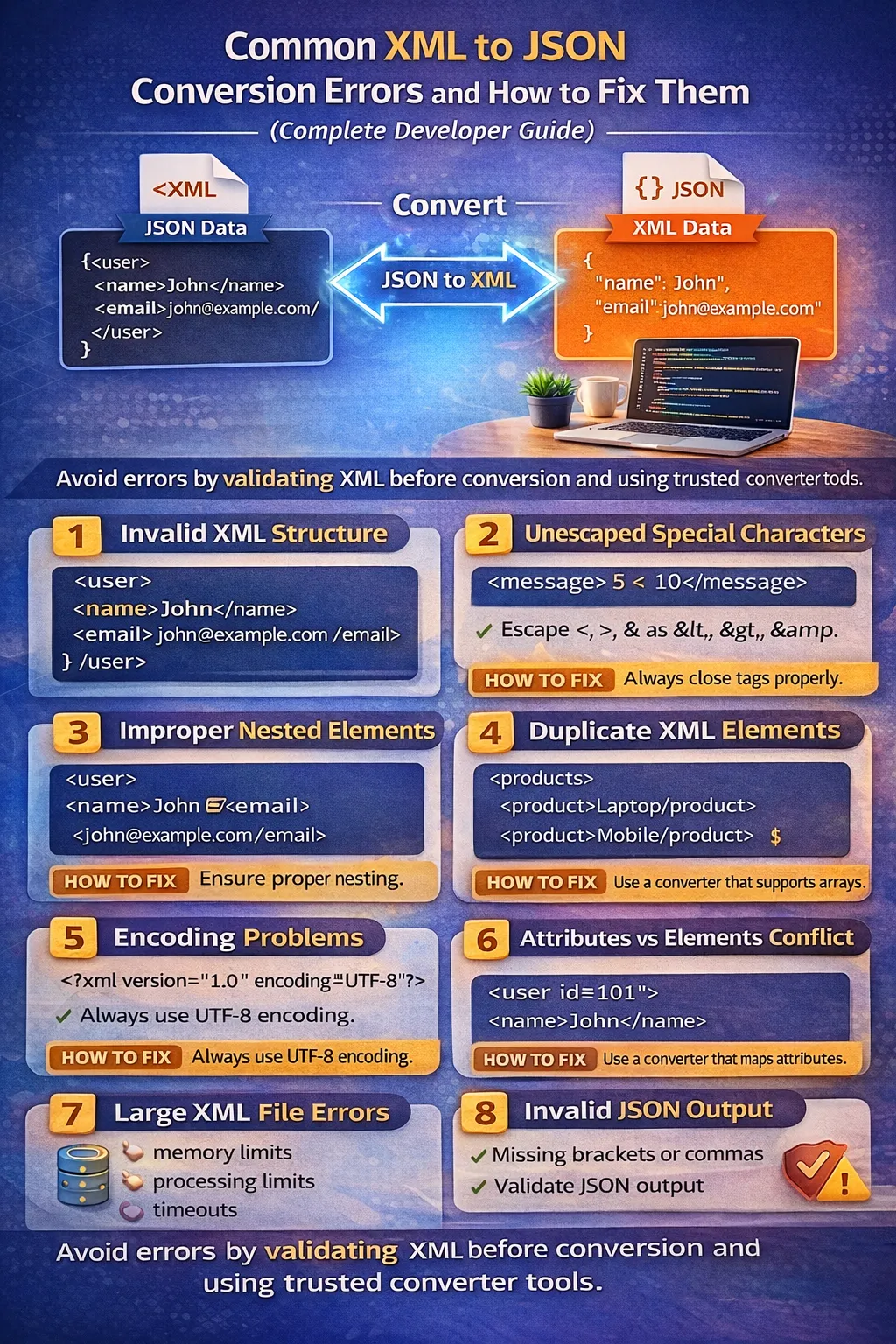
Data conversion between different formats is a common challenge in modern software development. Applications frequently exchange information through APIs, databases, enterprise systems, and external services, and this data is often structured using formats such as XML (Extensible Markup Language) and JSON (JavaScript Object Notation).
JSON has become one of the most widely used formats for modern web applications, REST APIs, JavaScript applications, and microservices. However, XML remains extremely important in enterprise software, SOAP APIs, legacy applications, configuration systems, document-processing workflows, and older third-party integrations.
Because of this, developers often need to convert XML data into JSON before using it in modern applications.
At a basic level, the process sounds simple:
XML → Converter → JSON
But real-world XML documents can be much more complicated.
A single XML document may contain:
-
nested elements
-
attributes
-
repeated elements
-
namespaces
-
text content
-
special characters
-
empty elements
-
mixed content
-
encoding declarations
-
large amounts of data
Even a small structural mistake can cause an XML parser to fail before the conversion process begins. In other situations, the XML may be valid, but the generated JSON may not have the structure that the application expects.
Developers frequently encounter issues such as:
-
XML parsing errors
-
missing closing tags
-
invalid XML declarations
-
incorrect nesting
-
unescaped special characters
-
duplicate or repeated elements
-
encoding problems
-
XML attribute conflicts
-
namespace-related issues
-
unexpected arrays
-
missing text content
-
invalid JSON output
-
large-file limitations
-
data type inconsistencies
Understanding these problems and knowing how to troubleshoot them is essential for reliable data processing.
In this guide, we will explore the most common XML to JSON conversion errors, explain why they happen, show practical examples, and provide effective ways to fix them.
Understanding XML to JSON Conversion
Before troubleshooting conversion errors, it is useful to understand the basic difference between XML and JSON.
XML represents data using elements and tags.
For example:
<user>
    <name>John</name>
    <email>john@example.com</email>
</user>
JSON represents similar information using objects and key-value pairs:
{
  "user": {
    "name": "John",
    "email": "john@example.com"
  }
}
The two structures can represent similar information, but they do not use exactly the same data model.
XML supports:
-
elements
-
attributes
-
namespaces
-
text nodes
-
comments
-
processing instructions
-
mixed content
JSON primarily supports:
-
objects
-
arrays
-
strings
-
numbers
-
booleans
-
null
Because of these differences, XML-to-JSON conversion is not always a perfect one-to-one transformation.
For example, XML attributes need to be represented using a convention because JSON does not have a native attribute concept.
XML:
<user id="101">
    <name>John</name>
</user>
One possible JSON representation is:
{
  "user": {
    "@id": "101",
    "name": "John"
  }
}
Another converter might produce:
{
  "user": {
    "attributes": {
      "id": "101"
    },
    "name": "John"
  }
}
This is why developers should understand both the source XML and the conversion tool's mapping rules.
Why XML to JSON Conversion Errors Occur
Conversion problems generally happen at one of three stages:
XML Input
   ↓
XML Parsing
   ↓
Data Mapping
   ↓
JSON Generation
   ↓
JSON Validation
An error can occur during any stage.
For example:
Stage 1: XML Parsing
The XML may be malformed.
<user>
    <name>John
</user>
The parser may stop immediately because the name element is not closed.
Stage 2: Data Mapping
The XML may be valid, but the converter may not know how to represent attributes, repeated elements, or namespaces.
Stage 3: JSON Generation
The converter may generate a structure that does not match the expected JSON schema.
Therefore, when troubleshooting, do not assume that every problem is an "XML error."
First identify which stage is failing.
1. Invalid XML Structure
One of the most common problems is invalid XML structure.
XML is strict about opening and closing tags.
Consider this invalid XML:
<user>
    <name>John
    <email>john@example.com</email>
</user>
The name element was opened but never closed.
A parser may report an error similar to:
Opening and ending tag mismatch
or:
XML parsing error
How to Fix It
Close the element correctly:
<user>
    <name>John</name>
    <email>john@example.com</email>
</user>
A basic rule is:
Every non-empty XML opening tag must have a corresponding closing tag.
2. Missing Closing Tags
Missing closing tags are especially common when XML is manually edited.
Incorrect:
<products>
    <product>
        <name>Laptop</name>
        <price>899
    </product>
</products>
The price element is missing its closing tag.
Correct:
<products>
    <product>
        <name>Laptop</name>
        <price>899</price>
    </product>
</products>
This may look like a small mistake, but XML parsers generally cannot ignore it.
3. Incorrect Nesting of Elements
XML elements must be properly nested.
Incorrect:
<user>
    <name>John</user>
</name>
The tags overlap incorrectly.
Correct nesting is:
<user>
    <name>John</name>
</user>
Think of XML tags like containers.
If you open one container inside another, the inner container should normally be closed before the outer container.
For example:
user
└── name
not:
user
└── name
    └── user closes first
Incorrect nesting is one of the most frequent causes of parser errors.
4. Unescaped Special Characters
XML has special characters that cannot always appear directly in text.
Important XML characters include:
-
< -
> -
& -
" -
'
The most important characters to watch for in text content are < and &.
For example, this XML is problematic:
<description>
    5 < 10
</description>
The parser may interpret < as the beginning of another XML tag.
Correct Version
Use an XML entity:
<description>
5 < 10
</description>
Common XML entities include:
| Character | XML Entity |
|---|---|
< |
< |
> |
> |
& |
& |
" |
" |
' |
' |
For example:
<company>Tom & Jerry</company>
represents:
Tom & Jerry
5. Unescaped Ampersands
Ampersands are a particularly common problem.
Incorrect:
<company>Johnson & Smith</company>
The parser may interpret & Smith as the beginning of an entity reference.
Correct:
<company>Johnson & Smith</company>
This is especially important when XML contains:
-
company names
-
URLs
-
query strings
-
user-generated content
-
product descriptions
For example:
<url>https://example.com/search?a=10&b=20</url>
The ampersand in the URL needs to be XML-escaped.
6. Invalid XML Attribute Syntax
XML attributes must follow a strict syntax.
Incorrect:
<user id=101>
The attribute value should be quoted.
Correct:
<user id="101">
Another incorrect example:
<user id="101" role=admin>
Correct:
<user id="101" role="admin">
Both single and double quotes can be used:
<user id='101'>
or:
<user id="101">
Consistency is usually preferable.
7. Duplicate Attributes
XML does not allow the same attribute name to appear twice on the same element.
Incorrect:
<user id="101" id="102">
This creates an invalid XML structure.
Correct:
<user id="101">
If multiple values are needed, they should be represented using an appropriate element structure or another attribute name.
8. Invalid XML Names
XML element and attribute names have naming rules.
For example, names should not arbitrarily begin with numbers.
Problematic:
<123user>John</123user>
A safer name is:
<user123>John</user123>
Similarly, attribute names should follow valid XML naming rules.
If XML is generated automatically by software, naming errors are less common, but manually generated XML can sometimes contain invalid names.
9. XML Declaration and Encoding Problems
XML documents often begin with an XML declaration:
<?xml version="1.0" encoding="UTF-8"?>
The declaration tells the parser information about the XML document.
Encoding problems can occur when the declaration says one encoding but the actual file uses another.
For example:
<?xml version="1.0" encoding="UTF-8"?>
while the file is actually saved using a different character encoding.
This mismatch can produce errors or corrupted characters.
How to Fix It
Use a consistent encoding throughout the workflow.
UTF-8 is generally a practical choice for modern applications.
Check:
-
XML declaration
-
File encoding
-
Database encoding
-
HTTP response encoding
-
Application parser configuration
10. Invalid or Corrupted Unicode Characters
Modern applications frequently exchange international text.
XML might contain:
<name>José García</name>
or:
<name>北京</name>
or:
<name>Привет</name>
If the input is incorrectly encoded, the output may contain:
José GarcÃa
or replacement characters such as:
�
These problems usually indicate an encoding mismatch somewhere in the pipeline.
How to Fix It
Keep the entire pipeline consistent:
Source
 ↓
UTF-8 XML
 ↓
XML Parser
 ↓
Application
 ↓
UTF-8 JSON
Also verify that the HTTP headers and file encodings match the actual content.
11. XML Attributes vs JSON Properties
XML attributes require special attention because JSON does not have a native attribute system.
Consider:
<user id="101" role="admin">
    <name>John</name>
</user>
A converter may produce:
{
  "user": {
    "@id": "101",
    "@role": "admin",
    "name": "John"
  }
}
Another converter may use:
{
  "user": {
    "attributes": {
      "id": "101",
      "role": "admin"
    },
    "name": "John"
  }
}
Another may flatten everything:
{
  "user": {
    "id": "101",
    "role": "admin",
    "name": "John"
  }
}
None of these mapping strategies is automatically the universal "correct" output.
The important thing is to understand what your application expects.
12. Attribute and Element Name Conflicts
Consider:
<user id="101">
    <id>202</id>
</user>
There are two different pieces of data named id.
A flat conversion could create:
{
  "user": {
    "id": "101",
    "id": "202"
  }
}
This is problematic.
A prefix-based strategy avoids the collision:
{
  "user": {
    "@id": "101",
    "id": "202"
  }
}
An attribute object also avoids the problem:
{
  "user": {
    "attributes": {
      "id": "101"
    },
    "id": "202"
  }
}
Therefore, when designing an XML-to-JSON mapping, always consider the possibility of naming conflicts.
13. Repeated XML Elements Becoming Arrays
XML commonly represents multiple records using repeated elements.
For example:
<products>
    <product>Laptop</product>
    <product>Mobile</product>
    <product>Tablet</product>
</products>
A natural JSON representation is:
{
  "products": {
    "product": [
      "Laptop",
      "Mobile",
      "Tablet"
    ]
  }
}
This is generally the correct conceptual representation because JSON uses arrays for collections.
However, some conversion libraries may handle repeated elements differently.
Developers should verify how their chosen converter represents repeated nodes.
14. Single Element vs Array Inconsistency
One subtle problem occurs when XML contains only one instance of an element.
For example:
<users>
    <user>
        <name>John</name>
    </user>
</users>
A converter may produce:
{
  "users": {
    "user": {
      "name": "John"
    }
  }
}
But when there are two users:
<users>
    <user>
        <name>John</name>
    </user>
    <user>
        <name>Sarah</name>
    </user>
</users>
the output may become:
{
  "users": {
    "user": [
      {
        "name": "John"
      },
      {
        "name": "Sarah"
      }
    ]
  }
}
Now the consuming application has to handle two possible types:
user = object
or:
user = array
This can cause bugs in application code.
How to Fix It
If your API requires a consistent schema, configure the converter or transformation layer so that the field is always an array.
For example:
{
  "users": {
    "user": [
      {
        "name": "John"
      }
    ]
  }
}
even when only one user exists.
15. Missing Text Content
Consider:
<message id="M100">Hello World</message>
The element has:
-
an attribute
-
text content
A naive converter might produce:
{
  "message": {
    "@id": "M100"
  }
}
and accidentally lose:
Hello World
A structure-preserving converter might instead produce:
{
  "message": {
    "@id": "M100",
    "#text": "Hello World"
  }
}
The exact representation depends on the converter.
When testing an XML-to-JSON tool, always test elements containing both attributes and text.
16. Mixed Content Problems
XML supports mixed content.
For example:
<description>
    This is <strong>very important</strong> information.
</description>
The element contains both text and another element.
Representing this cleanly in JSON is more difficult.
A converter may produce a structure containing text nodes and child elements, but the exact output varies significantly between tools.
If mixed content is important to your application, do not assume a generic XML-to-JSON converter will create the exact structure you need.
You may need custom transformation logic.
17. Empty XML Elements
XML supports empty elements.
These two forms are equivalent:
<user></user>
and:
<user/>
A converter may represent the empty element as:
{
  "user": null
}
or:
{
  "user": ""
}
or:
{
  "user": {}
}
The exact representation depends on the conversion rules.
This matters because:
null
is not the same as:
""
and neither is the same as:
{}
Applications should define how empty values are expected to behave.
18. XML Namespace Errors
Namespaces are frequently used in enterprise XML.
Example:
<user xmlns="https://example.com/users" id="101">
    <name>John</name>
</user>
Another example uses a prefix:
<u:user xmlns:u="https://example.com/users" id="101">
    <u:name>John</u:name>
</u:user>
If the conversion tool does not handle namespaces as expected, the resulting JSON may contain unexpected property names.
For example, you may see:
{
  "u:user": {
    "@id": "101",
    "u:name": "John"
  }
}
while your application expects:
{
  "user": {
    "id": "101",
    "name": "John"
  }
}
How to Fix It
Determine whether namespace information is:
-
required by the application
-
required only by the source XML
-
safe to remove
-
required for reverse conversion
Do not remove namespaces automatically if they carry important semantic information.
19. Invalid Namespace Prefixes
A namespace prefix must be declared before it is used.
Problematic XML:
<u:user>
    <u:name>John</u:name>
</u:user>
If u has not been declared, the XML is invalid.
Correct:
<u:user xmlns:u="https://example.com/users">
    <u:name>John</u:name>
</u:user>
Namespace-related parser errors can sometimes look confusing, especially when the XML comes from an external API.
Check namespace declarations first.
20. Invalid JSON Output
Sometimes XML parsing succeeds, but the resulting JSON is not what the application expects.
For example, malformed output could contain:
{
  "user": {
    "name": "John",
  }
}
The trailing comma makes this invalid JSON in standard JSON syntax.
Correct:
{
  "user": {
    "name": "John"
  }
}
Other common JSON syntax problems include:
-
missing closing braces
-
missing brackets
-
missing commas
-
unquoted property names
-
invalid string escaping
-
accidental comments
A JSON validator can quickly identify syntax errors.
21. Valid JSON but Incorrect Structure
A more difficult situation occurs when the JSON is valid but semantically wrong.
For example:
{
  "users": {
    "user": {
      "name": "John"
    }
  }
}
This is valid JSON.
But your application may expect:
{
  "users": {
    "user": [
      {
        "name": "John"
      }
    ]
  }
}
The first JSON is syntactically valid, but it does not match the expected schema.
This is why JSON validation should happen at two levels:
Syntax validation
Is it valid JSON?
Schema validation
Does it have the structure and data types the application expects?
22. Unexpected Data Types
XML data is often treated as text.
For example:
<price>899</price>
A converter might generate:
{
  "price": "899"
}
But your application might expect:
{
  "price": 899
}
These are different JSON data types.
The first is a string.
The second is a number.
The same issue can happen with booleans.
XML:
<active>true</active>
might become:
{
  "active": "true"
}
rather than:
{
  "active": true
}
How to Fix It
Decide which fields should be converted to:
-
strings
-
numbers
-
booleans
-
dates
-
null values
Then perform explicit type transformation where necessary.
23. Losing Leading Zeros
Automatic number conversion can create unexpected problems.
Consider:
<customer accountNumber="001245"/>
If converted to a number:
{
  "customer": {
    "accountNumber": 1245
  }
}
the leading zeros disappear.
If the account number is an identifier, this may be incorrect.
A safer representation is:
{
  "customer": {
    "accountNumber": "001245"
  }
}
This is an important lesson:
Not every numeric-looking value is actually a number.
IDs, ZIP codes, telephone numbers, product codes, invoice numbers, and account numbers are often better represented as strings.
24. Date and Time Conversion Problems
XML may contain date values such as:
<createdAt>2026-05-10T14:30:00Z</createdAt>
A converter may preserve this as a string:
{
  "createdAt": "2026-05-10T14:30:00Z"
}
That is usually a safe representation.
Problems can occur when application code automatically converts dates into local time or another format.
For example, a timestamp may change from UTC to a local timezone during processing.
Best Practice
Keep a clearly defined date and time format across the system.
For APIs, ISO 8601-style timestamps are commonly used.
25. Large XML File Conversion Errors
Large XML files can create performance problems.
For example, a file containing hundreds of megabytes or millions of records may exceed the memory limits of a browser-based converter.
Possible symptoms include:
-
browser freezing
-
timeout
-
memory errors
-
incomplete output
-
application crashes
-
server request limits
Why It Happens
Some tools load the entire XML document into memory before processing it.
For a large document, this can be expensive.
How to Fix It
For large XML files, consider:
-
streaming XML parsers
-
server-side processing
-
chunked processing
-
batch conversion
-
command-line tools
-
application-level transformation pipelines
Avoid using a browser-based converter for extremely large production datasets unless it explicitly supports them.
26. API Request Size Limits
XML-to-JSON conversion may occur inside an API.
Suppose an application sends a huge XML document to a conversion endpoint.
The request may be rejected because of:
-
maximum request body size
-
reverse proxy limits
-
server configuration
-
gateway restrictions
-
application framework limits
This is not necessarily a conversion-library problem.
Check the entire request path:
Client
 ↓
Load Balancer
 ↓
Reverse Proxy
 ↓
API Gateway
 ↓
Application
 ↓
XML Parser
Any layer can impose a size restriction.
27. Timeout Errors
Large or deeply nested XML can take longer to parse and convert.
A service might return:
Request Timeout
even though the XML itself is valid.
Possible solutions include:
-
processing data asynchronously
-
splitting large files
-
streaming input
-
increasing appropriate server timeouts
-
reducing unnecessary data
-
moving conversion to a background job
Do not simply increase timeouts without understanding why processing is slow.
28. Deeply Nested XML
XML allows considerable nesting.
For example:
<company>
    <department>
        <team>
            <project>
                <task>
                    <employee>
                        <profile>
                            <contact>
                                <email>john@example.com</email>
                            </contact>
                        </profile>
                    </employee>
                </task>
            </project>
        </team>
    </department>
</company>
A JSON conversion can preserve the hierarchy:
{
  "company": {
    "department": {
      "team": {
        "project": {
          "task": {
            "employee": {
              "profile": {
                "contact": {
                  "email": "john@example.com"
                }
              }
            }
          }
        }
      }
    }
  }
}
However, deeply nested structures can make application code harder to maintain.
If the target API does not need the complete hierarchy, a semantic transformation may produce a cleaner model.
29. Unexpected Root Element
Some conversion systems expect one root element.
For example:
<user>
    <name>John</name>
</user>
is valid XML.
But this is not a valid single-root XML document:
<user>John</user>
<user>Sarah</user>
If multiple top-level elements are required, they should generally be wrapped in a root element:
<users>
    <user>John</user>
    <user>Sarah</user>
</users>
The root element provides a single document hierarchy.
30. Incorrect XML Declaration Placement
The XML declaration, when present, should appear at the beginning of the document.
Correct:
<?xml version="1.0" encoding="UTF-8"?>
<user>
    <name>John</name>
</user>
Unexpected characters or whitespace before the declaration can cause problems with some parsers.
When an XML document is generated programmatically, ensure the declaration is placed correctly.
31. HTML Mistaken for XML
Developers sometimes receive HTML and attempt to process it as XML.
HTML and XML have different rules.
For example, HTML may contain constructs that browsers tolerate even when they are not well-formed XML.
A browser may successfully render:
<p>Hello
while an XML parser will reject malformed structure.
If the source is HTML rather than XML, use an appropriate HTML parser or clean the document before treating it as XML.
32. CDATA Handling Problems
XML supports CDATA sections:
<description><![CDATA[
    5 < 10 && 10 > 5
]]></description>
CDATA allows text containing characters that would otherwise need escaping.
A converter may return the CDATA content simply as:
{
  "description": "5 < 10 && 10 > 5"
}
or may preserve CDATA information depending on its configuration.
If your application does not need to distinguish CDATA from ordinary text, preserving the text value is usually sufficient.
33. Comments Being Lost During Conversion
XML supports comments:
<!-- Customer information -->
<customer id="101">
    <name>John</name>
</customer>
JSON does not have standard comments.
Therefore, conversion tools generally discard XML comments.
If the comment contains information that the application needs, it should be converted into explicit data rather than relying on comments.
For example:
{
  "customer": {
    "id": "101",
    "note": "Customer information"
  }
}
34. Processing Instructions
XML can contain processing instructions:
<?xml-stylesheet type="text/xsl" href="style.xsl"?>
JSON has no direct equivalent.
Depending on the converter, these instructions may be ignored or represented using a special property.
If your application depends on them, test the conversion behavior carefully.
35. Security Problems When Parsing XML
XML conversion can also introduce security risks if untrusted XML is parsed with insecure settings.
One important XML security concern is XML External Entity (XXE) processing.
An improperly configured parser may process external entities, potentially causing unintended file access or network requests.
When processing XML from external users or third-party systems:
-
use secure parser configurations
-
disable unnecessary external entity processing
-
avoid unsafe default parser settings
-
keep XML libraries updated
-
validate input
-
limit resource consumption
Converting XML into JSON does not automatically eliminate XML security risks.
The XML must be safely parsed first.
36. Entity Expansion and Resource Exhaustion
XML entities can also cause excessive resource consumption if a parser allows unsafe expansion behavior.
Applications processing untrusted XML should apply appropriate parser protections and resource limits.
This is especially important for:
-
public APIs
-
file upload systems
-
enterprise integrations
-
message-processing systems
Security should be considered part of the conversion pipeline, not an afterthought.
How to Troubleshoot XML to JSON Conversion Errors
When a conversion fails, use a systematic process rather than randomly changing the XML.
Step 1: Validate the XML
First determine whether the source XML is well-formed.
Check:
-
opening tags
-
closing tags
-
nesting
-
attributes
-
entities
-
namespaces
-
encoding
Step 2: Reduce the XML
If the document is large, create a small test case.
For example, instead of testing:
500 MB XML document
extract a small representative section:
<user id="101">
    <name>John</name>
</user>
If the small example works, gradually add complexity.
Step 3: Test Attributes
Add attributes:
<user id="101" role="admin">
    <name>John</name>
</user>
Check how the converter represents them.
Step 4: Test Repeated Elements
Add multiple records:
<users>
    <user id="101">
        <name>John</name>
    </user>
    <user id="102">
        <name>Sarah</name>
    </user>
</users>
Check whether they become an array.
Step 5: Test Special Characters
Include:
&
<
>
and verify proper escaping.
Step 6: Test Unicode
Use international characters:
José
北京
Москва
Check whether the output preserves them correctly.
Step 7: Validate the JSON
Once conversion succeeds, validate the resulting JSON.
Step 8: Compare Against the Expected Schema
Finally, determine whether the JSON has the structure your application requires.
A Practical Debugging Example
Suppose an API returns:
<users>
    <user id="101">
        <name>John</name>
    </user>
    <user id="102">
        <name>Sarah</name>
    </user>
</users>
The application expects:
{
  "users": [
    {
      "id": "101",
      "name": "John"
    },
    {
      "id": "102",
      "name": "Sarah"
    }
  ]
}
But the converter produces:
{
  "users": {
    "user": [
      {
        "@id": "101",
        "name": "John"
      },
      {
        "@id": "102",
        "name": "Sarah"
      }
    ]
  }
}
The JSON may be valid, but it does not match the expected structure.
The solution is not to declare the converter "broken."
Instead, add a transformation step:
XML
 ↓
XML-to-JSON conversion
 ↓
Intermediate JSON
 ↓
Application-specific transformation
 ↓
Final API JSON
This separation makes the system easier to maintain.
Generic Conversion vs Application-Specific Transformation
A useful architecture is to separate generic parsing from business logic.
Layer 1: XML Parser
Reads XML safely.
Layer 2: XML-to-JSON Mapping
Converts XML concepts into a predictable intermediate representation.
Layer 3: Transformation
Changes the intermediate structure into the application's desired schema.
Layer 4: Validation
Checks the final JSON.
For example:
XML
 ↓
Parser
 ↓
Intermediate JSON
 ↓
Business Mapping
 ↓
JSON Schema Validation
 ↓
Application
This architecture is more reliable than trying to force one generic converter to solve every application-specific requirement.
Using an Online XML to JSON Converter
For small files and development tasks, online XML-to-JSON converters can be useful.
They can help developers:
-
convert XML quickly
-
inspect JSON structure
-
identify malformed XML
-
test attribute mapping
-
inspect arrays
-
experiment with nested structures
-
format JSON output
A typical workflow is:
Paste XML
   ↓
Convert
   ↓
Inspect JSON
   ↓
Validate
   ↓
Use or modify output
However, developers should avoid sending confidential or sensitive production data to an online service unless the service's security and privacy requirements are appropriate.
For sensitive information, local or controlled server-side tools are generally preferable.
What to Check in an XML-to-JSON Converter
When choosing a conversion tool, look for support for:
-
XML attributes
-
nested elements
-
arrays
-
namespaces
-
text content
-
CDATA
-
empty elements
-
UTF-8
-
large files
-
schema validation
-
configurable mapping rules
-
secure XML parsing
A simple converter may be enough for a small XML document.
Enterprise integrations may require much more control.
Best Practices to Avoid XML to JSON Conversion Errors
Validate XML Before Conversion
Never assume incoming XML is valid.
Validate it before attempting transformation.
Use Consistent Encoding
Prefer a consistent encoding strategy throughout the pipeline.
UTF-8 is a common choice for modern applications.
Define Attribute Mapping Rules
Decide whether attributes will use:
@attribute
or:
attributes.attribute
or another application-specific representation.
Handle Repeated Elements Explicitly
Decide whether repeated XML elements should always become arrays.
Preserve Important Data
Check that conversion does not lose:
-
attributes
-
text content
-
namespace information
-
identifiers
-
empty values
-
repeated elements
Validate the Output
Use both JSON syntax validation and schema validation where appropriate.
Test Edge Cases
Do not test only simple XML.
Include:
-
attributes
-
arrays
-
nested elements
-
special characters
-
Unicode
-
empty nodes
-
namespaces
-
mixed content
-
duplicate names
Use Secure XML Parsers
Never assume that parsing external XML is automatically safe.
Configure parsers appropriately for untrusted input.
Real-World Scenario 1: Legacy API Integration
Imagine a company has an old XML API:
<customer id="1001" status="active">
    <name>John Smith</name>
    <email>john@example.com</email>
</customer>
A modern application expects:
{
  "id": "1001",
  "status": "active",
  "name": "John Smith",
  "email": "john@example.com"
}
The integration service can:
-
Receive XML.
-
Validate XML.
-
Parse attributes.
-
Convert elements.
-
Transform the intermediate structure.
-
Validate JSON.
-
Send JSON to the application.
This approach allows a modern frontend to remain independent of the legacy XML system.
Real-World Scenario 2: SOAP to REST Migration
SOAP services commonly use XML.
Suppose a SOAP response contains:
<response status="success">
    <customer id="1001">
        <name>John</name>
    </customer>
</response>
A REST API might expose:
{
  "status": "success",
  "customer": {
    "id": "1001",
    "name": "John"
  }
}
The migration layer maps XML attributes into normal JSON properties.
This allows an organization to modernize its API without immediately replacing the underlying legacy system.
Real-World Scenario 3: Data Migration
Suppose an old application stores product data in XML:
<product id="P101" category="electronics">
    <name>Laptop</name>
    <price currency="USD">899</price>
</product>
A modern database might use:
{
  "id": "P101",
  "category": "electronics",
  "name": "Laptop",
  "price": {
    "amount": 899,
    "currency": "USD"
  }
}
This is a semantic transformation.
The original XML representation is not simply copied into JSON.
Instead, the migration process creates a structure that better fits the target database.
Real-World Scenario 4: Microservice Adapter
A company may have:
Legacy XML Service
        ↓
Integration Adapter
        ↓
JSON Microservice
        ↓
Web Application
The adapter handles:
-
XML parsing
-
attribute mapping
-
data type conversion
-
error handling
-
JSON validation
-
logging
This keeps XML-specific complexity isolated from the rest of the application.
Common Mistakes to Avoid
Mistake 1: Assuming XML and JSON Have Identical Data Models
They do not.
Mistake 2: Assuming Every Converter Uses the Same Attribute Convention
Different tools may produce different structures.
Mistake 3: Ignoring Arrays
Repeated XML elements often require arrays.
Mistake 4: Ignoring Text Content
Elements can contain both attributes and text.
Mistake 5: Treating All Numeric Values as Numbers
IDs and codes may need to remain strings.
Mistake 6: Ignoring Encoding
Incorrect encoding can corrupt data.
Mistake 7: Assuming Valid JSON Means Correct JSON
Schema validation is also important.
Mistake 8: Sending Sensitive Data to Public Converters
Always consider privacy and security.
Mistake 9: Parsing Untrusted XML Without Security Controls
XML parsers need appropriate security configuration.
Mistake 10: Using One Conversion Rule for Every Application
Generic conversion and application-specific transformation are different tasks.
XML to JSON Error Prevention Checklist
Before deploying an XML-to-JSON workflow, use this checklist.
XML Input
-
Is the XML well-formed?
-
Is there exactly one root element?
-
Are all tags closed?
-
Is nesting correct?
-
Are attributes quoted?
-
Are duplicate attributes avoided?
-
Are special characters escaped?
-
Is encoding correct?
-
Are namespaces valid?
Conversion
-
Are attributes mapped consistently?
-
Are repeated elements converted correctly?
-
Are empty elements handled?
-
Is text content preserved?
-
Are namespaces handled correctly?
-
Are data types intentional?
JSON Output
-
Is the JSON syntactically valid?
-
Are arrays represented correctly?
-
Are property names correct?
-
Are data types correct?
-
Does the output match the API schema?
Security
-
Is untrusted XML handled securely?
-
Are external entities controlled?
-
Are file-size limits configured?
-
Are processing limits appropriate?
-
Is sensitive data protected?
Quick XML to JSON Troubleshooting Table
| Problem | Common Cause | Recommended Fix |
|---|---|---|
| XML parsing error | Missing closing tag | Close all elements |
| Invalid character error | Unescaped < or & |
Use XML entities |
| Attribute error | Missing quotes | Quote attribute values |
| Duplicate attribute error | Same attribute used twice | Rename or remove duplicate |
| Namespace error | Missing namespace declaration | Declare namespace correctly |
| Encoding issue | Mismatched character encoding | Use consistent UTF-8 configuration |
| Array problem | Repeated XML elements | Configure array mapping |
| Missing attribute | Mapping rule issue | Check converter configuration |
| Missing text | Text-node mapping issue | Preserve text content explicitly |
| Invalid JSON | Formatting/generation issue | Validate generated JSON |
| Wrong JSON type | Automatic type conversion | Define explicit types |
| Timeout | Large or complex XML | Use streaming/batch processing |
| Memory error | Entire file loaded into memory | Use streaming parser |
| Schema mismatch | Wrong mapping | Add transformation layer |
Frequently Asked Questions
What is the most common XML to JSON conversion error?
Malformed XML is one of the most common causes of conversion failure. Missing closing tags, incorrect nesting, invalid attributes, and unescaped special characters can prevent the XML parser from processing the document.
Why does XML parsing fail even though the data looks correct?
XML is stricter than HTML. A document may look visually understandable but still violate XML's well-formedness rules. Check closing tags, nesting, attributes, entities, namespaces, and encoding.
Why is & causing an XML error?
In XML, & starts an entity reference. A literal ampersand generally needs to be written as:
&
For example:
<company>Tom & Jerry</company>
Why do repeated XML elements become arrays in JSON?
JSON uses arrays to represent collections. When an XML element appears multiple times, a converter commonly represents those repeated elements as an array.
Why does one XML element become an object but multiple elements become an array?
Some converters dynamically choose the representation based on how many elements exist. This can cause schema inconsistency. If your application needs predictable output, configure repeated fields to always use arrays when possible.
Why are XML attributes sometimes shown with @ in JSON?
The @ character is a convention used by some XML-to-JSON converters to distinguish attributes from normal child elements.
For example:
{
  "user": {
    "@id": "101",
    "name": "John"
  }
}
Here, @id indicates that id originated as an XML attribute.
Does every XML-to-JSON converter use @?
No. Different libraries and tools use different mapping conventions. Some use prefixes, some use an attributes object, and others flatten attributes into normal JSON properties.
Why are XML numbers converted to JSON strings?
XML does not have JSON-style number types. XML element and attribute values are generally represented as text. A converter may therefore preserve numeric-looking values as strings.
For example:
{
  "price": "899"
}
instead of:
{
  "price": 899
}
Explicit type conversion may be needed.
Should IDs be JSON numbers or strings?
Usually, identifiers should be treated according to their semantics rather than their appearance. If an ID can contain leading zeros, letters, or formatting characters, a string is generally safer.
For example:
{
  "accountId": "001245"
}
preserves the original identifier.
What happens to XML comments during JSON conversion?
JSON has no standard comment syntax, so XML comments are usually discarded during conversion unless the tool provides a special mechanism for preserving them.
How are XML namespaces converted to JSON?
There is no single universal representation. A converter may preserve prefixes, include namespace declarations, remove namespace information, or use another mapping strategy.
Always check the specific converter's behavior if namespaces are important.
How do I fix an XML encoding error?
Check that the encoding declared by the XML matches the actual encoding of the file or response.
For example:
<?xml version="1.0" encoding="UTF-8"?>
should correspond to data actually encoded as UTF-8.
Also check HTTP headers, database settings, and application-level character encoding.
Why does my XML convert successfully but the JSON still fail?
Successful conversion only means that the conversion process completed.
The generated JSON may still fail application validation because of:
-
wrong property names
-
wrong data types
-
missing fields
-
incorrect nesting
-
unexpected arrays
-
missing attributes
Validate the JSON against the target application's schema.
Can large XML files be converted online?
Some online tools support large files, but browser and server limitations can make very large conversions unreliable. For production-scale or sensitive data, server-side or local processing is often more appropriate.
Is XML to JSON conversion safe for untrusted XML?
Not automatically. XML parsers need to be configured securely, particularly when processing untrusted input. Developers should consider external entity processing, resource limits, and other XML-specific security concerns.
Final Thoughts
XML-to-JSON conversion is an essential part of modern software integration, especially when applications need to communicate with legacy APIs, enterprise systems, SOAP services, and older data platforms.
Although the basic concept appears simple, real-world conversion can involve many complications.
The most common problems include:
-
invalid XML structure
-
missing closing tags
-
incorrect element nesting
-
unescaped special characters
-
invalid attributes
-
encoding mismatches
-
namespace issues
-
attribute and element conflicts
-
repeated elements
-
inconsistent arrays
-
missing text content
-
empty elements
-
unexpected data types
-
invalid JSON output
-
schema mismatches
-
large-file limitations
-
security problems
The best way to prevent these issues is to treat conversion as a complete data-processing workflow rather than a single button click.
A reliable workflow looks like this:
Validate XML
     ↓
Parse XML Securely
     ↓
Apply XML-to-JSON Mapping
     ↓
Transform Data if Necessary
     ↓
Validate JSON Syntax
     ↓
Validate JSON Schema
     ↓
Send to Application
For simple XML documents, an online converter can save time during development and testing.
For large, sensitive, or production data, developers should consider controlled server-side or local conversion processes with proper validation, logging, error handling, and security controls.
Most importantly, remember that valid XML does not automatically guarantee correct JSON output, and valid JSON does not automatically mean that the resulting data is correct for your application.
The conversion process should preserve the information that matters, handle attributes and repeated elements consistently, maintain important text and identifiers, and produce a predictable structure for the target system.
Once you understand the most common XML-to-JSON conversion errors and know how to troubleshoot them systematically, integrating XML-based systems with modern JSON applications becomes much easier.
Whether you are migrating a legacy API, connecting enterprise software, transforming database exports, building microservice adapters, or simply working with XML data during development, these troubleshooting techniques can help you build more reliable and maintainable data-conversion workflows.
When an XML-to-JSON conversion fails, don't just change the converter. First identify whether the problem is with the XML structure, the mapping rules, the generated JSON, or the application's expected schema. That approach will usually lead you to the real solution much faster.
Your email address will not be published. Comments are moderated.
0 Comments on This Post
Leave a Reply
Comments (0)
Spread the Word!
Join Our Developer Community!
Get weekly coding tips, tool updates, and exclusive tutorials straight to your inbox.
Request a Tool
×