How Browser Stores Data (Cookies, Cache, Storage)
Introduction
Web browsers are no longer simple tools used only to display websites. Modern browsers work like intelligent local data managers that store different types of information on a user’s device to improve performance, usability, and overall browsing experience.
Whenever you open a website, your browser may store small pieces of data locally. This stored data helps websites remember user preferences, keep users logged in, load pages faster, and even function offline in some cases.
The most common browser storage mechanisms are:
-
Cookies
-
Browser Cache
-
Web Storage (Local Storage and Session Storage)
Understanding how these storage methods work is extremely important for developers, website owners, and privacy-conscious users. In this article, we will explore how each storage mechanism functions, where it is used, its advantages, limitations, security concerns, and best practices.
1. Browser Cookies
What Are Cookies?
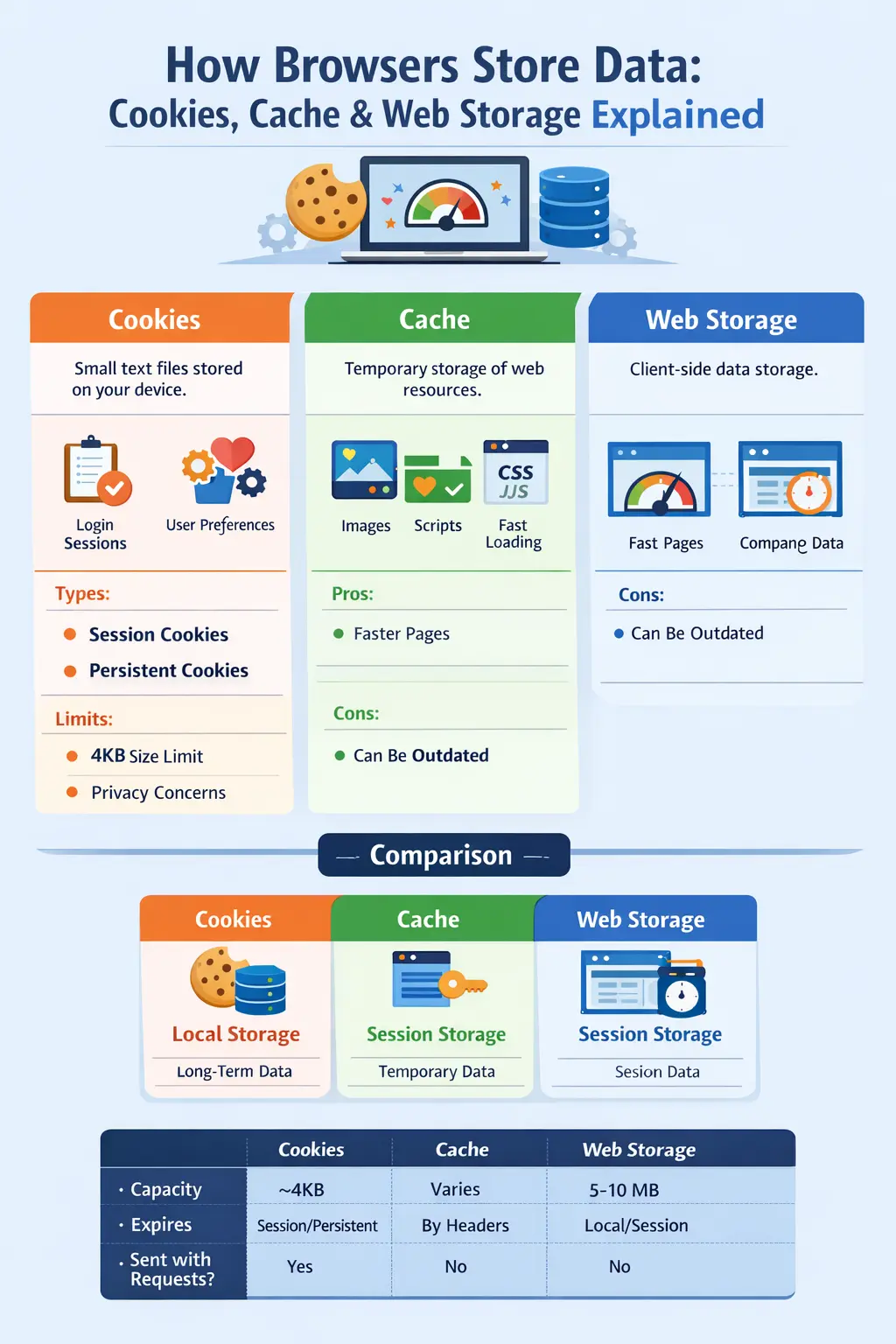
Cookies are small text files stored on a user’s device by websites through the browser. They are primarily used to store user-specific information such as login sessions, language preferences, and tracking identifiers.
Cookies play a critical role in enabling dynamic and personalized web experiences.
How Cookies Work
The cookie lifecycle usually follows these steps:
-
A user visits a website.
-
The website sends a cookie to the browser.
-
The browser stores the cookie locally.
-
On future visits or requests, the browser sends the cookie back to the server.
-
The server reads the cookie and responds accordingly.
This process allows websites to recognize returning users and maintain session continuity.
Example of Cookies in PHP
Setting a cookie:
// Set a cookie named 'username' that expires in 1 hour

setcookie("username", "Dailycodetools", time() + 3600, "/");
Reading a cookie:
if (isset($_COOKIE['username'])) {

    echo "Welcome back, " . $_COOKIE['username'];

}
Types of Cookies
Cookies can be categorized based on their purpose and lifespan:
-
Session Cookies
Temporary cookies that are deleted once the browser is closed. Commonly used to maintain login sessions. -
Persistent Cookies
Stored for a fixed duration and remain even after the browser is closed. Used for “Remember Me” functionality. -
First-Party Cookies
Created by the website the user is currently visiting. -
Third-Party Cookies
Created by external domains, usually for advertising, analytics, or tracking purposes.
Advantages of Cookies
-
Maintain user login sessions
-
Store user preferences such as language or theme
-
Enable analytics and tracking
-
Support personalization features
Limitations of Cookies
-
Very limited storage size (around 4KB per cookie)
-
Privacy concerns, especially with third-party cookies
-
Can slow down requests if too many cookies are sent
-
Vulnerable to attacks like CSRF and XSS if not handled properly
2. Browser Cache
What Is Browser Cache?
Browser cache is a temporary storage area where web resources such as images, CSS files, JavaScript files, fonts, and HTML documents are stored. The primary purpose of cache is to reduce page load times and minimize repeated network requests.
How Cache Works
When you visit a website for the first time:
-
The browser downloads all required resources from the server.
-
These resources are saved in the cache.
On subsequent visits:
-
The browser loads cached resources instead of downloading them again.
-
This significantly improves loading speed and reduces bandwidth usage.
Controlling Cache Using HTTP Headers
Developers can control caching behavior using HTTP headers, such as:
Cache-Control: max-age=3600
This header tells the browser to cache the resource for one hour.
Types of Browser Cache
-
Memory Cache
Stored in RAM and cleared when the browser is closed. Very fast but temporary. -
Disk Cache
Stored on the hard drive and persists across browser sessions.
Benefits of Cache
-
Faster page loading
-
Reduced server load
-
Lower bandwidth consumption
-
Improved user experience
Drawbacks of Cache
-
Outdated content if cache is not properly managed
-
Requires cache invalidation or versioning
-
Occupies local storage space
3. Web Storage (Local Storage and Session Storage)
What Is Web Storage?
Web Storage is an HTML5 feature that allows websites to store data on the client side using simple key-value pairs. Unlike cookies, web storage data is not sent with every HTTP request, making it more efficient.
Types of Web Storage
Local Storage
-
Data persists even after the browser is closed
-
Shared across tabs of the same origin
-
Storage capacity is usually between 5–10MB
Example:
// Store data
localStorage.setItem('username', 'Dailycodetools');
// Retrieve data
let user = localStorage.getItem('username');
console.log(user);
// Remove data
localStorage.removeItem('username');
// Clear all data
localStorage.clear();
Session Storage
-
Data is cleared when the browser tab is closed
-
Not shared across tabs
-
Ideal for temporary session data
Example:
// Store session data
sessionStorage.setItem('cart', '5');
// Retrieve data
let cartItems = sessionStorage.getItem('cart');
console.log(cartItems);
Common Use Cases for Web Storage
-
Saving user preferences such as dark mode
-
Storing temporary form input
-
Supporting offline web applications
-
Maintaining lightweight session data without cookies
4. Comparing Cookies, Cache, and Web Storage (Without Table)
Each browser storage mechanism serves a unique purpose:
-
Cookies are best for session management and server communication because they are sent with HTTP requests.
-
Cache is designed to improve performance by storing static assets locally.
-
Web Storage is ideal for storing larger amounts of client-side data efficiently.
Key differences include:
-
Cookies have very limited storage capacity and are sent with every request.
-
Cache can store large files but is mainly controlled by the browser and server headers.
-
Web storage allows developers to store structured data without impacting request size.
5. Browser Storage Management
Modern browsers manage storage using several techniques:
-
Storage Quotas limit how much data each website can store.
-
Eviction Policies automatically remove old or unused data.
-
Private Browsing Mode ensures stored data is deleted after the session ends.
-
Security Measures such as sandboxing and HTTPS protect stored data.
6. Best Practices for Developers
To use browser storage effectively:
-
Minimize cookie usage and store only essential information.
-
Use cache headers and versioning for static assets.
-
Prefer local storage for non-sensitive client-side data.
-
Never store passwords or sensitive information in cookies or local storage.
-
Follow privacy regulations such as GDPR and CCPA.
7. How Users Can Manage Browser Storage
Users can control browser storage by:
-
Clearing cookies and cache from browser settings.
-
Using incognito or private browsing mode.
-
Disabling third-party cookies.
-
Installing browser extensions to manage storage.
8. Real-World Use Cases
E-Commerce Websites
-
Cookies maintain login sessions and shopping carts.
-
Local storage saves recently viewed products.
-
Cache stores product images for faster loading.
Social Media Platforms
-
Cookies keep users logged in.
-
Local storage saves UI preferences like dark mode.
-
Cache improves feed loading speed.
Offline Web Applications
-
Cache and local storage allow data access without internet connectivity.
Conclusion
Modern browsers rely on multiple storage mechanisms to enhance performance, usability, and user experience. Cookies, cache, and web storage each have a clearly defined role:
-
Cookies manage sessions and server communication.
-
Cache improves website speed and efficiency.
-
Web storage enables efficient client-side data handling.
For developers, understanding these tools is essential for building fast, secure, and scalable websites. For users, awareness of browser storage helps in managing privacy and performance.
When used responsibly, browser storage mechanisms create smoother digital experiences while respecting user privacy and security standards.
Your email address will not be published. Comments are moderated.
0 Comments on This Post
Leave a Reply
Comments (0)
Spread the Word!
Join Our Developer Community!
Get weekly coding tips, tool updates, and exclusive tutorials straight to your inbox.
Request a Tool
×