How to Track Analytics for Tools Websites
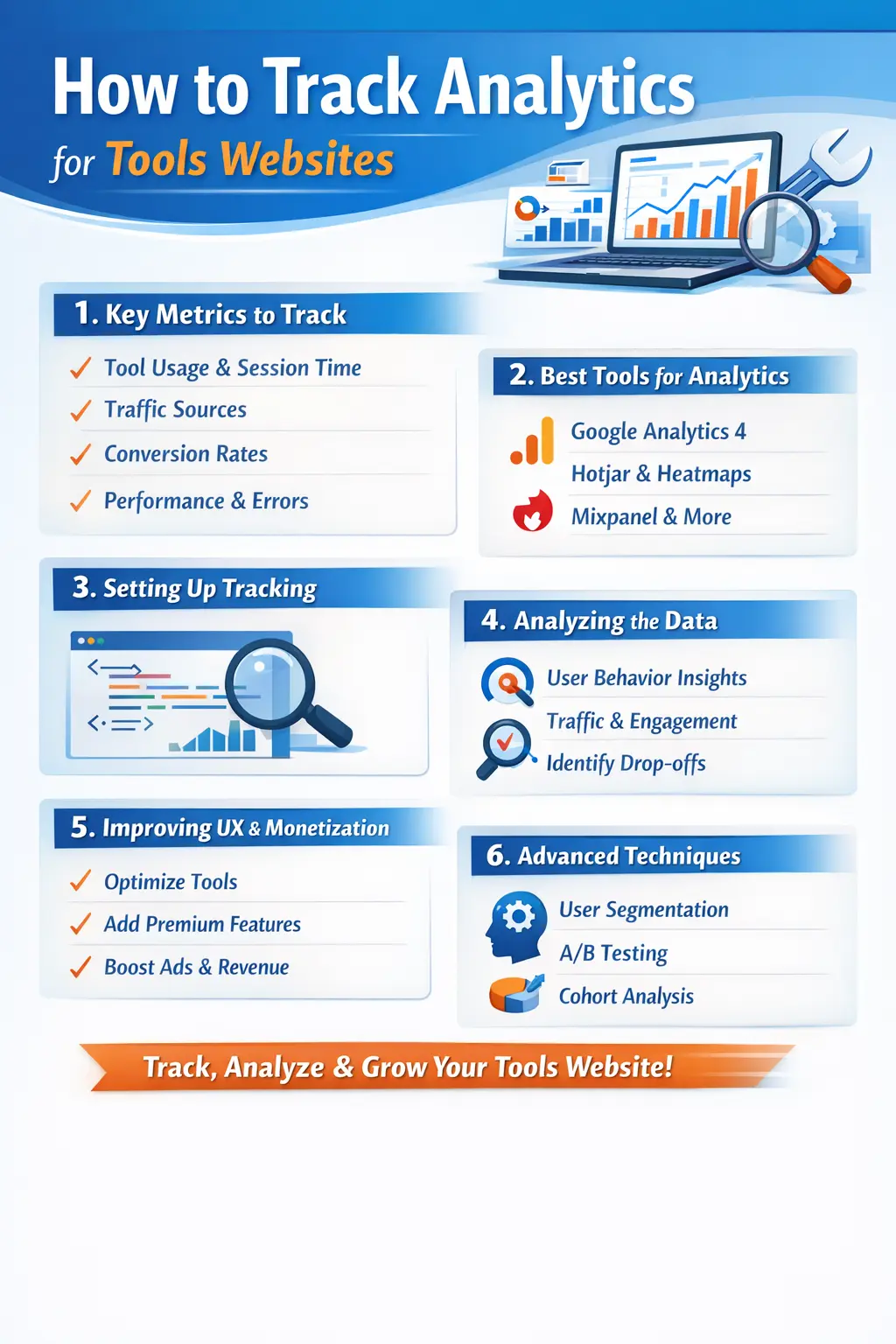
Tracking analytics for tools websites is one of the most important steps in building, growing, and monetizing a successful online tools platform. Unlike blogs or eCommerce websites, tools websites focus on utility, repeated usage, and task completion, which makes analytics tracking slightly different but far more powerful when done correctly.
In this complete guide, you will learn how to track analytics for tools websites from beginner to advanced level, including which metrics matter most, how to track tool usage, user behavior, engagement, performance, SEO impact, and monetization insights.
This guide is designed for developers, website owners, SaaS founders, and tool creators who want data-driven growth.
1. What Is Analytics Tracking for Tools Websites
Analytics tracking for tools websites means collecting, analyzing, and interpreting data related to how users interact with your tools. This includes:
-
Which tools users open
-
How often tools are used
-
How long users stay on each tool
-
Where users come from
-
Whether users return again
-
Which tools generate the most engagement or revenue
Analytics helps you understand real user behavior, not assumptions.
2. Why Analytics Is Critical for Tools Websites
Many tool website owners make the mistake of only tracking page views. For tools websites, page views alone are meaningless.
Analytics helps you:
-
Identify your most valuable tools
-
Improve user experience and usability
-
Increase engagement and retention
-
Improve SEO rankings
-
Reduce bounce rate
-
Optimize performance and speed
-
Make better product decisions
-
Monetize tools effectively
-
Detect errors and failures early
Without analytics, you don’t know why a tool succeeds or fails.
3. Key Analytics Metrics for Tools Websites
User Behavior Metrics
User behavior metrics tell you how users interact with your tools.
Important metrics include:
-
Tool open count
-
Tool usage frequency
-
Average time spent on a tool
-
Input and output actions
-
Button clicks
-
Tool completion rate
-
Repeat usage by same users
These metrics help you understand tool usefulness and engagement.
Traffic Metrics
Traffic metrics show where users come from.
Track:
-
Organic search traffic
-
Direct traffic
-
Social media traffic
-
Referral traffic
-
Campaign traffic
Understanding traffic sources helps you improve SEO and marketing strategy.
Engagement Metrics
Engagement metrics show how interested users are.
Important engagement metrics:
-
Average session duration
-
Pages per session
-
Bounce rate
-
Return visitors
-
Scroll depth
-
Interaction rate
High engagement means users find your tools valuable.
Conversion Metrics
Conversion metrics depend on your website goal.
Examples:
-
Tool usage event
-
Signup or login
-
Newsletter subscription
-
Premium feature usage
-
Ad click or affiliate click
-
File download or export
Tracking conversions helps measure success, not just traffic.
Performance Metrics
Tools websites must be fast.
Track:
-
Page load time
-
Tool execution time
-
API response time
-
Errors or failures
-
Device performance
Slow tools lose users quickly.
4. Best Analytics Tools for Tools Websites
Google Analytics 4 (GA4)
GA4 is essential for tools websites.
Benefits:
-
Event-based tracking
-
Custom event support
-
User journey tracking
-
Funnel analysis
-
Conversion tracking
-
Cross-device insights
GA4 allows you to track tool-specific actions, not just page views.
Google Search Console
Search Console helps track SEO performance.
You can monitor:
-
Search impressions
-
Clicks
-
CTR
-
Indexing status
-
Page performance
-
Core Web Vitals
This is critical for tools websites that rely on organic traffic.
Hotjar / Session Recording Tools
These tools show how users actually use your tools.
Features:
-
Heatmaps
-
Scroll tracking
-
Session recordings
-
User feedback
They help detect UX issues and confusion points.
Mixpanel or Amplitude
Best for advanced event tracking.
They allow:
-
Deep user segmentation
-
Retention analysis
-
Cohort tracking
-
Funnel optimization
Ideal for large tools platforms.
Server-Side & Custom Tracking
For advanced tools:
-
Track tool usage at backend
-
Log API requests
-
Track errors and failures
-
Measure tool performance accurately
Server-side tracking gives more reliable data.
5. How to Set Up Analytics for Tools Websites
Step 1: Install Analytics Code
Install GA4 or your analytics tool globally on:
-
Homepage
-
Tool pages
-
Dashboard
-
Blog pages
Ensure the script loads efficiently without slowing tools.
Step 2: Define Tool Events
Each tool should have custom events, such as:
-
Tool opened
-
Tool input submitted
-
Tool result generated
-
Tool reset
-
Tool download/export
Events should include parameters like tool name, category, and duration.
Step 3: Track Tool Usage Duration
Track:
-
Time spent on tool page
-
Active usage time
-
Idle time
This helps identify high-value tools.
Step 4: Set Conversion Goals
Define what success means:
-
Tool usage completed
-
User signup
-
Premium upgrade
-
Ad interaction
Conversions help measure business impact.
Step 5: Validate Tracking
Test analytics using:
-
Real user testing
-
Debug mode
-
Event logs
Incorrect tracking leads to wrong decisions.
6. SEO Analytics for Tools Websites
SEO is a major traffic source for tools websites.
Track:
-
Tool page impressions
-
Keyword performance
-
Tool-specific landing pages
-
Click-through rate
-
Indexing issues
Analytics helps identify:
-
Which tools rank best
-
Which need optimization
-
Which keywords bring engaged users
Create content around top-performing tools.
7. Using Analytics to Improve User Experience
Analytics shows where users struggle.
Use data to:
-
Simplify tool UI
-
Reduce steps
-
Improve instructions
-
Add examples
-
Optimize mobile usability
Better UX increases engagement and retention.
8. Analytics for Monetization
Analytics helps you monetize smartly.
Track:
-
Tools with highest usage
-
Tools with highest session duration
-
Tools with repeat users
Monetization ideas:
-
Ads on high-traffic tools
-
Premium features on popular tools
-
Affiliate links inside relevant tools
-
API access for heavy users
Never monetize blindly — use data.
9. Advanced Analytics Techniques
User Flow Analysis
Understand how users move:
-
From homepage to tools
-
Between multiple tools
-
From tool to blog or signup
This helps improve navigation and internal linking.
Segmentation
Segment users by:
-
Device
-
Location
-
New vs returning
-
Power users
-
Paid vs free users
Segmentation improves personalization.
Retention Analysis
Track:
-
Daily active users
-
Weekly active users
-
Returning users
-
Tool reuse frequency
Retention is more important than traffic.
A/B Testing
Test:
-
Tool layout
-
Button text
-
Default values
-
CTA placement
Use analytics to choose the winning version.
10. Privacy, Cookies & Compliance
Tools websites must respect privacy.
Best practices:
-
Clear privacy policy
-
Cookie consent
-
Minimal data collection
-
IP anonymization
-
GDPR and CCPA compliance
Privacy-friendly analytics builds trust.
11. Common Analytics Mistakes to Avoid
Avoid:
-
Tracking only page views
-
Ignoring tool events
-
Not tracking errors
-
Overloading analytics scripts
-
Not reviewing data regularly
-
Making decisions without context
Analytics is useful only if used correctly.
12. Best Practices for Tools Website Analytics
-
Track actions, not just visits
-
Focus on engagement over traffic
-
Review data weekly
-
Improve tools based on insights
-
Combine SEO + usage data
-
Build tools users return to
Consistency is key.
13. Future of Analytics for Tools Websites
Future trends include:
-
AI-driven insights
-
Predictive analytics
-
Privacy-first tracking
-
Server-side analytics
-
Personalization based on usage data
Early adopters gain advantage.
14. Final Conclusion
Tracking analytics for tools websites is not optional — it is essential. Analytics helps you understand users, improve tools, increase engagement, boost SEO, and monetize effectively.
A successful tools website is built on data-driven decisions, not assumptions.
When you track the right metrics, use the right tools, and continuously improve based on insights, your tools website can scale sustainably and outperform competitors.
If you want long-term growth, analytics is your strongest weapon.
Your email address will not be published. Comments are moderated.
0 Comments on This Post
Leave a Reply
Comments (0)
Spread the Word!
Join Our Developer Community!
Get weekly coding tips, tool updates, and exclusive tutorials straight to your inbox.
Request a Tool
×