How Payment Gateways Work (PayPal / Razorpay Flow)
Introduction
Online payments are the backbone of modern digital businesses. From eCommerce websites to SaaS platforms and online tools, payment gateways make it possible to accept money securely over the internet. Yet many developers and business owners don’t fully understand how payment gateways actually work behind the scenes.
In this article, we’ll explain how payment gateways work, with a clear and technical explanation of PayPal and Razorpay payment flow. This guide is beginner-friendly but detailed enough for developers and startups.
What Is a Payment Gateway?
A payment gateway is a technology that securely transfers payment information from a customer to the bank and back to the merchant.
In simple terms:
-
It collects payment details
-
Encrypts sensitive data
-
Sends it for authorization
-
Confirms success or failure
Examples of popular payment gateways include PayPal, Razorpay, Stripe, and Square.
Key Players in Online Payment Processing
Every online payment involves multiple entities:
-
Customer – The person making the payment
-
Merchant – Website or app accepting payment
-
Payment Gateway – PayPal / Razorpay
-
Acquiring Bank – Merchant’s bank
-
Issuing Bank – Customer’s bank
-
Card Network – Visa, MasterCard, RuPay
All these systems communicate within seconds.
How Payment Gateways Work (High-Level Flow)
The basic payment flow looks like this:
-
Customer places an order
-
Payment details are entered
-
Data is encrypted and sent
-
Bank authorization happens
-
Payment success or failure response
-
Money settlement to merchant
Step-by-Step Payment Gateway Flow
Step 1: Customer Initiates Payment
The user selects a product and clicks the Pay Now button. Payment details are entered on a secure checkout page.
Step 2: Payment Data Encryption
Payment gateways use encryption technologies like SSL and TLS to protect sensitive information.
Step 3: Authorization Request
The gateway sends the payment request to the acquiring bank, which forwards it to the issuing bank.
Step 4: Issuing Bank Verification
The customer’s bank verifies:
-
Card validity
-
Available balance
-
Fraud signals
The bank approves or declines the transaction.
Step 5: Response to Merchant
The payment gateway sends the result back to the website.
Step 6: Settlement
Approved payments are settled to the merchant account (usually T+1 to T+3 days).
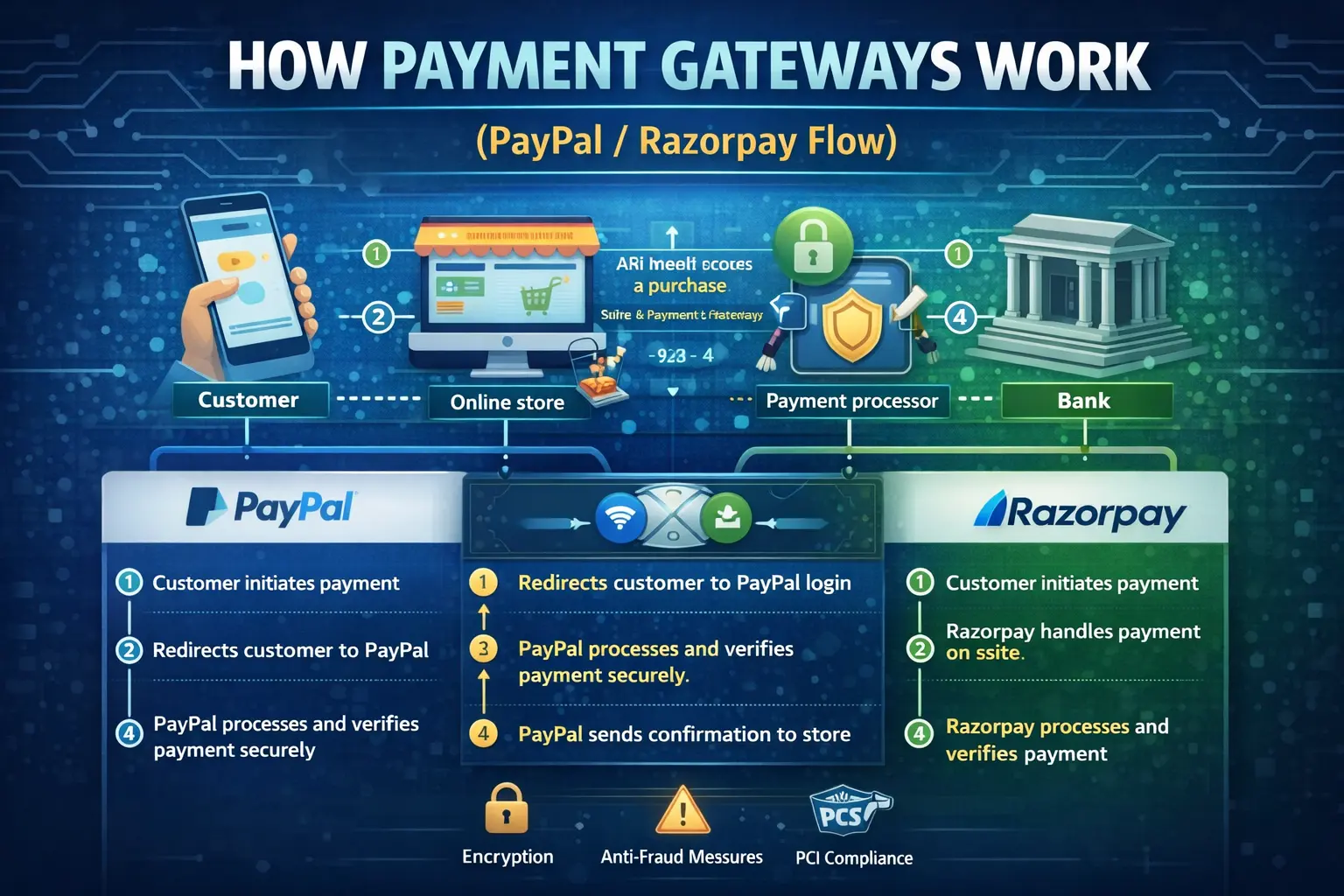
PayPal Payment Flow Explained
How PayPal Works
PayPal acts as both a payment gateway and a digital wallet.
PayPal Flow:
-
User chooses PayPal
-
Redirect to PayPal login
-
Payment authorization
-
Confirmation sent to merchant
-
Funds transferred to PayPal balance or bank
PayPal Technical Highlights
-
Uses REST APIs
-
Supports webhooks
-
Token-based authentication
-
High-level fraud detection
Razorpay Payment Flow Explained
How Razorpay Works
Razorpay is a popular Indian payment gateway supporting cards, UPI, wallets, and net banking.
Razorpay Flow:
-
Order created via API
-
Payment checkout opens
-
User completes payment
-
Razorpay verifies signature
-
Payment captured
-
Settlement to bank
Razorpay Technical Highlights
-
Order-based payment system
-
Webhook verification
-
Signature validation
-
UPI and wallet integration
Security Measures in Payment Gateways
Payment gateways use multiple layers of security:
-
SSL/TLS encryption
-
PCI-DSS compliance
-
Tokenization
-
Two-factor authentication
-
Fraud monitoring systems
Payment Authorization vs Capture
-
Authorization: Amount is blocked
-
Capture: Amount is deducted
Some gateways support delayed capture.
Role of APIs and Webhooks
APIs allow:
-
Creating orders
-
Verifying payments
-
Fetching transaction status
Webhooks notify your server about:
-
Payment success
-
Failure
-
Refunds
Common Payment Failures
-
Insufficient balance
-
Network issues
-
Incorrect details
-
Bank downtime
Proper error handling improves user experience.
Payment Gateway Charges
-
Transaction fee (1–3%)
-
GST (India)
-
International payment charges
Pricing varies by provider.
Choosing the Right Payment Gateway
Choose based on:
-
Supported payment methods
-
Transaction fees
-
Settlement time
-
API documentation
-
Support quality
Final Thoughts
Payment gateways are complex but essential systems that power online transactions. Understanding how PayPal and Razorpay work helps developers build secure, reliable payment systems.
With the right implementation and security practices, payment gateways enable seamless digital payments and business growth.
FAQs
Q1. Is PayPal better than Razorpay?
Depends on business type and location.
Q2. How long does settlement take?
Usually 1–3 business days.
Q3. Are payment gateways safe?
Yes, when implemented correctly.
Q4. Can I use multiple gateways?
Yes, many businesses do.
Conclusion:
Payment gateways simplify online payments while maintaining security and compliance. Understanding their flow is key to building trusted online platforms.
Your email address will not be published. Comments are moderated.
0 Comments on This Post
Leave a Reply
Comments (0)
Spread the Word!
Join Our Developer Community!
Get weekly coding tips, tool updates, and exclusive tutorials straight to your inbox.
Request a Tool
×