What Is Web Security? Common Web Attacks and Protection Methods Explained
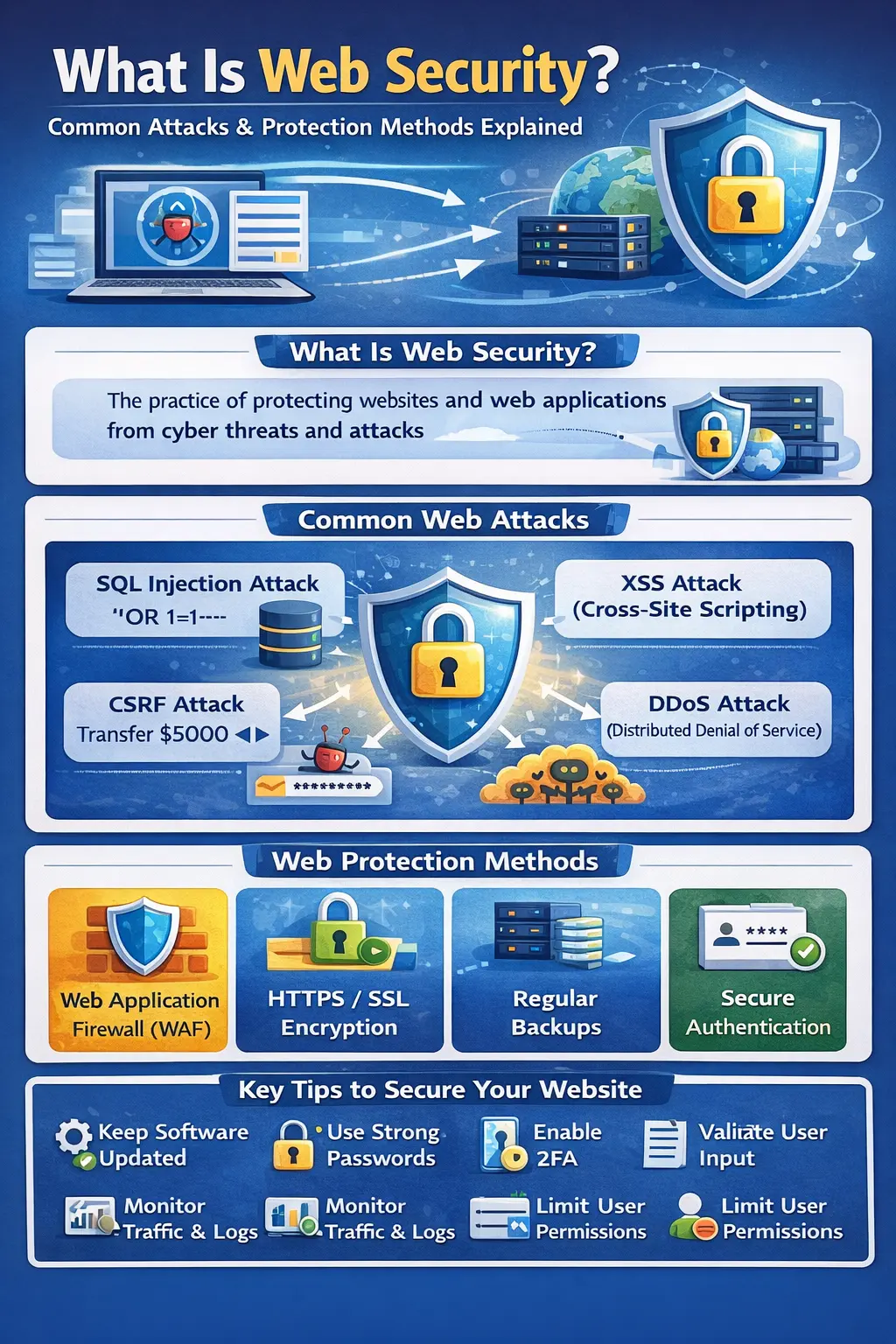
What Is Web Security? Common Web Attacks and Protection Methods Explained
The internet has become an essential part of modern life. People use websites and web applications every day for online banking, shopping, education, healthcare, communication, entertainment, business, government services, and countless other activities. As more personal and business information moves online, protecting websites and web applications from cyber threats has become increasingly important.
Cybercriminals continuously search for vulnerable websites, outdated software, weak passwords, insecure configurations, exposed databases, and application vulnerabilities. A successful attack can result in stolen information, unauthorized access, financial losses, website downtime, malware distribution, or serious damage to a company's reputation.
This is where web security becomes essential.
Web security is the process of protecting websites, web applications, APIs, servers, databases, user accounts, and online data from unauthorized access, cyber attacks, malicious activity, and other security threats.
Whether you operate a personal blog, business website, eCommerce store, SaaS platform, WordPress website, PHP application, CodeIgniter project, Laravel application, or large enterprise platform, security should be considered from the beginning of development and maintained throughout the life of the website.
In this guide, you will learn what web security means, why it matters, the most common web security attacks, how attackers exploit vulnerable websites, how to test website security, important protection methods, web security testing tools, and a practical website security checklist.
What Is Web Security?
Web security refers to the technologies, security controls, development practices, policies, and processes used to protect websites and web applications from cyber threats.
Simple Web Security Definition
Web security is the practice of protecting websites, web applications, servers, users, and online data from cyber attacks, unauthorized access, data theft, and malicious activity.
A strong web security strategy aims to protect three fundamental properties of information:
-
Confidentiality
-
Integrity
-
Availability
These principles are commonly known as the CIA Triad.
Why Is Web Security Important?
A website connected to the internet can potentially be discovered and targeted by automated scanners, bots, attackers, and malicious campaigns.
Even a small security weakness can sometimes provide an attacker with an opportunity to gain unauthorized access or manipulate application behavior.
Poor web security can lead to:
-
Data breaches
-
Stolen user credentials
-
Financial fraud
-
Account takeover
-
Website defacement
-
Malware distribution
-
Unauthorized administrator access
-
Database compromise
-
Website downtime
-
Search visibility problems
-
Loss of customer trust
-
Legal and compliance issues
-
Business interruption
For businesses, the cost of recovering from a security incident can be much greater than the cost of implementing reasonable security controls beforehand.
The CIA Triad of Web Security
1. Confidentiality
Confidentiality ensures that sensitive information is accessible only to authorized people and systems.
Examples include:
-
Password protection
-
Encryption
-
Authentication
-
Access controls
-
Role-based permissions
2. Integrity
Integrity ensures that information cannot be changed, deleted, or manipulated without authorization.
Examples include:
-
Data validation
-
Access controls
-
Digital signatures
-
File integrity monitoring
-
Secure backups
3. Availability
Availability ensures that websites and applications remain accessible when legitimate users need them.
Important availability measures include:
-
Reliable hosting
-
Backup infrastructure
-
Load balancing
-
Disaster recovery
-
DDoS protection
-
Monitoring
A secure website should protect information while also remaining available to legitimate users.
Web Security vs Cybersecurity
Web security and cybersecurity are closely related, but they are not exactly the same.
Web security primarily focuses on websites, web applications, APIs, browsers, web servers, databases, sessions, authentication, and online services.
Cybersecurity is a broader field that covers networks, computers, mobile devices, cloud infrastructure, applications, endpoints, identities, data, and other digital systems.
For example, protecting a PHP login form against SQL injection is a web security task, while protecting an organization's entire corporate network is part of broader cybersecurity.
Common Web Security Attacks
There are many types of attacks that can affect websites and web applications. Some target application code, while others target authentication, infrastructure, configuration, users, or availability.
The most common web security threats include:
-
SQL Injection
-
Cross-Site Scripting
-
Cross-Site Request Forgery
-
Brute Force Attacks
-
Credential Stuffing
-
Session Hijacking
-
Malware Injection
-
Man-in-the-Middle Attacks
-
File Upload Vulnerabilities
-
Remote Code Execution
-
Directory Traversal
-
Security Misconfiguration
-
Broken Access Control
-
Server-Side Request Forgery
-
DDoS Attacks
-
Phishing
Understanding these attacks helps developers and website owners implement appropriate security controls.
SQL Injection (SQLi)
SQL Injection occurs when an application incorrectly incorporates untrusted input into database queries.
An insecure query might look like:
$sql = "SELECT * FROM users WHERE email = '$email'";
If user input is inserted directly into the query, an attacker may attempt to manipulate the SQL statement.
The consequences can include:
-
Unauthorized database access
-
Exposure of sensitive information
-
Modification of records
-
Deletion of data
-
Authentication bypass
-
Database corruption
How to Prevent SQL Injection
The most important protection is to use parameterized queries or prepared statements.
For example:
$stmt = $conn->prepare("SELECT * FROM users WHERE email = ?");
$stmt->bind_param("s", $email);
$stmt->execute();
Additional protection includes:
-
Validate input
-
Use prepared statements
-
Apply least-privilege database permissions
-
Avoid dynamically constructing SQL queries from raw input
-
Keep database software updated
-
Monitor suspicious database activity
Cross-Site Scripting (XSS)
Cross-Site Scripting, commonly called XSS, occurs when an application allows untrusted content to execute as JavaScript in another user's browser.
XSS can affect applications containing:
-
Comments
-
Search parameters
-
User profiles
-
Forum posts
-
Messages
-
URL parameters
-
Other user-generated content
Types of XSS
Stored XSS
Malicious content is stored by the application and later displayed to users.
Reflected XSS
Malicious input is immediately reflected in the application's response.
DOM-Based XSS
The vulnerability occurs in client-side JavaScript when unsafe data is used to manipulate the page.
How to Prevent XSS
Use:
-
Context-aware output encoding
-
Input validation
-
Content Security Policy
-
Safe DOM APIs
-
Secure frameworks
-
HttpOnly cookies
-
Avoidance of unsafe HTML injection
For PHP applications, output escaping can be performed with:
echo htmlspecialchars($userInput, ENT_QUOTES, 'UTF-8');
Cross-Site Request Forgery (CSRF)
Cross-Site Request Forgery tricks an authenticated user's browser into submitting an unwanted request to a website where the user is already logged in.
Potentially sensitive actions include:
-
Changing an email address
-
Changing account settings
-
Updating passwords
-
Creating accounts
-
Performing financial actions
-
Modifying application data
How to Prevent CSRF
Recommended protections include:
-
CSRF tokens
-
SameSite cookies
-
Origin validation
-
Referer validation where appropriate
-
Re-authentication for sensitive operations
-
Shorter session lifetimes where appropriate
Frameworks such as CodeIgniter 4 provide built-in CSRF protection that developers should configure and use correctly.
Brute Force Attacks
A brute force attack repeatedly attempts different credentials against a login or authentication system.
Automated bots can perform large numbers of login attempts against exposed authentication endpoints.
How to Prevent Brute Force Attacks
Use:
-
Strong passwords
-
Multi-factor authentication
-
Login rate limiting
-
Progressive delays
-
CAPTCHA where appropriate
-
Suspicious-login monitoring
-
Account security notifications
Simply increasing password complexity is not enough. Authentication systems should also limit automated attempts.
Credential Stuffing
Credential stuffing is different from traditional brute force attacks.
Attackers use usernames and passwords obtained from previous data breaches and try those credentials on other websites.
This works because some users reuse the same password across multiple services.
Protection Methods
Website owners should consider:
-
MFA
-
Rate limiting
-
Login anomaly detection
-
Breached-password screening
-
Device and session monitoring
-
Secure password reset processes
Users should also use unique passwords for important accounts.
Session Hijacking
Web applications commonly create sessions after successful authentication.
If an attacker obtains a valid session identifier, they may attempt to impersonate the legitimate user.
Session Security Best Practices
Use:
-
HTTPS
-
Secure cookies
-
HttpOnly cookies
-
SameSite cookies
-
Session ID regeneration after authentication
-
Session expiration
-
Logout invalidation
-
Protection against session fixation
Malware Injection
A compromised website may contain malicious scripts, redirects, unwanted advertisements, or malware.
Common symptoms include:
-
Unexpected redirects
-
Unknown JavaScript
-
Spam pages
-
Suspicious popups
-
Browser security warnings
-
Unknown administrator accounts
-
Modified website files
How to Prevent Malware Injection
-
Keep software updated
-
Remove unused plugins and components
-
Restrict file permissions
-
Monitor file changes
-
Scan websites regularly
-
Protect administrator accounts
-
Maintain clean backups
Man-in-the-Middle Attacks
A Man-in-the-Middle attack occurs when an attacker attempts to intercept communication between a user and a server.
Without proper encryption, sensitive information transmitted across an insecure connection may be exposed.
Protection
Use:
-
HTTPS
-
TLS
-
HSTS
-
Secure Wi-Fi practices
-
Valid TLS certificates
-
Secure network configurations
HTTPS is an important security requirement, but HTTPS alone does not make an application secure against every type of web vulnerability.
File Upload Vulnerabilities
File uploads are a common security concern because applications may accept images, documents, videos, PDFs, or other files from users.
Poorly designed upload functionality can create security risks.
File Upload Security Best Practices
-
Validate file types
-
Validate file size
-
Restrict permitted extensions
-
Generate safe filenames
-
Avoid trusting the original filename
-
Store uploads safely
-
Prevent executable files from running
-
Scan files where appropriate
-
Apply correct permissions
Whenever possible, uploaded files should be separated from executable application code.
Remote Code Execution (RCE)
Remote Code Execution is a critical vulnerability that can allow unauthorized commands or code to execute on a remote system.
Depending on the vulnerability and server configuration, successful exploitation can result in severe compromise.
Prevention
-
Keep frameworks and dependencies updated
-
Never execute untrusted input
-
Restrict server permissions
-
Disable unnecessary dangerous functionality
-
Use secure coding practices
-
Monitor server activity
-
Perform regular vulnerability assessments
Directory Traversal
Directory Traversal vulnerabilities can occur when an application incorrectly handles user-controlled file paths.
An attacker may attempt to manipulate a path to access files outside the intended directory.
Potentially exposed files could include:
-
Configuration files
-
Application source code
-
Logs
-
Credentials
-
System files
Prevention
Use:
-
Path validation
-
Allowlists
-
Safe file-handling APIs
-
Restricted permissions
-
Controlled storage directories
-
Proper server configuration
Security Misconfiguration
Security misconfiguration is one of the most common causes of web application vulnerabilities.
Examples include:
-
Debug mode enabled in production
-
Default credentials
-
Unnecessary services
-
Exposed administration interfaces
-
Excessive permissions
-
Missing security headers
-
Directory listing enabled
-
Detailed error messages exposed to users
Prevention
Regularly review:
-
Server configuration
-
Application settings
-
Database permissions
-
File permissions
-
Security headers
-
Administrative access
-
Development and production configuration differences
Broken Access Control
Authentication answers the question:
“Who are you?”
Authorization answers:
“What are you allowed to access?”
A user may be correctly authenticated but still be able to access information or functionality they should not have permission to use.
Protection
Implement:
-
Role-based access control
-
Server-side authorization checks
-
Resource ownership validation
-
Least privilege
-
Deny-by-default policies
-
Regular permission reviews
Never rely solely on hiding buttons or links in the frontend.
DDoS Attacks
Distributed Denial of Service attacks attempt to overwhelm a service with large amounts of traffic or requests.
The objective is generally to affect availability rather than directly steal information.
Potential consequences include:
-
Website downtime
-
Slow response times
-
Increased infrastructure costs
-
Lost revenue
-
Poor user experience
DDoS Protection
Organizations may use:
-
CDN services
-
WAFs
-
Rate limiting
-
Load balancing
-
Traffic filtering
-
DDoS mitigation services
-
Auto-scaling infrastructure
How Cybercriminals Find Vulnerable Websites
Many attacks are automated.
Attackers may use automated systems to discover:
-
Outdated software
-
Vulnerable plugins
-
Weak credentials
-
Exposed administration panels
-
Open services
-
Public configuration files
-
Insecure APIs
-
Common application vulnerabilities
A website does not need to be famous to attract automated attacks.
This is why security should be implemented even on small websites and newly launched applications.
How to Test Website Security
Website security testing helps identify weaknesses before attackers exploit them.
Testing should only be performed on websites and systems that you own or have explicit permission to assess.
A basic security testing process can include the following steps.
1. Check HTTPS and TLS
Verify that:
-
HTTPS is enabled
-
HTTP requests redirect appropriately
-
TLS is configured correctly
-
Certificates are valid
-
Sensitive pages are not accessible through insecure connections
2. Review Security Headers
Important headers may include:
-
Content-Security-Policy
-
Strict-Transport-Security
-
X-Content-Type-Options
-
Referrer-Policy
-
Permissions-Policy
-
X-Frame-Options where appropriate
Security headers help browsers enforce additional security controls.
3. Test Authentication
Review:
-
Password policies
-
MFA
-
Login rate limiting
-
Password reset functionality
-
Session handling
-
Login error behavior
-
Account recovery
4. Test Authorization
Check whether users can access resources that belong to other users or roles.
Authorization should always be enforced server-side.
5. Test Input Validation
Review:
-
Login forms
-
Search forms
-
Contact forms
-
URL parameters
-
API parameters
-
File uploads
-
User-generated content
Input validation should be combined with safe output handling and secure server-side processing.
6. Check File Upload Security
Verify that uploaded files:
-
Are restricted by type
-
Have appropriate size limits
-
Use safe filenames
-
Cannot execute as server-side code
-
Are stored in an appropriate location
7. Run Vulnerability Scans
Automated security scanners can help identify known weaknesses and configuration problems.
However, automated scanning should not be treated as a complete security audit.
8. Perform Manual Security Testing
Manual testing is important for vulnerabilities involving:
-
Business logic
-
Authorization
-
Application workflows
-
Session management
-
Complex APIs
9. Review Logs
Monitor:
-
Failed logins
-
Unexpected administrator activity
-
Server errors
-
File modifications
-
Suspicious requests
-
Traffic anomalies
10. Fix and Retest
Security testing should be part of an ongoing process.
After fixing a vulnerability:
-
Apply the fix.
-
Test the affected functionality.
-
Confirm the vulnerability is resolved.
-
Check for regressions.
-
Continue monitoring.
Best Web Security Testing Tools
Different security tools serve different purposes.
OWASP ZAP
OWASP ZAP is an open-source web application security testing tool.
It can help security professionals and developers identify common web application vulnerabilities during authorized testing.
Burp Suite
Burp Suite is a widely used web security testing platform.
It provides capabilities for:
-
HTTP request inspection
-
Application testing
-
API testing
-
Security assessment
-
Vulnerability analysis
Cloudflare
Cloudflare provides several security and infrastructure services, including:
-
CDN
-
DDoS protection
-
WAF
-
Bot protection
-
TLS/HTTPS support
A WAF can help block many known malicious request patterns before they reach an application.
Sucuri
Sucuri provides website security services including:
-
Website monitoring
-
Malware detection
-
Website firewall capabilities
-
Security cleanup services
Google Safe Browsing
Google Safe Browsing helps identify websites associated with malware, phishing, and other unsafe content.
Website owners should monitor their site's security reputation and investigate warnings quickly.
What Is a Web Application Firewall (WAF)?
A Web Application Firewall sits between users and a web application and analyzes incoming traffic.
Depending on its configuration, a WAF can help detect and block malicious requests associated with:
-
SQL injection
-
XSS
-
Malicious bots
-
Exploit attempts
-
Abnormal traffic
-
Some forms of automated abuse
A WAF should be treated as an additional security layer, not a replacement for secure application development.
HTTPS and SSL/TLS Security
HTTPS protects communication between a browser and server by using TLS encryption.
It helps protect:
-
Login credentials
-
Personal information
-
Payment information
-
API communication
-
Session data
HTTPS is essential for modern websites, but it does not prevent vulnerabilities such as SQL injection, XSS, broken access control, or insecure business logic.
Strong Authentication Best Practices
Authentication is one of the most important components of web security.
Recommended practices include:
-
Use strong password hashing
-
Prefer Argon2id or bcrypt where appropriate
-
Enable MFA
-
Use secure password reset mechanisms
-
Apply login rate limiting
-
Regenerate sessions after authentication
-
Use secure cookies
-
Monitor suspicious login behavior
Never store user passwords as plain text.
Security Headers
Security headers can add another layer of browser-enforced protection.
Important examples include:
Content-Security-Policy
Helps control which resources a browser is allowed to load.
Strict-Transport-Security
Instructs compatible browsers to use HTTPS for the site.
X-Content-Type-Options
Helps prevent certain MIME-type sniffing behaviors.
Referrer-Policy
Controls how much referrer information browsers send.
Permissions-Policy
Controls access to selected browser features.
Headers should be configured according to the application's actual requirements rather than copied blindly.
Website Security Monitoring
Security is not a one-time task.
Websites should be monitored continuously for unusual behavior.
Monitor:
-
Failed authentication attempts
-
Administrator logins
-
File changes
-
Database activity
-
Server errors
-
Resource usage
-
Traffic anomalies
-
Malware warnings
-
Unexpected redirects
Early detection can reduce the impact of a security incident.
Website Security Checklist
Use this checklist as a practical starting point for improving website security:
-
HTTPS is enabled
-
TLS configuration is reviewed
-
Software and dependencies are updated
-
SQL queries use parameterized statements
-
User input is validated
-
Output is safely encoded
-
CSRF protection is enabled
-
Secure session cookies are configured
-
MFA is enabled for administrator accounts
-
Login rate limiting is implemented
-
Passwords are securely hashed
-
File uploads are restricted
-
Debug mode is disabled in production
-
Security headers are reviewed
-
Database permissions follow least privilege
-
Admin access is restricted
-
Regular backups are maintained
-
Backups are tested
-
Security logs are monitored
-
Vulnerability scans are performed
-
Dependencies are regularly reviewed
-
Malware monitoring is enabled where appropriate
-
Security incidents have a response plan
Web Security for PHP, CodeIgniter and Laravel Developers
Developers working with PHP frameworks should build security into every layer of the application.
Important practices include:
Database Security
Use prepared statements or framework query builders rather than concatenating raw user input into SQL queries.
Input Validation
Validate user-controlled data on the server.
Output Escaping
Escape output according to its context.
Authentication
Use secure password hashing and robust session management.
Authorization
Perform permission checks on the server for every sensitive action.
CSRF Protection
Enable framework-provided CSRF protection where applicable.
File Uploads
Validate and securely store uploaded files.
Error Handling
Do not expose database credentials, stack traces, file paths, or sensitive configuration details to production users.
Environment Configuration
Keep secrets such as:
-
Database credentials
-
API keys
-
Encryption keys
-
Service credentials
outside publicly accessible files whenever possible.
OWASP Top 10
The OWASP Top 10 is one of the best-known awareness resources for web application security.
The current list includes:
-
Broken Access Control
-
Cryptographic Failures
-
Injection
-
Insecure Design
-
Security Misconfiguration
-
Vulnerable and Outdated Components
-
Identification and Authentication Failures
-
Software and Data Integrity Failures
-
Security Logging and Monitoring Failures
-
Server-Side Request Forgery
Developers should use OWASP guidance as part of a broader application security program.
Web Security for Small Businesses
Small websites are not automatically safe from cyber attacks.
Many automated attacks target websites based on software versions, exposed services, vulnerable plugins, weak credentials, or common configuration mistakes.
Small businesses should prioritize:
-
HTTPS
-
Strong authentication
-
MFA
-
Software updates
-
Backups
-
WAF protection
-
Secure hosting
-
Limited administrator access
-
Monitoring
-
Regular security reviews
Even basic security improvements can significantly reduce common risks.
Web Security for Enterprise Websites
Enterprise environments require additional security layers because they often involve large amounts of data, multiple applications, distributed infrastructure, and many users.
Enterprise security strategies may include:
-
CDN infrastructure
-
WAF
-
DDoS protection
-
Identity management
-
Zero Trust architecture
-
Security monitoring
-
Vulnerability management
-
Threat intelligence
-
Security Operations Centers
-
Incident response teams
-
Disaster recovery systems
Security should be integrated into development, deployment, infrastructure, and operations.
Web Security and SEO
Security and SEO are closely connected through user experience, trust, and website safety.
HTTPS is a lightweight Google ranking signal, but security involves much more than rankings.
A compromised website may experience:
-
Browser security warnings
-
Malware warnings
-
Loss of user trust
-
Traffic declines
-
Search visibility problems
-
Reputation damage
Keeping a website secure helps maintain a reliable experience for both users and search engines.
Common Web Security Myths
Myth 1: Small Websites Don't Get Hacked
Reality: Automated systems can target websites of any size.
Myth 2: HTTPS Makes a Website Completely Secure
Reality: HTTPS protects communication but does not prevent SQL injection, XSS, broken access control, or insecure application logic.
Myth 3: Antivirus Software Is Enough
Reality: Web security requires secure development, authentication, access control, monitoring, backups, updates, and other layers.
Myth 4: Security Is a One-Time Task
Reality: Security requires continuous monitoring, maintenance, updates, and testing.
Myth 5: A WAF Replaces Secure Coding
Reality: A WAF is an additional security layer and cannot replace secure application development.
Future of Web Security
The web security landscape continues to evolve.
Important trends include:
Artificial Intelligence
AI-based systems can help detect unusual behavior, identify patterns, and support security monitoring.
Zero Trust
Zero Trust security assumes that access should be verified rather than automatically trusted.
Passkeys
Passkeys provide a modern authentication approach designed to reduce dependence on traditional passwords.
Automated Security Testing
Security testing is increasingly integrated into CI/CD pipelines and software development workflows.
Cloud Security
As applications move to cloud infrastructure, identity, configuration, API security, containers, and cloud permissions become increasingly important.
Post-Quantum Cryptography
The development of quantum-resistant cryptographic standards is becoming increasingly important as computing technology evolves.
Frequently Asked Questions
What is web security?
Web security is the practice of protecting websites, web applications, APIs, servers, users, and online information from cyber attacks and unauthorized access.
Why is web security important?
Web security protects sensitive information, user accounts, business systems, online transactions, and website availability while helping maintain user trust.
What are common web security attacks?
Common attacks include SQL injection, XSS, CSRF, brute force attacks, credential stuffing, session hijacking, malware injection, DDoS, broken access control, and security misconfiguration.
How can I test my website security?
You can begin by checking HTTPS, TLS configuration, security headers, authentication, authorization, input validation, file uploads, dependencies, logs, and known vulnerabilities. Automated scanners and professional security testing can provide additional coverage.
What are the best web security testing tools?
Popular tools include OWASP ZAP and Burp Suite for authorized application security testing. Services such as Cloudflare and Sucuri can provide additional website protection and monitoring.
Is HTTPS enough to secure a website?
No. HTTPS protects data during transmission, but it does not prevent application vulnerabilities such as SQL injection, XSS, CSRF, broken access control, or insecure business logic.
How can I prevent SQL injection?
Use parameterized queries or prepared statements, validate input, apply least-privilege database permissions, and avoid building SQL queries by concatenating untrusted input.
How can I prevent XSS?
Use context-aware output encoding, validate input, implement an appropriate Content Security Policy, and avoid unsafe client-side HTML manipulation.
How often should website security be tested?
Security should be monitored continuously. Vulnerability assessments, dependency reviews, security testing, and configuration reviews should be performed regularly and whenever significant application changes are introduced.
Is web security only important for large companies?
No. Websites of every size can be targeted by automated attacks, making basic security controls important for personal websites, small businesses, startups, and enterprises.
Related Web Security Resources
If your website uses online tools or web applications, consider reviewing the available security and developer utilities on DailyCodeTools that can help with secure development, testing, and website maintenance.
Use internal links naturally from the relevant sections rather than adding unrelated tools.
Final Thoughts
Web security is a fundamental requirement for anyone building or managing a website in today's connected environment.
A secure website requires much more than an SSL certificate. Effective protection combines HTTPS, secure authentication, access control, input validation, prepared SQL statements, CSRF protection, secure session management, security headers, WAF protection, backups, monitoring, regular updates, and continuous security testing.
Understanding common web security attacks such as SQL injection, XSS, CSRF, brute force attacks, session hijacking, malware injection, file upload vulnerabilities, DDoS, and broken access control is the first step toward building safer web applications.
Developers should also regularly review their applications against established security guidance such as the OWASP Top 10 and integrate security testing into the development lifecycle.
Whether you manage a small business website, WordPress installation, PHP application, CodeIgniter project, Laravel application, eCommerce platform, SaaS product, or enterprise web application, security should be treated as an ongoing process.
Web security is not a one-time task. It is a continuous responsibility involving prevention, testing, monitoring, maintenance, and rapid response.
Your email address will not be published. Comments are moderated.
0 Comments on This Post
Leave a Reply
Comments (0)
Spread the Word!
Join Our Developer Community!
Get weekly coding tips, tool updates, and exclusive tutorials straight to your inbox.
Request a Tool
×