Best Free GDPR Compliance Tools for Website Owners
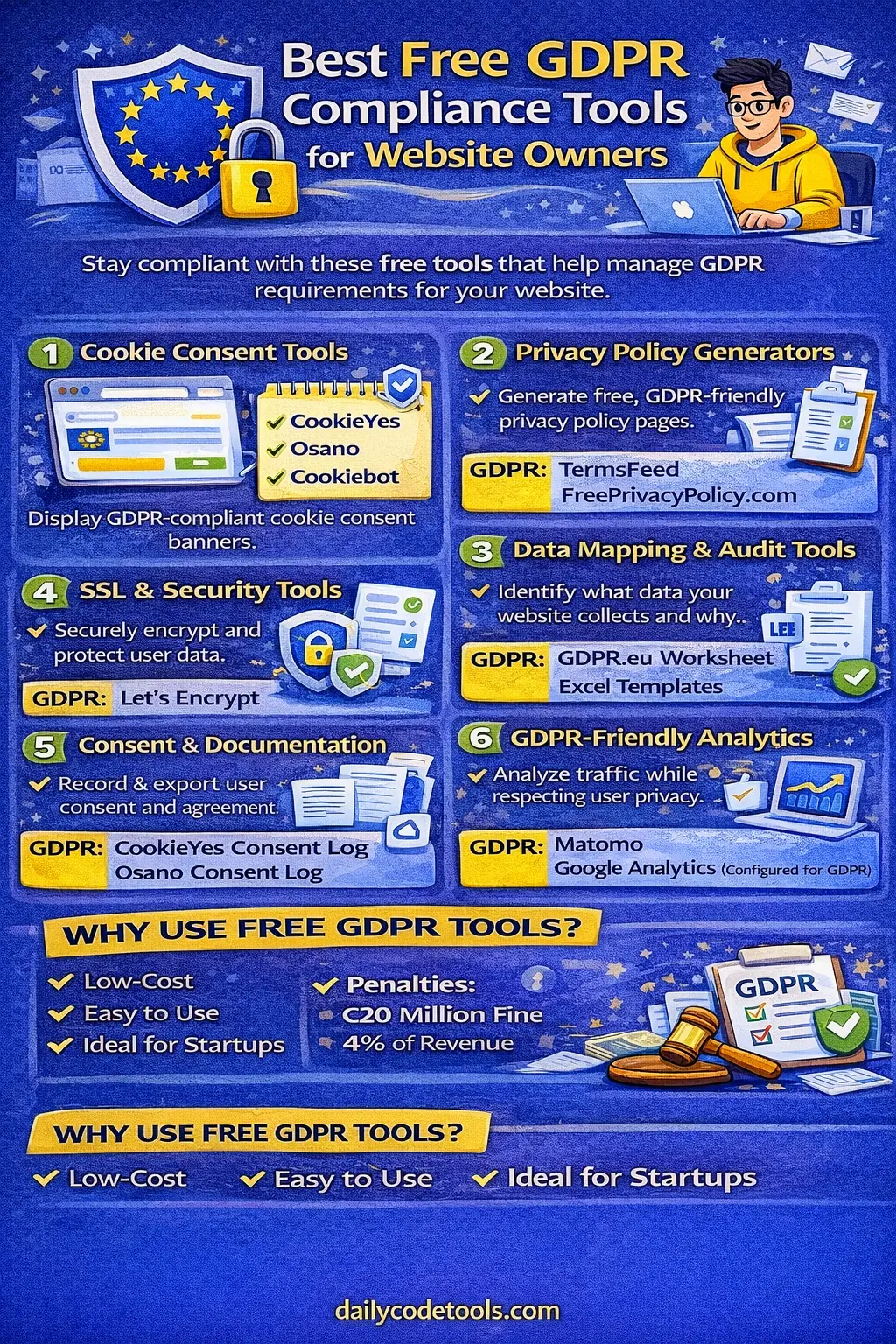
Best Free GDPR Compliance Tools for Website Owners in 2026
Data privacy has become one of the most important responsibilities for website owners around the world. Whether you operate a personal blog, online store, SaaS platform, portfolio website, news publication, business website, or global eCommerce company, visitors increasingly expect their personal information to be handled responsibly.
The General Data Protection Regulation (GDPR) is one of the world's most influential privacy laws. Although it is an EU regulation, its impact extends far beyond Europe. A business based in the United States, India, Canada, Australia, the United Kingdom, or another country may still need to consider GDPR requirements when it offers services to people in the European Economic Area or monitors their behavior.
The good news is that getting started with privacy compliance does not necessarily require an expensive enterprise platform.
There are many free or free-tier tools that can help website owners identify cookies, manage consent, create privacy documentation, improve website security, understand data flows, and audit privacy practices.
However, free tools should be viewed as compliance aids rather than a complete legal compliance solution. GDPR compliance involves technology, processes, documentation, contracts, security practices, and organizational decisions. A cookie banner alone does not make a website GDPR compliant.
This comprehensive guide explains the best free GDPR compliance tools for website owners in 2026, what each category does, how to use these tools together, and what limitations website owners should understand.
What Is GDPR?
GDPR stands for the General Data Protection Regulation.
It is a European Union data protection framework that became applicable on May 25, 2018. The regulation establishes rules for how organizations collect, use, store, disclose, protect, and otherwise process personal data.
Personal data can include information such as:
-
Names
-
Email addresses
-
Phone numbers
-
IP addresses
-
Online identifiers
-
Cookie identifiers
-
Account information
-
Location information
-
Device information
-
Customer records
-
Contact form submissions
-
Authentication information
-
Online behavioral information
Depending on the circumstances, even information that does not directly identify someone can become personal data when it can reasonably be linked with an individual.
GDPR also gives individuals several important rights concerning their personal information.
These include rights relating to:
-
Access
-
Correction
-
Deletion
-
Restriction of processing
-
Data portability
-
Objection
-
Certain automated decision-making and profiling activities
The regulation also requires organizations to have an appropriate legal basis for processing personal data and to provide transparent information about how personal data is used.
Does GDPR Apply to a Website Outside Europe?
This is one of the most common questions asked by global website owners.
The answer is: possibly.
GDPR is not limited to companies physically located inside the European Union.
An organization outside the EU may fall within GDPR's territorial scope when it offers goods or services to individuals in the EU or monitors their behavior, depending on the circumstances.
For example, imagine a website operated from:
-
India
-
United States
-
Canada
-
Australia
-
Singapore
-
UAE
-
Brazil
If that website actively offers services to people in Europe or engages in activities covered by GDPR's territorial scope, the organization may need to evaluate GDPR obligations.
Simply receiving an occasional visitor from Europe does not automatically mean that every website must comply with every GDPR requirement. Applicability depends on the actual circumstances and processing activities.
This distinction is important because many websites incorrectly assume either:
"We are outside Europe, so GDPR does not apply."
or:
"We have one European visitor, so we are fully subject to GDPR."
Neither statement is a reliable universal rule.
Website owners should evaluate their specific situation.
Why Do Website Owners Need GDPR Compliance Tools?
GDPR compliance can involve many different activities.
A website may need to understand:
-
What personal data it collects
-
Why the information is collected
-
Where the information is stored
-
Which third parties receive the information
-
Which cookies are installed
-
Which analytics services are used
-
Which advertising technologies are present
-
How consent is obtained
-
How consent can be withdrawn
-
How privacy requests are handled
-
How long information is retained
-
How information is secured
-
Which processors handle personal information
Trying to track all of these manually can become difficult.
Free GDPR tools can make the process easier by helping website owners automate parts of the work.
For example:
Cookie scanners can identify cookies.
Consent management platforms can provide consent interfaces.
Privacy policy generators can help organize privacy disclosures.
Security tools can identify technical weaknesses.
Analytics platforms can provide privacy-oriented measurement options.
Data mapping templates can help document information flows.
The important point is that these tools work together.
No single free tool can automatically make an entire organization GDPR compliant.
Best Free GDPR Compliance Tools for Website Owners
The following categories represent some of the most useful areas for small businesses, bloggers, developers, startups, agencies, publishers, and eCommerce websites.
1. Cookie Consent and Consent Management Tools
Cookies are one of the first privacy issues most website owners encounter.
Websites may use cookies for:
-
Login sessions
-
Shopping carts
-
Analytics
-
Advertising
-
Personalization
-
Security
-
Social media integrations
-
A/B testing
-
Marketing
-
Embedded content
Not all cookies are treated the same way.
Some cookies may be necessary for a requested service, while others may involve analytics, advertising, personalization, or other processing that requires additional consideration.
This is why a properly configured consent management solution can be useful.
CookieYes
CookieYes provides cookie consent and cookie management functionality for websites.
Depending on the plan and configuration, features may include:
-
Cookie scanning
-
Cookie categorization
-
Consent banners
-
Consent preferences
-
Consent records
-
Privacy-oriented configuration
-
Support for different website platforms
It can be useful for small websites that want a relatively straightforward way to start managing cookie consent.
Best for
-
Blogs
-
Small businesses
-
WordPress websites
-
HTML websites
-
Marketing websites
-
Small eCommerce websites
Important consideration
Do not install a cookie banner and assume compliance is complete.
Your banner should actually reflect the technologies used on your website. If analytics, advertising, pixels, embedded media, or other third-party technologies are loaded before appropriate consent, the banner may not solve the underlying issue.
Osano
Osano provides privacy and consent management products and has offered free options for smaller projects.
It can help organizations manage website consent and understand third-party technologies.
Potentially useful features include:
-
Consent management
-
Cookie controls
-
Privacy-related configuration
-
Third-party technology visibility
Best for
-
Startups
-
Small businesses
-
SaaS websites
-
Websites using several third-party services
The exact capabilities and limits of free plans can change, so website owners should verify current plan details before selecting a solution.
Cookiebot
Cookiebot is another well-known consent management platform.
Its technology can help websites discover cookies and trackers and provide visitors with consent choices.
Potential functionality can include:
-
Automatic scanning
-
Cookie categorization
-
Consent management
-
Cookie declaration
-
Consent records
Best for
Websites that use a large number of third-party scripts and want greater visibility into what technologies are operating on their pages.
Important note
Free availability and usage limits can depend on the current pricing structure, website size, and feature requirements.
2. Privacy Policy Generators
A privacy policy is another important part of website transparency.
A privacy policy should explain relevant information such as:
-
What personal data is collected
-
Why it is collected
-
How it is used
-
Who receives it
-
How long it is retained
-
User rights
-
Contact information
-
Cookies and tracking
-
Third-party services
-
International transfers where relevant
-
Security practices where appropriate
A generator can make creating an initial policy significantly easier.
However, generated legal text should not be blindly copied.
The policy should accurately describe what the website actually does.
If your website uses Google Analytics, advertising networks, contact forms, payment processors, email marketing software, hosting providers, customer databases, or other third-party services, those activities should be reviewed.
TermsFeed
TermsFeed offers tools for generating website legal policies.
Depending on the current product and configuration, it can help generate privacy-related documents based on information about your website.
Useful for
-
Small businesses
-
Bloggers
-
Developers
-
eCommerce stores
-
Freelancers
-
SaaS projects
One advantage of a structured generator is that it forces you to think about the services and data practices used by your website.
FreePrivacyPolicy.com
FreePrivacyPolicy.com provides online policy generation tools.
It can be useful for website owners who need to create an initial privacy policy and identify common privacy-related disclosures.
Best for
-
Personal websites
-
Blogs
-
Small businesses
-
New websites
Before publishing any generated policy, review every section.
A privacy policy should describe your actual data practices rather than an idealized version of your website.
iubenda
iubenda provides privacy and compliance tools for websites and applications.
Its ecosystem can help organizations create and manage privacy documentation and related compliance components.
Best for
-
Websites with multiple third-party services
-
SaaS applications
-
eCommerce websites
-
Agencies
-
International websites
Free tiers may have limitations, so verify current availability and features before relying on them.
3. Data Mapping Tools
One of the most overlooked areas of privacy compliance is data mapping.
Many website owners know they collect information but cannot clearly explain where every piece of information goes.
Consider a simple contact form.
A visitor enters:
-
Name
-
Email
-
Phone number
-
Message
The information may then travel through:
Website → Web server → Database → Email service → CRM → Support system → Backup
If you do not know this data flow, it becomes difficult to properly document privacy practices.
A data map can solve this problem.
GDPR Data Mapping Worksheets
A spreadsheet can be one of the most useful free privacy tools available.
You do not necessarily need expensive software to start documenting your data processing activities.
Create columns such as:
| Data Category | Source | Purpose | Storage | Recipient | Retention | Legal Basis |
|---|---|---|---|---|---|---|
| Name | Contact form | Customer support | Database | Support team | Defined period | Appropriate legal basis |
| Registration | Account management | Database | Email provider | Defined period | Appropriate legal basis | |
| IP address | Web server | Security | Server logs | Hosting provider | Defined period | Appropriate legal basis |
| Payment data | Checkout | Payment processing | Payment provider | Payment processor | Defined period | Contract/legal requirements |
The exact legal basis and retention period should be determined according to the actual processing activity and applicable law.
Google Sheets and Microsoft Excel
You can create a simple GDPR data inventory using:
-
Google Sheets
-
Microsoft Excel
-
LibreOffice Calc
This is particularly useful for small organizations.
You can create separate sheets for:
Personal Data
Record each category of information collected.
Third Parties
List every external provider.
Cookies
Record cookie names, purposes, providers, and categories.
Retention
Document how long different types of information are retained.
Privacy Requests
Track access, deletion, correction, and other applicable requests.
Security
Document important security controls and review dates.
For many small websites, a well-maintained spreadsheet is better than an expensive compliance platform that nobody updates.
4. Free Website Security Tools
GDPR is not only about consent and privacy policies.
Security is also an essential component of protecting personal information.
Organizations should use appropriate technical and organizational measures to protect personal data against risks such as unauthorized access, accidental loss, disclosure, or destruction.
Several free tools can help improve website security.
Let's Encrypt
Let's Encrypt provides free TLS certificates.
HTTPS encrypts communication between a visitor's browser and the website.
This is especially important when websites process:
-
Login credentials
-
Contact information
-
Customer data
-
Payment-related information
-
Account information
-
Private communications
Modern websites should generally use HTTPS throughout the site rather than only on selected pages.
Best for
Virtually every website.
Important note
HTTPS protects data in transit.
It does not automatically secure:
-
Your database
-
Server accounts
-
Administrator passwords
-
Backups
-
Third-party processors
-
Application vulnerabilities
TLS is one layer of security, not the complete security strategy.
Cloudflare
Cloudflare offers a free plan with several security and performance features.
Depending on the current plan, these may include functionality related to:
-
DNS
-
HTTPS
-
DDoS mitigation
-
Security controls
-
Performance
-
Caching
Cloudflare can be especially useful for websites receiving traffic from multiple countries.
Best for
-
Global websites
-
Blogs
-
Small businesses
-
Online stores
-
Content websites
However, website owners should understand which Cloudflare services process visitor information and reflect relevant third-party processing in their privacy documentation where appropriate.
Security Headers
Security header testing tools can help website owners identify missing or weak HTTP security headers.
Common headers include:
-
Content-Security-Policy
-
Strict-Transport-Security
-
X-Content-Type-Options
-
Referrer-Policy
-
Permissions-Policy
These controls can help reduce certain classes of web security risks.
For example, Content Security Policy can restrict where scripts and other resources may load from.
Why this matters for privacy
Security vulnerabilities can potentially expose personal information.
Therefore, privacy and security should not be treated as completely separate topics.
5. Website Cookie Scanning Tools
Many website owners are surprised by how many cookies and third-party technologies exist on a website.
A page may contain:
-
Analytics scripts
-
Advertising scripts
-
Social media widgets
-
Video embeds
-
Maps
-
Chat systems
-
Payment widgets
-
A/B testing scripts
-
Affiliate tracking
-
CDN services
Some technologies may set cookies directly while others may trigger additional third-party requests.
A cookie scanner can help identify them.
Why Cookie Scanning Matters
Imagine a website owner believes the site only uses one analytics cookie.
A scan reveals:
-
4 analytics cookies
-
3 advertising cookies
-
2 social media cookies
-
1 marketing pixel
-
Several third-party storage technologies
The website owner can then investigate each technology.
This process is far more useful than simply installing a generic banner.
6. GDPR-Friendly Analytics Tools
Analytics is another major privacy consideration.
Website owners want to understand:
-
How many visitors arrive
-
Which pages are popular
-
Where traffic originates
-
Which countries visitors come from
-
Which devices visitors use
-
How users navigate the website
But analytics systems may process information about visitors.
Therefore, analytics configuration should be reviewed carefully.
Matomo
Matomo is a popular analytics platform with strong privacy-focused features.
It can be self-hosted, which gives organizations greater control over their analytics infrastructure.
Depending on configuration, organizations can use privacy controls involving:
-
IP anonymization
-
Data retention
-
Cookie settings
-
User privacy
-
Tracking limitations
Why self-hosted analytics can be attractive
With self-hosting, the organization has greater control over where analytics data is stored and how the platform is configured.
However, self-hosting also creates responsibilities.
You need to manage:
-
Server security
-
Software updates
-
Backups
-
Access control
-
Database security
-
Monitoring
Self-hosted does not automatically mean GDPR compliant.
Google Analytics
Google Analytics is widely used by websites around the world.
It can be configured with privacy-conscious settings and consent mechanisms.
However, website owners should carefully review:
-
What data is collected
-
Consent requirements
-
Analytics configuration
-
Google signals
-
Advertising features
-
Data retention
-
User deletion processes
-
International data transfers
-
Applicable legal requirements
A website should not simply install Google Analytics and assume that it is automatically GDPR compliant.
The configuration matters.
7. Consent Management for Analytics and Advertising
One of the most important technical concepts for website owners is consent gating.
Suppose a website loads:
Google Analytics
Advertising Pixel
Marketing Tracker
immediately when the page loads.
Then the user clicks:
Reject
A banner appearing afterward does not necessarily undo the fact that those technologies already executed.
A better technical architecture can prevent non-essential technologies from loading until the relevant consent conditions are satisfied.
This is where a Consent Management Platform (CMP) can become valuable.
Essential vs Non-Essential Cookies
Website owners should distinguish between technologies that are necessary for the requested service and technologies used for purposes such as:
-
Advertising
-
Behavioral analytics
-
Personalization
-
Marketing
-
Cross-site tracking
The exact treatment depends on the technology, purpose, jurisdiction, and applicable legal requirements.
Do not label every cookie as "essential" simply to avoid asking for consent.
8. WordPress GDPR Plugins
WordPress powers a huge number of websites worldwide.
Its plugin ecosystem provides several tools that can help website owners address privacy-related requirements.
Popular options include:
Complianz
Complianz provides cookie consent and privacy-related functionality for WordPress websites.
Depending on configuration and plan, features may include:
-
Cookie consent
-
Cookie scanning
-
Consent management
-
Privacy documentation
-
Regional configurations
Best for
WordPress websites that want an integrated privacy management solution.
WP GDPR Compliance
Plugins in this category can help website owners add consent-related functionality to WordPress forms and other areas.
However, plugin quality varies.
Before installing any privacy plugin, check:
-
Last update
-
Compatibility
-
Developer reputation
-
Security history
-
Reviews
-
Active installations
-
Current WordPress compatibility
A privacy plugin that is not maintained can introduce security problems.
GDPR Cookie Consent Plugins
Several WordPress plugins focus specifically on cookie consent.
These can help with:
-
Cookie banners
-
Cookie categories
-
Consent preferences
-
Script blocking
-
Consent logs
Always test the plugin after installation.
Use browser developer tools and cookie scanners to confirm that the website behaves as expected.
9. Browser Developer Tools
One of the best free privacy auditing tools is already built into your browser.
Chrome, Edge, Firefox, and other modern browsers provide developer tools.
You can inspect:
-
Cookies
-
Local storage
-
Session storage
-
Network requests
-
JavaScript
-
Third-party domains
-
HTTP headers
-
Loaded resources
Open Developer Tools and inspect the Network and Application/Storage sections.
This can reveal third-party services that you may not have noticed.
How to Perform a Basic Privacy Audit
Open your website in a private/incognito browser session.
Then:
-
Open Developer Tools.
-
Open the Network panel.
-
Reload the page.
-
Look at third-party domains.
-
Inspect cookies and storage.
-
Identify analytics requests.
-
Identify advertising requests.
-
Identify embedded services.
-
Test the consent banner.
-
Reload the page after rejecting optional cookies.
-
Confirm whether blocked technologies remain blocked.
Repeat the process after accepting optional cookies.
This simple test can reveal significant configuration problems.
10. Google Lighthouse
Google Lighthouse is primarily a website quality auditing tool, but it can be useful as part of a broader technical review.
It can analyze areas such as:
-
Performance
-
Accessibility
-
Best practices
-
SEO
Some of the security and technical findings can indirectly support better privacy engineering.
For example, keeping outdated scripts and insecure third-party dependencies under control can reduce technical risk.
Lighthouse is not a GDPR compliance checker.
It should be treated as a general web quality tool.
11. Privacy-Focused Website Audit Checklist
You can create your own free GDPR audit system.
Start with the following categories.
Data Collection
Ask:
-
What personal information does the website collect?
-
Why is it collected?
-
Is the collection necessary?
-
Is the amount of data minimized?
-
Who can access it?
Cookies
Ask:
-
Which cookies exist?
-
Which third parties set cookies?
-
Which cookies are necessary?
-
Which cookies require consent?
-
Can users withdraw consent?
Analytics
Ask:
-
Which analytics tools are installed?
-
What information do they collect?
-
Are privacy settings enabled?
-
Is consent required?
-
How long is analytics data retained?
Forms
Ask:
-
What information does each form collect?
-
Where does the information go?
-
Is it stored in a database?
-
Is it emailed?
-
Is it sent to a CRM?
Third Parties
List:
-
Hosting provider
-
Analytics provider
-
Payment processor
-
Email provider
-
CDN
-
Advertising provider
-
Chat provider
-
CRM
-
Marketing tools
Security
Check:
-
HTTPS
-
Strong passwords
-
Multi-factor authentication
-
Server updates
-
Database security
-
Backups
-
Access controls
-
Logging
-
Vulnerability management
12. Free Consent Record and Documentation Tools
Consent can be difficult to prove if it is not recorded properly.
A compliant consent mechanism should generally be able to demonstrate what happened when consent is required.
Depending on the system, useful records can include:
-
Timestamp
-
Consent status
-
Consent categories
-
Policy version
-
Relevant configuration
-
Consent withdrawal
-
User identifier where appropriate and lawful
Be careful about collecting excessive information merely to prove consent.
Privacy compliance should also follow data minimization principles.
Consent Logs
Some consent management platforms provide consent logging functionality.
Free plans may include limited records or retention.
Before choosing a tool, determine:
-
How many consent records are stored?
-
How long are they retained?
-
Can they be exported?
-
What information is recorded?
-
Can users change their choices?
-
Can withdrawn consent be recorded?
-
Is the system suitable for your traffic volume?
13. Email Marketing and GDPR
Email marketing is another area where privacy compliance becomes important.
A website may collect an email address for:
-
Newsletter subscriptions
-
Marketing campaigns
-
Product updates
-
Account notifications
-
Download delivery
-
Customer communication
These purposes should not automatically be treated as identical.
A visitor subscribing to a newsletter should understand what they are signing up for.
Good practices include:
-
Clear subscription language
-
Appropriate consent mechanisms
-
Unsubscribe functionality
-
Accurate records
-
Data minimization
-
Secure subscriber storage
-
Clear privacy information
14. Contact Forms and GDPR
Contact forms are often overlooked.
A basic form might request:
Name
Email
Phone
Message
But ask yourself:
Do you really need all four fields?
If the phone number is unnecessary, removing it can reduce the amount of personal data collected.
This is an example of data minimization.
Website owners should collect information that is relevant and necessary for the stated purpose rather than collecting everything simply because the form can.
15. User Data Deletion and Access Requests
GDPR includes rights that can require organizations to respond to individuals exercising applicable data protection rights.
Website owners should have a process for handling requests.
For example:
Step 1: Receive the request
A visitor asks what personal information the website stores about them.
Step 2: Verify identity when appropriate
Organizations should avoid giving personal data to an unauthorized requester.
Step 3: Locate relevant data
Search:
-
User database
-
CRM
-
Email system
-
Support system
-
Marketing platform
-
Relevant backups where applicable
Step 4: Review the request
Determine what information can be provided, deleted, corrected, or otherwise handled under applicable law.
Step 5: Respond
Follow the applicable legal requirements and timelines.
A privacy compliance strategy is therefore much bigger than a cookie banner.
16. Data Retention Management
Keeping personal data forever creates unnecessary risk.
A useful privacy audit asks:
"How long do we actually need this information?"
Examples might include:
-
Customer records
-
Contact form submissions
-
Server logs
-
Analytics information
-
Newsletter subscriptions
-
User accounts
-
Support tickets
Retention requirements vary by data type and legal obligations.
Some information may need to be retained for regulatory or contractual reasons, while other information may no longer be necessary.
Create a retention schedule.
For example:
| Data Type | Purpose | Retention Review |
|---|---|---|
| Contact requests | Customer support | Periodically reviewed |
| User accounts | Account service | While account remains active, subject to requirements |
| Marketing subscribers | Newsletter | Until unsubscribe or other applicable event |
| Server logs | Security | Defined security retention period |
| Analytics data | Website analysis | Configured retention period |
The exact periods should be determined based on your business, legal obligations, and processing purposes.
17. Third-Party Vendor Audit
Modern websites rarely operate alone.
Even a simple website may depend on:
-
Hosting
-
CDN
-
Analytics
-
Fonts
-
CAPTCHA
-
Maps
-
Video
-
Payment providers
-
Email services
-
Chat widgets
-
Advertising networks
Every third-party service can introduce another data flow.
Create a vendor inventory.
For each service, record:
-
Company
-
Service
-
Purpose
-
Data processed
-
Country/region
-
Privacy documentation
-
Contract/DPA status where relevant
-
Retention
-
Security information
This can be managed in a simple spreadsheet.
18. International Data Transfers
Global websites should pay particular attention to international data transfers.
Personal information may move between countries when you use:
-
Cloud hosting
-
SaaS platforms
-
Analytics providers
-
Email services
-
CRMs
-
Customer support platforms
For example:
A website operated in India may use:
Indian business
        ↓
US hosting provider
        ↓
European visitor
        ↓
US analytics service
        ↓
Global email platform
This can create a complex data-processing environment.
Organizations should identify relevant transfer mechanisms and contractual arrangements where required.
This is an area where automated tools cannot replace legal and organizational review.
19. GDPR and eCommerce Websites
Online stores often process significantly more personal information than simple blogs.
An eCommerce website may handle:
-
Customer name
-
Email
-
Phone
-
Shipping address
-
Billing information
-
Order history
-
Payment information
-
Device information
-
Marketing preferences
Third-party systems may also receive data.
Examples include:
-
Payment processors
-
Shipping companies
-
Email platforms
-
Fraud prevention systems
-
Analytics services
-
Advertising platforms
Therefore, eCommerce businesses should perform a deeper data mapping exercise.
20. GDPR for Bloggers and Content Websites
Small bloggers often assume GDPR is only for large companies.
That is not necessarily correct.
A blog may use:
-
Contact forms
-
Newsletter subscriptions
-
Analytics
-
Advertising
-
Comment systems
-
Social media embeds
-
Affiliate links
-
Embedded YouTube videos
-
Third-party fonts
Each technology should be reviewed.
For a small blog, a practical starting stack could be:
Privacy policy + cookie audit + consent management + HTTPS + analytics review + data inventory
This can provide a strong foundation without requiring expensive enterprise software.
21. GDPR for SaaS Websites
SaaS applications have additional complexity.
A SaaS product may process:
-
User profiles
-
Login information
-
Company information
-
Uploaded documents
-
Usage data
-
Billing records
-
Support tickets
-
API logs
-
IP addresses
SaaS companies should therefore consider:
-
Privacy notices
-
Data processing agreements
-
Processor management
-
Data retention
-
Security controls
-
User rights workflows
-
Access controls
-
Breach response
-
Subprocessors
Free website tools can help with some areas, but a SaaS company may eventually require professional privacy and legal support.
22. GDPR Compliance for Developers
Developers have an important role in privacy.
Privacy should ideally be considered during development rather than added after launch.
Useful development practices include:
Collect Less Data
Do not create database columns simply because they might be useful later.
Hash Sensitive Credentials
Passwords should never be stored as plain text.
Encrypt Sensitive Information Where Appropriate
Security architecture should match the sensitivity of the information.
Restrict Database Access
Only authorized systems and people should have access.
Protect APIs
Use authentication, authorization, rate limiting, validation, and appropriate logging.
Avoid Sensitive Information in Logs
Debug logs can accidentally expose:
-
Passwords
-
Tokens
-
Session IDs
-
Email addresses
-
Personal messages
Review Third-Party Scripts
Every external JavaScript library can potentially introduce security and privacy considerations.
23. GDPR and Advertising
Advertising is one of the more complicated areas of website privacy.
Advertising technologies can involve:
-
Cookies
-
Device identifiers
-
Behavioral information
-
IP addresses
-
Interest-based profiling
-
Third-party requests
Website owners using advertising should understand:
-
Which advertising vendors are present
-
What information they process
-
Whether consent is required
-
How the consent mechanism integrates with the advertising system
-
How withdrawal is handled
Simply writing "This website uses cookies" is not equivalent to implementing an appropriate consent mechanism.
24. GDPR and Social Media Embeds
Social media buttons and embedded content can create additional third-party requests.
Examples include:
-
YouTube videos
-
Instagram embeds
-
Facebook widgets
-
X/Twitter embeds
-
LinkedIn widgets
-
Social sharing tools
Some embedded resources can communicate with third-party servers when a page loads.
A privacy-friendly architecture may delay certain embedded resources until appropriate consent or user interaction, depending on the technology and applicable requirements.
25. GDPR Compliance Tools for Developers
Developers can combine several free tools to perform technical checks.
A practical toolkit may include:
Browser Developer Tools
Inspect cookies, network requests, scripts, storage, and third-party connections.
Cookie Scanner
Identify cookies and tracking technologies.
Security Header Checker
Review HTTP security headers.
SSL/TLS Checker
Verify certificate and HTTPS configuration.
Lighthouse
Review general technical website quality.
Spreadsheet
Document data processing and third parties.
Consent Management Platform
Control and document applicable consent.
This combination can provide a strong technical starting point.
26. Best Free GDPR Toolkit for a Small Website
If you operate a small website and have almost no compliance budget, start simple.
A practical setup could look like this:
Step 1: HTTPS
Use a valid TLS certificate.
Step 2: Cookie Audit
Scan the website and identify cookies.
Step 3: Third-Party Audit
Identify every external script and service.
Step 4: Privacy Policy
Create a policy that accurately reflects your website.
Step 5: Consent Management
Implement an appropriate consent mechanism for technologies that require consent.
Step 6: Analytics Review
Review analytics configuration and privacy settings.
Step 7: Data Inventory
Create a spreadsheet documenting personal data.
Step 8: Security Review
Check passwords, software updates, access controls, headers, backups, and server security.
Step 9: User Rights Process
Create a method for receiving and handling applicable privacy requests.
Step 10: Review Regularly
Repeat the audit whenever major website technologies change.
27. Best Free GDPR Toolkit for WordPress
A WordPress website can start with:
-
HTTPS
-
A reputable consent management plugin
-
Privacy policy generator
-
Cookie scanner
-
Security plugin
-
WordPress updates
-
Database backups
-
Two-factor authentication
-
Developer Tools
-
Data inventory spreadsheet
Avoid installing multiple overlapping privacy plugins without understanding how they interact.
Two plugins trying to control the same scripts can create unexpected behavior.
28. Best Free GDPR Toolkit for eCommerce
For an online store, consider:
-
Consent management
-
Privacy policy
-
Cookie audit
-
Payment processor review
-
Shipping provider review
-
Analytics review
-
Advertising review
-
Customer database security
-
Data retention policy
-
Access request process
-
Deletion workflow
-
Vendor inventory
-
Security monitoring
eCommerce websites generally process more personal data, so their privacy review should be more comprehensive than a simple informational website.
29. Free vs Paid GDPR Compliance Tools
Free tools are excellent for getting started.
However, they have limitations.
Free Tools
Advantages:
-
No or low cost
-
Easy to test
-
Suitable for small websites
-
Good for learning
-
Useful for basic audits
Disadvantages:
-
Limited features
-
Limited support
-
Usage restrictions
-
Fewer automation capabilities
-
May require manual work
-
May not cover advanced organizational requirements
Paid Tools
Paid platforms may provide:
-
Advanced consent management
-
Automated scanning
-
Larger-scale monitoring
-
Detailed reporting
-
Compliance workflows
-
Vendor management
-
Legal updates
-
Support
-
Enterprise integrations
The correct choice depends on the size and complexity of the organization.
30. Common GDPR Mistakes Website Owners Make
Mistake 1: Installing a Cookie Banner and Stopping There
A banner does not automatically solve every privacy issue.
Mistake 2: Using a Generic Privacy Policy
If the policy does not describe your actual services, it may provide poor transparency.
Mistake 3: Forgetting Third-Party Services
Fonts, analytics, videos, maps, chat tools, and advertising can all create additional data flows.
Mistake 4: Loading Trackers Before Consent
Depending on the technology and applicable law, non-essential tracking may need to wait until appropriate consent.
Mistake 5: Keeping Data Forever
Data retention should have a legitimate reason.
Mistake 6: Collecting Too Much Information
Only request information that is actually necessary for the purpose.
Mistake 7: Ignoring Security
Privacy without security is incomplete.
Mistake 8: Never Testing the Website
A privacy configuration can break after a plugin, theme, script, or analytics update.
Mistake 9: Ignoring Mobile
Privacy behavior should be tested on mobile devices as well as desktop.
Mistake 10: Assuming GDPR Is the Only Privacy Law
Global websites may encounter multiple privacy regimes.
GDPR Is Not the Only Privacy Law
Website owners serving an international audience should think beyond GDPR.
Depending on the countries and regions where they operate, they may encounter privacy requirements such as:
-
UK GDPR
-
EU GDPR
-
California privacy laws
-
Other US state privacy laws
-
Canada's privacy framework
-
Brazil's LGPD
-
India's Digital Personal Data Protection framework
-
Australia's Privacy Act
-
Singapore's PDPA
-
South Africa's POPIA
-
Other national and regional privacy requirements
These laws are not identical.
A consent mechanism designed for one jurisdiction may not automatically satisfy another jurisdiction.
Global website owners should therefore consider a broader privacy strategy.
GDPR vs Other Privacy Laws
One important difference between privacy regulations is that they can have different:
-
Definitions
-
Territorial scopes
-
Consent requirements
-
Consumer rights
-
Disclosure requirements
-
Data transfer rules
-
Retention requirements
-
Enforcement mechanisms
Therefore, avoid describing a tool as universally "GDPR compliant" without considering how your organization actually uses it.
The better approach is:
Use tools to support compliance with your specific legal and technical requirements.
31. How to Build a Free GDPR Compliance Workflow
Here is a practical workflow that almost any small website owner can follow.
Phase 1: Discover
Scan the website.
Find:
-
Cookies
-
Scripts
-
Third-party requests
-
Forms
-
Analytics
-
Advertising
-
Embedded content
Phase 2: Document
Create a data inventory.
Document:
-
What data is collected
-
Why
-
Where it goes
-
Who receives it
-
How long it is retained
Phase 3: Control
Implement:
-
Consent management
-
Script blocking where appropriate
-
Privacy settings
-
Security controls
Phase 4: Inform
Publish:
-
Privacy policy
-
Cookie information
-
Relevant notices
Phase 5: Respond
Create workflows for applicable:
-
Access requests
-
Deletion requests
-
Correction requests
-
Objections
-
Consent withdrawals
Phase 6: Review
Audit the website periodically.
32. How Often Should You Audit GDPR Compliance?
There is no universal rule saying every website should perform the exact same audit on a particular schedule.
However, regular reviews are a sensible practice.
Perform a privacy review when:
-
You install a new analytics tool
-
You add advertising
-
You install a new plugin
-
You add a payment provider
-
You add a CRM
-
You launch a newsletter
-
You redesign the website
-
You change hosting
-
You introduce personalization
-
You change data retention
-
You introduce a new form
For a small website, a periodic review every few months can be a practical internal target.
33. A Simple Monthly Privacy Check
Website owners can create a recurring monthly checklist.
Website
-
Is HTTPS working?
-
Are security certificates valid?
-
Are there new third-party scripts?
Cookies
-
Have new cookies appeared?
-
Are cookie categories accurate?
-
Does consent withdrawal work?
Analytics
-
Is analytics still configured correctly?
-
Are privacy settings active?
Forms
-
Did any new fields get added?
-
Is unnecessary information being collected?
Third Parties
-
Did any provider change?
-
Were new integrations added?
Security
-
Are plugins updated?
-
Are administrator accounts secure?
-
Are backups working?
This simple process can prevent privacy configuration from becoming outdated.
34. How to Test a Cookie Consent Banner
Do not just look at the banner visually.
Test its behavior.
Test A: First Visit
Open the website in a fresh private browser session.
Check which cookies and trackers appear before making a choice.
Test B: Reject
Choose the option to reject optional technologies.
Reload the page.
Check whether the relevant technologies remain blocked.
Test C: Accept
Accept the relevant categories.
Reload.
Verify that the expected technologies activate.
Test D: Withdraw
Open the privacy settings again.
Withdraw previously granted consent.
Verify that future processing behaves according to the site's consent architecture.
Test E: Mobile
Repeat the process on a smartphone.
This is especially important because mobile layouts can sometimes change how consent interfaces behave.
35. What Makes a Good GDPR Compliance Tool?
Before selecting a tool, evaluate the following:
Accuracy
Does it correctly identify the technologies used by your website?
Transparency
Can you understand what the tool is doing?
Control
Can visitors change their preferences?
Documentation
Can the organization demonstrate relevant consent or configuration where necessary?
Integration
Does it work with your CMS and analytics tools?
Performance
Does it significantly slow down the website?
Security
Is the provider reputable and the software maintained?
Scalability
Will it still work when your website grows?
Geographic Support
Can it handle the regions where your visitors and customers are located?
Cost
What are the limits of the free plan?
A free tool is only useful if it actually meets your requirements.
36. Are Free GDPR Tools Really Enough?
For a small website, free tools can be an excellent starting point.
They can help with:
-
Cookie discovery
-
Consent management
-
Privacy documentation
-
HTTPS
-
Security checks
-
Data mapping
-
Analytics configuration
-
Technical audits
But there are areas that software cannot automatically solve.
For example:
-
Determining the correct legal basis
-
Designing organizational privacy processes
-
Negotiating contracts
-
Assessing complex international transfers
-
Handling unusual legal requests
-
Conducting complex risk assessments
-
Determining all regulatory obligations
For complex businesses, professional legal or privacy advice may be appropriate.
37. GDPR Compliance Is a Process, Not a Plugin
This is perhaps the most important lesson for website owners.
There is no magic "GDPR compliant" button.
A website can have:
-
A cookie banner
-
A privacy policy
-
HTTPS
-
Analytics
-
Security plugins
and still have privacy problems if the underlying data practices are incorrect.
Think of GDPR compliance as a continuous process:
Discover → Document → Minimize → Protect → Inform → Obtain consent where required → Respect rights → Review
This mindset is much more effective than treating privacy as a one-time website task.
38. Recommended Free GDPR Stack for 2026
For a small global website, the following approach can provide a useful starting point:
| Requirement | Free Starting Option |
|---|---|
| HTTPS | Let's Encrypt |
| Cookie consent | CookieYes / other reputable CMP |
| Cookie scanning | Cookie scanner/CMP |
| Privacy policy | TermsFeed / FreePrivacyPolicy |
| Analytics | Matomo or carefully configured analytics |
| Security | Cloudflare + security headers |
| Data mapping | Google Sheets / Excel |
| Technical audit | Browser Developer Tools |
| Performance review | Lighthouse |
| Documentation | Spreadsheet + secure storage |
| Consent management | Reputable CMP |
| Security monitoring | Hosting/security tools |
Availability, free-plan limits, and features can change, so verify the current provider terms before implementation.
39. Best GDPR Tools by Website Type
Personal Blog
Recommended starting tools:
-
Privacy policy generator
-
Cookie scanner
-
Consent management
-
HTTPS
-
Analytics privacy settings
-
Data inventory
Small Business Website
Recommended:
-
Consent management
-
Privacy policy
-
Cookie audit
-
Security headers
-
HTTPS
-
Data mapping
-
Vendor inventory
eCommerce Store
Recommended:
-
Consent management
-
Privacy policy
-
Cookie scanning
-
Payment processor review
-
Customer data inventory
-
Retention policy
-
Analytics review
-
Security controls
-
User rights workflow
SaaS Application
Recommended:
-
Privacy management
-
Consent management where applicable
-
Data inventory
-
Vendor/subprocessor management
-
Security monitoring
-
Data retention
-
User rights workflow
-
Access controls
-
Incident response planning
International Enterprise
Free tools may still be useful for testing and discovery, but larger organizations often require dedicated privacy management, security, legal, and governance systems.
40. Final GDPR Compliance Checklist for Website Owners
Before considering your website's privacy program reasonably organized, review these areas.
Privacy
-
Privacy policy is published
-
Policy accurately reflects actual processing
-
Privacy information is easy to find
-
Data collection purposes are documented
-
Third-party providers are identified
Cookies
-
Website cookies have been audited
-
Third-party trackers have been identified
-
Consent categories are configured appropriately
-
Optional technologies are controlled according to applicable requirements
-
Consent withdrawal works
Data
-
Personal data inventory exists
-
Data sources are documented
-
Data recipients are documented
-
Retention periods are reviewed
-
Unnecessary data collection has been reduced
Security
-
HTTPS is enabled
-
Admin accounts use strong authentication
-
Software is updated
-
Database access is restricted
-
Backups are protected
-
Security headers are reviewed
-
Sensitive information is not exposed in logs
User Rights
-
Privacy request process exists
-
Identity verification process is considered
-
Data can be located when required
-
Applicable deletion/correction processes exist
-
Consent withdrawal can be handled
Third Parties
-
Analytics providers are documented
-
Advertising providers are documented
-
Payment providers are documented
-
Email providers are documented
-
Hosting providers are documented
-
Other processors are reviewed
Frequently Asked Questions About Free GDPR Compliance Tools
Is there a completely free GDPR compliance tool?
There are free and free-tier tools for individual compliance tasks such as cookie scanning, consent management, privacy policy creation, security checks, and data mapping.
However, no single free tool can guarantee that an entire organization is GDPR compliant.
Is a free cookie banner enough for GDPR?
No.
A cookie banner is only one part of a broader privacy strategy.
You also need to consider what data your website collects, which technologies are used, the purposes of processing, applicable legal bases, privacy notices, user rights, security, third-party providers, and other requirements.
Does a small blog need GDPR compliance?
A small blog should evaluate whether GDPR applies to its processing activities.
The size of the website alone does not determine applicability.
A blog that collects email addresses, uses analytics, runs advertising, operates contact forms, or serves international users should review its privacy practices carefully.
Does GDPR apply to websites in India?
Potentially.
Being located in India does not automatically exclude an organization from GDPR's territorial scope.
If a website offers goods or services to people in the EU or monitors their behavior in circumstances covered by GDPR, the organization may have GDPR obligations.
Indian businesses should also consider India's own applicable data protection requirements.
Does GDPR apply to US websites?
Potentially.
A US website can fall within GDPR's territorial scope depending on its activities involving people in the EU.
US businesses should also evaluate applicable federal, state, and sector-specific privacy requirements.
Is Google Analytics GDPR compliant?
Google Analytics should not simply be labeled "GDPR compliant" without considering the actual configuration and circumstances.
Website owners should review analytics settings, consent requirements, data collection, retention, advertising functionality, international transfers, and applicable legal obligations.
Is Matomo GDPR compliant?
Matomo provides privacy-focused features, but compliance depends on how it is deployed and configured and on the organization's actual processing activities.
Self-hosting can provide additional control, but it also creates security and administration responsibilities.
Can I create a GDPR privacy policy for free?
Yes, several online services offer free privacy policy generation or free tiers.
However, generated text should be reviewed carefully.
Your privacy policy should describe what your website actually does.
How often should I update my privacy policy?
Update it whenever your data processing practices materially change.
Examples include:
-
Adding analytics
-
Adding advertising
-
Adding payment services
-
Launching a newsletter
-
Adding a CRM
-
Changing hosting
-
Adding new forms
-
Adding new third-party services
Periodic reviews are also useful even when no obvious change has occurred.
Does HTTPS make my website GDPR compliant?
No.
HTTPS is an important security measure, but GDPR compliance involves many other areas.
HTTPS protects data transmitted between browsers and servers. It does not automatically address consent, privacy notices, retention, user rights, third-party processing, or other organizational requirements.
What is the best free GDPR tool for a small website?
There is no single best tool for every website.
A small website can often start with:
-
A reputable cookie consent solution
-
A privacy policy generator
-
A cookie scanner
-
HTTPS
-
A security header checker
-
A privacy-conscious analytics configuration
-
A spreadsheet for data mapping
The best combination depends on the technologies installed on your website.
Final Thoughts
GDPR compliance can seem complicated, especially when you are running a small website without a dedicated legal or privacy team.
The good news is that you do not need to purchase an expensive enterprise platform before taking meaningful action.
Free and free-tier tools can help website owners understand their websites, discover cookies, document data flows, manage consent, create privacy documentation, improve security, and audit third-party services.
A practical starting strategy is:
Audit your website → identify personal data → identify cookies and trackers → review third parties → create accurate privacy documentation → implement appropriate consent controls → improve security → document data retention → create user-rights processes → review regularly.
For a personal blog, this process may be relatively simple.
For an eCommerce store, SaaS platform, marketplace, advertising-supported publication, or international enterprise, the process can become considerably more complex.
Most importantly, do not treat GDPR compliance as a checkbox.
A privacy banner cannot replace good data practices.
A privacy policy cannot replace security.
HTTPS cannot replace consent.
A cookie scanner cannot determine your legal obligations.
And a free compliance tool cannot replace responsible data governance.
The strongest privacy strategy combines technology, documentation, security, transparency, data minimization, consent management, and ongoing review.
If you are building a global website in 2026, privacy should be considered from the beginning rather than added after problems appear.
Start with the free tools available today, understand exactly what information your website processes, remove unnecessary tracking and data collection, secure the information you actually need, and continuously review your privacy practices as your website grows.
That approach not only helps support GDPR compliance efforts — it can also build stronger user trust and create a more secure, transparent, and sustainable website for visitors around the world.
Disclaimer: This article provides general informational guidance and does not constitute legal advice. GDPR and other privacy requirements can vary according to your organization, users, processing activities, jurisdictions, contracts, and technologies. For complex or high-risk processing activities, consider obtaining advice from a qualified privacy professional or legal adviser.
Your email address will not be published. Comments are moderated.
0 Comments on This Post
Leave a Reply
Comments (0)
Spread the Word!
Join Our Developer Community!
Get weekly coding tips, tool updates, and exclusive tutorials straight to your inbox.
Request a Tool
×