How to Make Your Website GDPR Compliant (Step-by-Step)
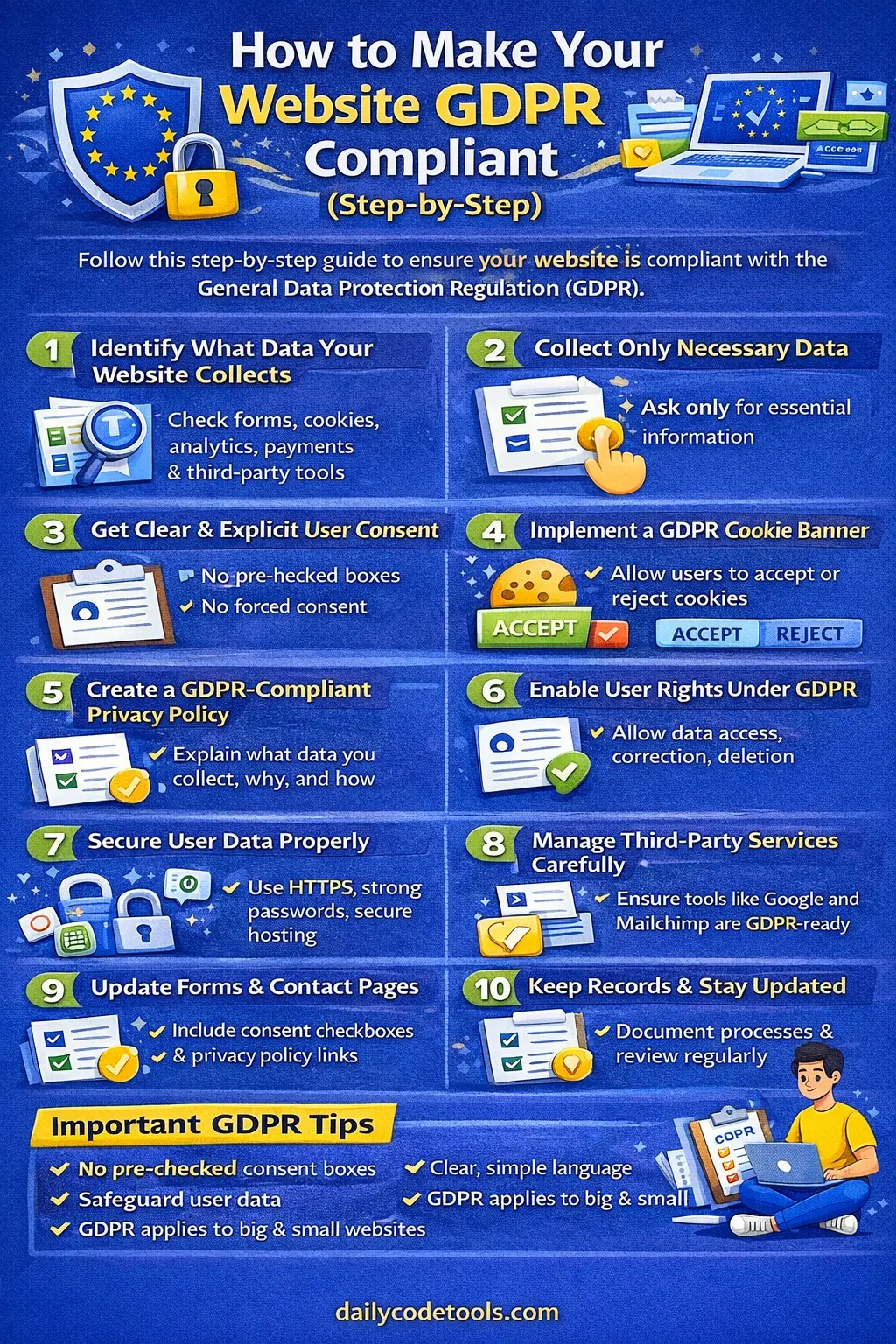
In today’s digital world, privacy is no longer something website owners can treat as an afterthought. Almost every modern website collects, stores, analyzes, or shares some type of information about visitors.
A simple contact form may collect a name and email address. Analytics tools may record information about how visitors interact with your pages. Advertising platforms may use identifiers for personalization or measurement. E-commerce websites may process addresses, payment-related information, order history, and account details.
This is where the General Data Protection Regulation (GDPR) becomes important.
The GDPR is one of the world's most influential data protection laws. It establishes rules for how organizations process personal data and gives individuals significant rights over information relating to them. The regulation entered into force on May 24, 2016, and became applicable on May 25, 2018.
For website owners, the good news is that GDPR compliance does not necessarily mean building a complicated legal system from scratch.
It starts with understanding what your website does with personal data.
You need to know:
-
What information you collect
-
Why you collect it
-
Which tools receive it
-
Where it is stored
-
How long you keep it
-
What legal basis you rely on
-
How users can exercise their rights
-
How you protect the information
-
What happens if something goes wrong
This guide explains how to make a website GDPR compliant step by step, using simple language that beginners, bloggers, freelancers, developers, agencies, SaaS owners, and small businesses can understand.
Important: This article is an educational guide, not legal advice. GDPR obligations can depend on your business model, location, processing activities, sector, and the people whose data you process. For higher-risk or complex processing, consider getting advice from a qualified privacy professional.
What Is GDPR?
GDPR stands for General Data Protection Regulation.
Its official name is Regulation (EU) 2016/679. It provides a framework for protecting individuals when organizations process their personal data.
The GDPR focuses on several major ideas:
-
Transparency
-
Lawful processing
-
Data minimization
-
Purpose limitation
-
Security
-
Accountability
-
Individual rights
The European Commission describes seven core principles, including lawfulness and transparency, purpose limitation, data minimization, accuracy, storage limitation, integrity and confidentiality, and accountability.
In simple terms, GDPR asks organizations to treat personal information responsibly rather than collecting everything simply because technology makes it possible.
When Did GDPR Start?
The GDPR entered into force on May 24, 2016, and became applicable on May 25, 2018.
Although it is an EU regulation, its practical reach is broader than simply businesses physically located inside the European Union.
Does GDPR Apply to Your Website?
This is one of the most important questions to answer before doing anything else.
A common misconception is:
“My company is outside Europe, so GDPR doesn't apply to my website.”
That is not necessarily correct.
The GDPR can apply to organizations outside the EU in situations covered by its territorial scope, including where they offer goods or services to individuals in the EU or monitor their behaviour there.
However, another common oversimplification is saying:
“If anyone from Europe can open my website, GDPR automatically applies.”
That is also too broad.
Simply having a website that is technically accessible worldwide does not automatically establish that every GDPR obligation applies. The actual circumstances and processing activities matter.
Questions to Ask
Consider:
-
Do you intentionally offer products or services to people in the EU?
-
Do you have EU customers?
-
Do you monitor or analyze behaviour of people in the EU?
-
Do you operate an online service used by people in the EU?
-
Do you collect personal data from individuals located in the EU?
-
Do your business activities specifically target European users?
If the answer to relevant questions is yes, you should investigate GDPR applicability carefully.
What Counts as Personal Data Under GDPR?
One of the most important concepts in GDPR compliance is personal data.
The term is broader than many beginners expect.
Personal data is information relating to an identified or identifiable living individual. Information that can be combined with other information to identify someone may also qualify.
Examples can include:
-
Name
-
Email address
-
Phone number
-
Home address
-
IP address
-
Location information
-
Cookie identifiers
-
Advertising identifiers
-
Account information
-
Online identifiers
-
Contact form submissions
-
Customer records
-
Login information
-
Certain device information
Even pseudonymized or encrypted information can remain personal data if it can be linked back to an identifiable person.
Examples on a Typical Website
Suppose you run a blog.
A visitor reads an article.
Your website might collect:
-
IP address through server logs
-
Cookie identifiers
-
Analytics events
-
Browser information
-
Contact information if they submit a form
Now suppose you operate an e-commerce store.
You may additionally process:
-
Name
-
Email
-
Shipping address
-
Billing information
-
Order history
-
Account credentials
-
Customer support messages
This is why GDPR compliance needs to begin with data discovery.
Step 1: Identify Everything Your Website Collects
Before changing your website, create a complete picture of your data.
This process is often called data mapping or data inventory.
Don't start by installing a cookie banner immediately.
First understand what is actually happening behind the scenes.
Check Your Website Forms
Look for:
-
Contact forms
-
Newsletter forms
-
Registration forms
-
Login pages
-
Checkout forms
-
Quote-request forms
-
Download forms
-
Survey forms
-
Comment forms
-
Support forms
For every form, write down:
-
What information is collected?
-
Why is it collected?
-
Is every field necessary?
-
Where does the information go?
-
Who can access it?
-
How long is it retained?
-
Which third-party service receives it?
For example:
Contact form
Fields:
-
Name
-
Email
-
Message
Purpose:
-
Responding to the user's inquiry
Destination:
-
Business email inbox
Retention:
-
Based on your documented business and legal requirements
This is much more useful than simply writing “we collect user data.”
Step 2: Create a Website Data Inventory
Create a spreadsheet or document containing every major processing activity.
A simple structure could look like this:
| Website Feature | Data Collected | Purpose | Recipient | Retention |
|---|---|---|---|---|
| Contact form | Name, email, message | Respond to inquiry | Email provider | Defined period |
| Newsletter | Send newsletter | Email platform | Until unsubscribe/other applicable period | |
| Analytics | Online identifiers/events | Website measurement | Analytics provider | According to configuration |
| Login | Email, password credentials | Account access | Hosting/database provider | While account exists |
| Checkout | Customer/order details | Process purchase | Payment/shipping providers | According to business/legal requirements |
Your inventory doesn't have to be complicated.
The objective is visibility.
You cannot properly protect information you don't know you are collecting.
Step 3: Understand Why You Collect Each Type of Data
GDPR emphasizes purpose limitation.
That means you should have a specific reason for processing personal data rather than collecting information without a defined purpose.
For every data field, ask:
“Why do we need this?”
Suppose your contact form asks:
-
Name
-
Email
-
Phone
-
Company
-
Job title
-
Date of birth
-
Address
But you only need to reply to a basic question.
Do you really need all six fields?
Probably not.
A simpler form might need only:
-
Name
-
Email
-
Message
The principle is simple:
Collect information because you need it for a legitimate, clearly defined purpose—not because your form builder allows it.
Step 4: Apply Data Minimization
GDPR's data minimization principle means collecting and processing only the personal data that is necessary for your stated purpose.
This is one of the easiest GDPR principles for small websites to apply.
Bad Example
A newsletter signup asks for:
-
Full name
-
Phone number
-
Date of birth
-
Home address
-
Gender
-
Email address
If the only purpose is sending a newsletter, most of these fields may be unnecessary.
Better Example
Ask for:
-
Email address
-
Name, if genuinely useful
That's it.
Why Data Minimization Matters
Collecting less data can:
-
Reduce privacy risk
-
Reduce storage requirements
-
Simplify security
-
Make your privacy notices clearer
-
Reduce the consequences of a breach
-
Improve user experience
Privacy compliance and good UX can often work together.
Step 5: Determine Your Legal Basis for Processing
This is a critical area where beginner guides often make mistakes.
GDPR does not mean you must obtain consent for every piece of personal data you process.
Consent is only one possible legal basis.
Depending on the circumstances, processing may rely on another lawful basis, such as:
-
Consent
-
Contract
-
Legal obligation
-
Vital interests
-
Public task
-
Legitimate interests
The correct legal basis depends on the specific processing activity.
For example, processing an order may involve a contractual necessity rather than relying on a marketing consent checkbox.
Why This Matters
If you use a single checkbox saying:
“I consent to everything.”
that does not automatically make every processing activity lawful.
Instead, identify the purpose and determine the appropriate legal basis for that purpose.
Step 6: Use Consent Correctly
Consent is still extremely important in many website situations.
Where you rely on consent, GDPR requires consent to be:
-
Freely given
-
Specific
-
Informed
-
Unambiguous
The European Commission also explains that consent requests should be clear, concise, understandable, and distinguishable from other information such as terms and conditions.
Avoid Pre-Checked Boxes
Bad:
☑ Send me marketing emails
The user should actively make the choice.
Better:
☐ I would like to receive marketing emails.
Avoid Bundled Consent
Don't combine unrelated purposes into one vague checkbox.
For example:
“I agree to the privacy policy, marketing, analytics, personalized advertising, and third-party data sharing.”
This can make it difficult for users to understand exactly what they are agreeing to.
Instead, separate choices where appropriate.
Step 7: Don't Confuse Privacy Policy Acceptance With Consent
This is a common website mistake.
A privacy policy generally explains how you process information.
It is not automatically something the user must “consent to” as though it were a contract for every processing activity.
For example, putting this on a form:
☐ I agree to the Privacy Policy.
does not magically establish consent for every possible processing purpose.
Instead:
-
Provide the required privacy information
-
Identify the relevant legal basis
-
Obtain consent separately where consent is the legal basis
-
Make optional choices genuinely optional
The design should match the legal purpose.
Step 8: Audit Your Cookies and Tracking Technologies
Cookies are one of the biggest sources of confusion in GDPR compliance.
A website may use cookies for:
-
Login sessions
-
Shopping carts
-
Language preferences
-
Analytics
-
Advertising
-
Personalization
-
Social media integrations
-
Tracking
Not every cookie has the same legal treatment.
Some cookies may be necessary for a service or functionality, while others can require user choice under applicable EU rules.
The European Commission notes that cookies can also be subject to sector-specific rules such as the ePrivacy framework.
Therefore, don't assume:
“All cookies are GDPR consent cookies.”
And don't assume:
“Cookies are just technical files, so privacy rules don't matter.”
You need to understand what each technology does.
Step 9: Create a Proper Cookie Consent Mechanism
If your website uses non-essential tracking technologies that require consent, your consent mechanism should give users a meaningful choice.
A basic approach can include:
Accept all
Reject non-essential
Manage preferences
The exact implementation depends on your website and applicable rules.
Avoid Dark Patterns
A banner that makes “Accept” huge and colorful while hiding “Reject” may create compliance concerns.
The European Commission specifically discusses deceptive cookie-consent designs such as making rejection harder than acceptance.
The goal should be straightforward:
Make the user's choice clear and easy.
Step 10: Don't Load Non-Essential Trackers Before Consent When Consent Is Required
This is where many cookie banners fail.
Imagine a website displays:
“We use cookies. Accept?”
But Google Analytics, advertising scripts, tracking pixels, or other non-essential technologies have already loaded before the visitor clicks anything.
The banner alone does not fix the underlying implementation.
A proper consent architecture should control the loading of relevant technologies according to the user's choice and the legal requirements applicable to your site.
Test Your Website
Open the website in a fresh browser session.
Before interacting with the consent banner, check:
-
Which cookies are created?
-
Which scripts execute?
-
Which third-party requests occur?
-
Which tracking services load?
-
What happens after rejection?
-
What happens after acceptance?
This technical audit is often more valuable than simply checking whether a banner appears visually.
Step 11: Create a GDPR-Friendly Privacy Policy
A privacy policy is one of the most important documents on a privacy-focused website.
But simply downloading a generic privacy policy and changing the company name is not enough.
Your privacy notice should accurately describe your actual processing activities and provide the information required by applicable law.
Depending on your processing, relevant information can include:
-
Who controls the data
-
What personal data is collected
-
Why it is processed
-
Legal basis
-
Recipients or categories of recipients
-
Retention periods or criteria
-
Data subject rights
-
How users can contact you
-
Relevant international transfer information
-
Automated decision-making/profiling information where applicable
The exact notice depends on your circumstances.
Keep the Language Simple
Instead of writing:
“The controller shall process the personal data of the data subject pursuant to applicable statutory provisions…”
say:
“We collect your email address so we can respond to your message.”
Legal accuracy is important, but unnecessary complexity can make privacy information difficult to understand.
Step 12: Put Your Privacy Policy Where Users Can Find It
A privacy policy should not be hidden.
Common locations include:
-
Website footer
-
Contact forms
-
Signup pages
-
Checkout pages
-
Account registration
-
Newsletter forms
-
Cookie settings
-
Mobile navigation
For example:
Privacy Policy | Cookie Settings | Terms
A visitor should not have to search through five pages to discover how their information is used.
Step 13: Add Privacy Information Near Data Collection Points
A privacy policy in the footer is useful, but contextual information can make your forms much clearer.
For example:
“We use the information you provide to respond to your inquiry. See our Privacy Policy for details about how we process personal data.”
Then link to the relevant policy.
For marketing:
“We will use your email address to send the newsletter you requested. You can unsubscribe at any time.”
The idea is simple:
Tell people what is happening when the data is being collected.
Step 14: Give Users a Way to Exercise Their GDPR Rights
GDPR gives individuals significant rights regarding their personal data.
Depending on the circumstances, individuals can have rights including:
-
Right to be informed
-
Right of access
-
Right to rectification
-
Right to erasure
-
Right to restriction of processing
-
Right to data portability
-
Right to object
-
Rights relating to certain automated decision-making
Your website should have a practical process for handling these requests.
You don't necessarily need an expensive automated dashboard.
For a small website, a documented email-based process may be a practical starting point.
Step 15: Create a Data Request Process
Create a dedicated privacy contact method.
For example:
You can explain:
“If you want to request access, correction, deletion, or other rights concerning your personal data, contact us at privacy@example.com.”
Then establish an internal process.
When a Request Arrives
-
Record the request.
-
Identify what the user is asking for.
-
Verify identity where reasonably necessary.
-
Locate relevant data.
-
Check applicable exceptions and restrictions.
-
Respond within the applicable legal timeframe.
-
Document what you did.
Don't ignore privacy requests because your business is small.
The European Commission provides guidance for businesses on handling requests from individuals exercising their rights.
Step 16: Understand the Right to Deletion
The right to erasure is often called the right to be forgotten.
But it does not mean:
“Every user can demand that every record be deleted immediately in every situation.”
There are circumstances where organizations may have lawful reasons to retain certain information.
For example, legal obligations, legitimate legal claims, or other applicable exceptions can affect deletion requests.
Therefore, create a process rather than promising:
“We delete everything whenever you ask.”
Instead, evaluate each request according to the applicable rules.
Step 17: Set Data Retention Periods
GDPR includes a storage limitation principle.
Personal data should not be kept longer than necessary for the purposes for which it is processed.
This means you should avoid keeping everything forever.
Create a retention schedule for important categories.
For example:
| Data | Purpose | Retention Approach |
|---|---|---|
| Newsletter email | Newsletter delivery | Until unsubscribe or applicable retention point |
| Contact inquiry | Customer communication | Defined business period |
| Account information | Account operation | While account exists, subject to applicable requirements |
| Transaction records | Accounting/legal | According to applicable legal requirements |
| Security logs | Security monitoring | Defined security retention period |
The exact period depends on your business, legal obligations, and purpose.
Step 18: Secure Your Website With HTTPS
Security is a fundamental part of responsible personal-data processing.
Your website should use HTTPS.
HTTPS helps protect information while it travels between a visitor's browser and your website.
For example:
Bad:
http://example.com
Better:
https://example.com
HTTPS alone does not make a website GDPR compliant.
It is one security measure within a broader security program.
Step 19: Improve Website Security
Basic security practices should include:
-
HTTPS
-
Strong administrator passwords
-
Multi-factor authentication where available
-
Regular software updates
-
Secure hosting
-
Limited administrator access
-
Secure database credentials
-
Regular backups
-
Monitoring for suspicious activity
-
Removal of unused plugins
-
Secure development practices
If you use WordPress, for example, outdated plugins can become a security problem.
Don't install dozens of plugins simply because they are free.
Every additional plugin can increase:
-
Attack surface
-
Data processing
-
Maintenance requirements
-
Third-party dependencies
Step 20: Limit Internal Access to Personal Data
Not everyone working on your website needs access to everything.
Imagine you have five employees.
Does every employee need access to:
-
Customer database?
-
Payment information?
-
Support conversations?
-
Newsletter subscribers?
-
Analytics data?
Probably not.
Use role-based access where practical.
Give employees only the access required for their job.
This is commonly known as the principle of least privilege.
Step 21: Review Your Third-Party Services
Modern websites rarely operate alone.
You might use:
-
Hosting providers
-
Analytics platforms
-
Email marketing services
-
Payment processors
-
Customer support systems
-
CRM platforms
-
Cloud storage
-
Spam protection
-
Advertising platforms
-
Social media integrations
-
Chat widgets
Each service can introduce another data-processing relationship.
Create a third-party inventory.
| Service | Purpose | Data Shared | Contract/DPA | Transfer Considerations |
|---|---|---|---|---|
| Hosting | Website delivery | Server/user data | Check provider terms | Review location/mechanism |
| Analytics | Measurement | Events/identifiers | Check provider documentation | Review transfers |
| Email platform | Newsletter | Email/name | Check DPA | Review transfers |
| Payment provider | Payments | Transaction data | Check provider terms | Review transfers |
Step 22: Check Data Processing Agreements
When a service provider processes personal data on your behalf, the contractual relationship can be important under GDPR.
Depending on the relationship, you may need a Data Processing Agreement (DPA) or other appropriate contractual terms.
Don't assume that because a company is famous, everything is automatically compliant for your particular use case.
Review:
-
DPA
-
Privacy documentation
-
Security information
-
Data-processing terms
-
Subprocessors
-
International transfer mechanisms
-
Retention policies
Your responsibility doesn't disappear simply because you use a third-party tool.
Step 23: Review International Data Transfers
Many websites use services based outside the EU/EEA.
This can create international data-transfer considerations.
For example, your:
-
Hosting
-
Analytics
-
CRM
-
Email provider
-
Customer support platform
may process information in different countries.
GDPR has rules and safeguards for certain transfers of personal data to third countries. The European Commission identifies mechanisms including adequacy decisions, Standard Contractual Clauses (SCCs), and Binding Corporate Rules (BCRs), depending on the circumstances.
Don't simply write:
“Your information may be transferred internationally.”
Your privacy documentation should accurately describe the relevant arrangements.
Step 24: Make Your Contact Forms Privacy-Friendly
Your contact form should be reviewed carefully.
A basic form might contain:
Name
Message
That's often enough for a general inquiry.
If you add:
-
Phone
-
Company size
-
Job title
-
Location
-
Budget
-
Date of birth
ask whether each field has a real purpose.
Example Form Notice
“We use the information you provide to respond to your inquiry. Please see our Privacy Policy for information about how we process personal data.”
If you rely on consent for a separate purpose, handle that purpose separately.
Step 25: Review Newsletter Forms
Email marketing is another area where privacy mistakes are common.
Your newsletter system should make it clear:
-
What the subscriber is signing up for
-
What type of emails they will receive
-
How they can unsubscribe
-
Which company is sending the messages
Avoid automatically adding people to marketing lists merely because they submitted a contact form unless the applicable legal basis and circumstances support that use.
Good Newsletter Example
“Subscribe to receive our weekly web development tips and privacy updates.”
Then provide the appropriate signup mechanism and information.
Step 26: Make Unsubscribing Easy
If someone subscribed to your newsletter, don't make them search through your website to unsubscribe.
Provide a visible unsubscribe mechanism in marketing emails.
A good experience is:
Unsubscribe
or
Manage email preferences
One or two clicks should generally be enough to start the process.
Privacy is not only about collecting data.
It is also about respecting people's choices after collection.
Step 27: Audit Your Analytics Setup
Analytics tools can provide valuable information, but they can also involve personal data or online identifiers depending on configuration.
Before using an analytics tool, understand:
-
What it collects
-
Whether it uses cookies
-
What identifiers it creates
-
What information is sent to the provider
-
Where information is processed
-
How long information is retained
-
Whether consent is required for your particular setup
-
Which settings reduce unnecessary data collection
Don't assume:
“It's just Google Analytics, so I don't need to think about GDPR.”
The tool name does not determine your compliance.
Your configuration and processing activities matter.
Step 28: Review Advertising and Tracking Pixels
Advertising systems can be more complicated because they may involve:
-
Tracking
-
Profiling
-
Advertising identifiers
-
Cross-site or cross-context measurement
-
Data sharing with advertising providers
Review every advertising script installed on your website.
Ask:
-
Why is this script installed?
-
What data does it collect?
-
When does it load?
-
Does it require user consent?
-
Where is information sent?
-
Is the activity described in your privacy notice?
-
Can the script be disabled until the appropriate choice is made?
Remove tracking scripts you don't actually need.
Step 29: Check Embedded Content
Website owners often forget about embedded content.
Examples include:
-
YouTube videos
-
Maps
-
Social media posts
-
Chat widgets
-
Fonts
-
Third-party forms
-
Payment widgets
Some embedded services may make network requests or set identifiers when the page loads.
You should therefore audit embedded content too.
For privacy-sensitive embeds, consider whether you can:
-
Delay loading
-
Use privacy-enhanced configurations
-
Load content only after user interaction
-
Provide an alternative
-
Explain the processing clearly
Step 30: Review Comments and User Accounts
If your website allows comments, consider what happens to:
-
Display names
-
Email addresses
-
IP addresses
-
Comment content
-
Account credentials
-
Moderation records
If users can create accounts, consider:
-
Registration data
-
Password storage
-
Password reset information
-
Login logs
-
Account deletion
-
Inactive account retention
Never store passwords in plain text.
Use established secure password-hashing mechanisms appropriate for your technology stack.
Step 31: Create a Data Breach Response Plan
GDPR compliance isn't just about preventing problems.
You also need to know what to do when something goes wrong.
A personal-data breach can involve a security incident affecting the confidentiality, integrity, or availability of personal data.
Examples might include:
-
Hacked database
-
Stolen administrator credentials
-
Accidental email sent to the wrong recipient
-
Lost device containing personal information
-
Unauthorized access
-
Exposed database
-
Misconfigured cloud storage
Step 32: Understand the 72-Hour Breach Rule
One of the most frequently repeated GDPR facts is:
“You have 72 hours to report every breach.”
That's not quite correct.
Under GDPR, where a personal-data breach is likely to result in a risk to individuals' rights and freedoms, the controller generally must notify the relevant supervisory authority without undue delay and, where feasible, within 72 hours after becoming aware of it.
Higher-risk breaches may also require communication to affected individuals.
Therefore, don't wait three days before starting your investigation.
Start immediately.
Your Breach Plan Should Include
-
Detect
-
Contain
-
Investigate
-
Assess risk
-
Document
-
Notify the authority where required
-
Notify affected people where required
-
Remediate
-
Review what went wrong
Step 33: Keep Records of Consent
If consent is your legal basis, don't just collect a checkbox.
You should be able to demonstrate what the user agreed to.
Depending on your system, records may include:
-
Date and time
-
Consent purpose
-
Version of consent text
-
User identifier
-
Source/page
-
Choice made
-
Withdrawal status
This is part of the broader GDPR principle of accountability: organizations should not only comply but be able to demonstrate compliance.
Step 34: Make Consent Withdrawal Easy
Consent should not be a one-way door.
If someone can opt in, they should have a practical way to withdraw consent.
For example:
-
Cookie preference center
-
Email unsubscribe
-
Account settings
-
Privacy request email
Avoid making withdrawal dramatically harder than giving consent.
Step 35: Create a Cookie Preference Center
Instead of showing users only:
Accept
consider providing:
-
Accept all
-
Reject non-essential
-
Manage preferences
Inside the preference center, categories might include:
-
Necessary
-
Analytics
-
Advertising
-
Personalization
The exact categories and implementation should reflect the actual technologies used by your website.
A preference center is useful because it gives users more meaningful control.
Step 36: Review Your Website's Privacy Settings Regularly
Your website changes over time.
A developer may install a new plugin.
A marketing team may add a tracking pixel.
A designer may embed a new video service.
A business owner may start using a new CRM.
Each change can introduce new processing.
Therefore, GDPR compliance should be treated as an ongoing process.
Create a monthly, quarterly, or otherwise appropriate review schedule.
Check:
-
New plugins
-
New scripts
-
New forms
-
New third parties
-
New cookies
-
Privacy policy changes
-
Analytics changes
-
Security updates
-
Data retention
-
User requests
Step 37: Don't Forget Server Logs
Website owners often think:
“We don't collect personal data because we don't have a form.”
But your infrastructure may still process information.
Server logs can contain information such as:
-
IP addresses
-
Request timestamps
-
URLs
-
User-agent information
-
Error logs
Depending on the circumstances, these can constitute personal data.
Your technical team should understand what gets logged and for how long.
Don't retain logs indefinitely simply because your hosting provider makes it easy.
Step 38: Review Your WordPress Website
If your website uses WordPress, perform a dedicated audit.
Check:
-
WordPress core
-
Themes
-
Plugins
-
Contact forms
-
Analytics plugins
-
SEO plugins
-
Security plugins
-
Comment systems
-
Newsletter plugins
-
Social integrations
-
Backup services
-
CDN
-
Hosting
Every plugin should have a purpose.
If you installed a plugin two years ago and no one remembers why, investigate it.
Unused plugins should generally be removed rather than simply left inactive.
Step 39: Review Your E-Commerce Website
E-commerce websites typically process more personal data than basic blogs.
You may handle:
-
Customer names
-
Emails
-
Addresses
-
Order history
-
Account information
-
Shipping information
-
Payment-related information
-
Customer service conversations
You need to understand the role of:
-
Payment providers
-
Shipping providers
-
Tax/accounting tools
-
Fraud-prevention services
-
Email platforms
-
Customer support platforms
Don't collect payment information yourself unless you have a genuine reason and the necessary security architecture.
Using established payment processors can reduce certain technical burdens, but you still need to understand the data flow and legal responsibilities.
Step 40: Review SaaS and Membership Websites
SaaS websites have additional privacy considerations because they often maintain long-term user accounts.
Review:
-
Account creation
-
Login
-
Profile information
-
Usage analytics
-
Billing
-
Customer support
-
Product telemetry
-
User-generated content
-
Account deletion
-
Data exports
-
Backups
A user deleting their account doesn't necessarily mean every backup can disappear instantly.
Your privacy documentation and retention policy should explain relevant practices accurately.
Step 41: Train Your Team
GDPR isn't only a developer problem.
Your:
-
Developers
-
Marketers
-
Customer-support staff
-
Sales team
-
Administrators
-
Content team
may all interact with personal data.
Employees should understand basic rules such as:
-
Don't share customer data unnecessarily
-
Don't download personal data to personal devices without authorization
-
Don't send customer information to the wrong recipient
-
Don't use personal data for unrelated purposes
-
Report suspicious incidents quickly
-
Respect deletion/access requests
-
Follow password and security policies
Even a short internal privacy training session can be useful.
Step 42: Document Your Privacy Processes
Documentation is one of the most overlooked parts of compliance.
Create internal documents covering:
-
Data inventory
-
Processing purposes
-
Legal bases
-
Retention periods
-
Third-party vendors
-
Security measures
-
Consent records
-
Data request process
-
Breach response process
-
Privacy review procedure
You don't need a 200-page manual to get started.
A small business can begin with a well-organized privacy folder and a few practical documents.
Step 43: Understand Controller and Processor Roles
Another important GDPR concept is the difference between a controller and a processor.
In simplified terms:
-
A controller determines why and how personal data is processed.
-
A processor processes personal data on behalf of a controller.
For example, your business might decide to collect customer emails for newsletter delivery, while an email marketing provider processes those addresses on your behalf.
The exact legal relationship should be assessed based on the actual arrangement rather than the name of the service.
Understanding these roles helps determine responsibilities and contractual requirements.
Step 44: Don't Copy Someone Else's Privacy Policy
Copying a competitor's privacy policy is a bad approach.
Why?
Because your website may use completely different:
-
Tools
-
Cookies
-
Data fields
-
Vendors
-
Retention periods
-
Legal bases
-
International transfers
-
User rights procedures
A privacy policy should describe your actual processing activities.
If your policy says you don't use advertising cookies but your website loads five advertising scripts, the policy is inaccurate.
Accuracy matters.
Step 45: Don't Assume a Cookie Banner Means Compliance
A cookie banner is only one component.
You could have a beautiful cookie banner and still have privacy problems because:
-
Trackers load before consent
-
Reject doesn't work
-
Consent isn't recorded
-
Privacy policy is inaccurate
-
Third parties aren't disclosed
-
Withdrawal is impossible
-
New scripts bypass the consent system
Think of a banner as the user interface for a consent system, not the entire compliance program.
Step 46: Don't Collect Data “Just in Case”
One of the easiest rules to remember is:
If you don't need it, don't collect it.
Suppose your sales team says:
“Let's collect everyone's birthday. Maybe we'll use it for marketing later.”
That's exactly the kind of unnecessary collection you should question.
Ask:
-
What is the purpose?
-
Is it necessary?
-
What is the legal basis?
-
How long will we retain it?
-
Who needs access?
-
What happens if there is a breach?
If you don't have a good answer, reconsider collecting it.
Step 47: Build a GDPR Compliance Checklist
Use this checklist as a practical starting point.
Data Collection
-
Identify all personal data collected
-
Identify all forms
-
Identify cookies and trackers
-
Identify analytics tools
-
Identify advertising technologies
-
Identify third-party services
-
Identify server-side data collection
Legal Basis
-
Identify the purpose of each processing activity
-
Determine the applicable legal basis
-
Document your reasoning
-
Review consent-based processing separately
Forms
-
Remove unnecessary fields
-
Add appropriate privacy information
-
Link to privacy policy
-
Separate optional marketing choices
-
Avoid pre-checked consent boxes
Cookies
-
Audit all cookies
-
Categorize technologies
-
Review consent requirements
-
Prevent relevant non-essential technologies from loading before required consent
-
Provide appropriate choices
-
Record consent where necessary
-
Provide withdrawal/preferences functionality
Privacy Policy
-
Explain what data is collected
-
Explain why it is collected
-
Explain legal bases
-
Explain recipients
-
Explain retention
-
Explain user rights
-
Explain international transfers where relevant
-
Provide contact details
User Rights
-
Create access request process
-
Create deletion request process
-
Create correction process
-
Create consent withdrawal process
-
Create objection process
-
Create portability process where applicable
Security
-
HTTPS enabled
-
Strong passwords
-
MFA for important accounts
-
Limited administrator access
-
Updated software
-
Secure hosting
-
Backups
-
Incident response plan
Third Parties
-
Audit vendors
-
Review DPAs
-
Review subprocessors
-
Review international transfers
-
Update privacy notices
Ongoing Compliance
-
Schedule privacy audits
-
Review new plugins
-
Review new scripts
-
Review new vendors
-
Review data retention
-
Review security
-
Train employees
Common GDPR Mistakes Website Owners Make
Let's look at some of the most common mistakes.
Mistake 1: “We Are a Small Business”
Being small does not automatically remove GDPR obligations.
The important question is what processing you perform and whether GDPR applies to your activities.
Mistake 2: “We Only Collect Email Addresses”
An email address can be personal data.
If you collect it, you need to understand why, how, where, and for how long it is processed.
Mistake 3: “We Have a Privacy Policy, So We're Done”
A privacy policy is only one part of compliance.
You also need appropriate practices behind the policy.
Mistake 4: “We Have a Cookie Banner”
A banner doesn't automatically make your tracking implementation compliant.
Your underlying scripts, consent mechanism, records, and withdrawal process matter too.
Mistake 5: “Consent Is Always Required”
GDPR provides multiple legal bases for processing.
Don't use consent simply because it sounds like the safest option.
Identify the correct legal basis for each processing activity.
Mistake 6: “Google Analytics Is Automatically Fine”
No third-party tool gives you automatic compliance.
You need to understand your specific configuration and data flows.
Mistake 7: “We Keep Everything Forever”
GDPR includes storage limitation.
Create appropriate retention practices rather than keeping personal data indefinitely without justification.
Mistake 8: “We Don't Need a Breach Plan”
Every organization should know what to do when a security incident occurs.
Waiting until a breach happens to decide who should respond wastes valuable time.
How Much Does GDPR Compliance Cost?
There is no single GDPR compliance price.
For a small blog, costs might be relatively low.
You may need:
-
Privacy policy review
-
Cookie management
-
Website configuration
-
Security improvements
-
Documentation
A larger company may need:
-
Privacy professionals
-
Legal counsel
-
Security specialists
-
Data-mapping software
-
Consent-management platforms
-
Dedicated privacy staff
-
Audits
The important point is that compliance should be based on your actual risks and processing activities.
You don't necessarily need expensive enterprise software to start improving your website's privacy practices.
Can You Make a Small Website GDPR Compliant Yourself?
For a simple website, you can perform a substantial amount of the initial work yourself.
For example:
-
Audit forms
-
Audit cookies
-
List third-party services
-
Remove unnecessary data collection
-
Improve security
-
Create a data request process
-
Review privacy notices
-
Document processing activities
However, more complicated situations may require professional advice.
Consider getting specialist help if you process:
-
Sensitive or special-category data
-
Large volumes of personal information
-
Children's data
-
Detailed behavioural profiles
-
Biometric information
-
Health information
-
Financial information
-
Large-scale monitoring
-
High-risk automated decision-making
GDPR Compliance for Bloggers
If you run a personal blog, your setup may be relatively simple.
You might have:
-
Contact form
-
Newsletter
-
Analytics
-
Comments
-
Hosting logs
-
Social embeds
Start by auditing each one.
Remove tools you don't need.
For example, if you have three analytics tools but only use one, consider removing the other two.
Fewer technologies often mean fewer privacy complications.
GDPR Compliance for Freelancers
Freelancers should pay special attention to:
-
Client forms
-
Invoices
-
Email
-
CRM systems
-
Project-management platforms
-
Cloud storage
-
Calendars
-
Contact databases
If you store client information in multiple platforms, document where it exists.
A simple data inventory can make privacy management much easier.
GDPR Compliance for E-Commerce Businesses
Online stores should review:
-
Customer accounts
-
Checkout
-
Payment processing
-
Shipping
-
Marketing
-
Abandoned-cart tools
-
Analytics
-
Advertising
-
Customer support
-
Reviews
-
Returns
E-commerce businesses should also distinguish between information required to fulfill an order and information collected for optional marketing.
GDPR Compliance for SaaS Companies
SaaS businesses generally need a more detailed privacy program.
Review:
-
Account data
-
Product analytics
-
Logs
-
Customer support
-
Billing
-
User-generated content
-
Integrations
-
APIs
-
Subprocessors
-
Data deletion
-
Data export
-
Backups
SaaS companies should also clearly understand their role in relation to customer data, especially when customers use the platform to process information about their own users.
GDPR Compliance and SEO
A common concern is:
“Will GDPR hurt SEO?”
Privacy compliance and SEO are not inherently opposites.
In fact, a privacy-conscious website can still have:
-
Fast pages
-
Helpful content
-
Good UX
-
Strong technical SEO
-
Secure HTTPS
-
Accessible navigation
-
High-quality content
The main challenge can arise when tracking and personalization systems are heavily integrated into the site.
You should not sacrifice required privacy protections simply to collect more analytics data.
Instead, focus on first-party measurement, aggregated reporting, and privacy-conscious analytics practices where appropriate.
GDPR and Website Performance
Privacy tools can sometimes affect performance.
For example:
-
Cookie banners
-
Consent management platforms
-
Tracking scripts
-
Third-party embeds
can add JavaScript and network requests.
That doesn't mean you should remove privacy controls.
Instead:
-
Remove unnecessary scripts
-
Load scripts efficiently
-
Reduce third-party dependencies
-
Avoid duplicate trackers
-
Optimize consent-management code
-
Lazy-load non-essential embeds where appropriate
Privacy and performance can coexist with good technical implementation.
A Simple GDPR Compliance Workflow
If you are overwhelmed, follow this order.
Day 1: Audit
List:
-
Forms
-
Cookies
-
Analytics
-
Ads
-
Plugins
-
Third-party services
-
Databases
-
Server logs
Day 2: Reduce
Remove:
-
Unused plugins
-
Unnecessary fields
-
Duplicate trackers
-
Unnecessary third-party scripts
Day 3: Legal Review
For each processing activity, identify:
-
Purpose
-
Legal basis
-
Retention
-
Recipients
Day 4: User Experience
Improve:
-
Privacy notices
-
Cookie choices
-
Consent mechanisms
-
Privacy links
-
User request process
Day 5: Security
Check:
-
HTTPS
-
Passwords
-
MFA
-
Updates
-
Backups
-
Access permissions
Day 6: Documentation
Create:
-
Data inventory
-
Vendor list
-
Retention schedule
-
Breach procedure
-
Data-request procedure
Day 7: Test
Test the website as a real visitor.
Ask:
“If I were a visitor, would I understand what this website is doing with my information?”
If the answer is no, improve the experience.
What a GDPR-Friendly Website Should Feel Like
A privacy-friendly website shouldn't feel complicated.
A visitor should be able to:
-
Understand why information is requested
-
Find the privacy policy
-
Understand cookie choices
-
Make meaningful choices where required
-
Change relevant preferences
-
Request access to their data
-
Request correction or deletion where applicable
-
Understand who receives their information
-
Trust that the business takes security seriously
Good privacy design is ultimately about communication and responsible data handling.
Frequently Asked Questions
Is GDPR only for European companies?
No.
The GDPR can apply to organizations outside the EU depending on their activities, including certain situations involving offering goods or services to people in the EU or monitoring their behaviour.
Does every website need a cookie banner?
Not necessarily in exactly the same way.
The answer depends on the cookies and technologies your website uses and the applicable legal requirements.
Essential technologies may receive different treatment from analytics, advertising, and tracking technologies.
Audit your actual implementation instead of automatically installing a generic banner.
Does GDPR require consent for every form?
No.
GDPR provides multiple legal bases for processing.
For each form, identify the purpose and determine the appropriate legal basis.
Can I use a pre-checked consent box?
If you are relying on consent, avoid pre-checked boxes.
Consent should involve a clear affirmative choice and meet the GDPR's requirements for being freely given, specific, informed, and unambiguous.
Do I need a privacy policy?
If GDPR applies to your processing, transparency obligations are important, and you generally need to provide individuals with the required information about how their personal data is processed.
The exact content should reflect your actual processing activities.
Do small websites need GDPR compliance?
If GDPR applies to their activities, being small does not automatically exempt a website from the regulation.
The size of the website is not the only factor that matters.
Does HTTPS make a website GDPR compliant?
No.
HTTPS is an important security measure, but GDPR compliance also involves transparency, lawful processing, data minimization, retention, user rights, accountability, third-party relationships, and other requirements.
Is Google Analytics GDPR compliant?
There is no simple yes-or-no answer based solely on the product name.
You need to assess your specific analytics configuration, data flows, legal basis, consent requirements, settings, and applicable transfer arrangements.
What happens if someone asks me to delete their data?
You should have a documented process for handling the request.
The right to erasure has exceptions and is not absolute in every situation, so assess the request rather than automatically deleting everything.
How quickly do I need to respond to a GDPR request?
GDPR provides specific rules and timeframes for responding to data-subject requests, with extensions possible in certain circumstances.
Create a process that ensures requests are identified, tracked, verified where necessary, and handled within the applicable timeframe.
What if my website gets hacked?
Immediately activate your incident-response process.
Determine:
-
What happened
-
What data was affected
-
When it happened
-
Whether personal data was involved
-
What risk exists for individuals
-
Whether notification is required
Where a qualifying breach is likely to pose a risk to individuals' rights and freedoms, the GDPR generally requires notification to the supervisory authority without undue delay and, where feasible, within 72 hours after becoming aware of the breach.
Can I use a free privacy-policy generator?
You can use tools as a starting point, but don't blindly publish whatever they generate.
Review the result against your actual website.
If your website uses:
-
Analytics
-
Advertising
-
Email marketing
-
User accounts
-
Payments
-
International services
your privacy documentation needs to reflect those activities.
Final GDPR Website Compliance Checklist
Before calling your website privacy-ready, ask yourself:
Data
-
Do I know what personal data I collect?
-
Do I know why I collect it?
-
Do I collect only what I need?
-
Do I know where it is stored?
-
Do I know who can access it?
Legal Basis
-
Have I identified the legal basis for each major processing activity?
-
Am I using consent only where appropriate?
-
Are consent requests clear and specific?
Cookies
-
Have I identified all cookies and tracking technologies?
-
Do I understand which ones are necessary?
-
Do I handle non-essential technologies appropriately?
-
Can users manage relevant preferences?
-
Can users withdraw consent where applicable?
Privacy Policy
-
Is my privacy policy accurate?
-
Does it describe actual data collection?
-
Does it explain purposes?
-
Does it explain relevant legal bases?
-
Does it explain user rights?
-
Does it identify relevant recipients?
-
Does it explain retention?
-
Does it address international transfers where necessary?
User Rights
-
Can users request access?
-
Can they request correction?
-
Can they request deletion where applicable?
-
Can they withdraw consent where applicable?
-
Can they object where applicable?
-
Do I have a process for handling requests?
Security
-
Is HTTPS enabled?
-
Are administrator accounts protected?
-
Is MFA enabled where possible?
-
Is software updated?
-
Are backups maintained?
-
Is access limited?
-
Do I have a breach-response process?
Third Parties
-
Have I listed my vendors?
-
Have I reviewed their privacy documentation?
-
Have I checked DPAs where appropriate?
-
Have I reviewed international data transfers?
-
Do I know what information each vendor receives?
Ongoing Compliance
-
Do I review new plugins?
-
Do I review new scripts?
-
Do I review new vendors?
-
Do I update privacy documentation when processing changes?
-
Do I periodically review retention and security?
Conclusion: How to Make Your Website GDPR Compliant
Making a website GDPR compliant is not simply about adding a cookie banner or placing a privacy-policy link in the footer.
Real compliance starts with understanding your data.
You need to know:
What do we collect?
Why do we collect it?
What is our legal basis?
Who receives it?
How long do we keep it?
How do we protect it?
What choices and rights do users have?
Once you answer those questions, GDPR compliance becomes much more manageable.
Start with a complete data audit.
Then reduce unnecessary collection.
Review your legal bases.
Implement appropriate consent mechanisms where consent is required.
Audit cookies and tracking technologies.
Create an accurate privacy notice.
Build a process for user rights requests.
Secure your website.
Review third-party services and international transfers.
Document everything.
And most importantly, remember that GDPR compliance is not a one-time project.
Your website will change.
You may install a new analytics tool, launch a newsletter, add a payment provider, introduce user accounts, change hosting, or install a new plugin.
Every significant change can affect your privacy obligations.
That is why the best approach is to make privacy part of your normal website-management process.
A privacy-friendly website should not merely try to avoid penalties. It should make it easier for people to understand what happens to their information and give them meaningful control where the law requires it.
The European Commission describes accountability as a core GDPR principle: organizations are responsible for complying with the principles and for demonstrating that compliance.
So, if you're starting today, don't try to fix everything at once.
Begin with these five actions:
-
Audit your website's data collection.
-
Remove data and tracking technologies you don't need.
-
Review your legal bases, consent mechanisms, and privacy notices.
-
Secure your website and create a breach-response process.
-
Create a repeatable process for user rights, vendors, retention, and privacy reviews.
That's a practical foundation for building a website that treats user privacy as a real responsibility rather than a checkbox.
Your email address will not be published. Comments are moderated.
0 Comments on This Post
Leave a Reply
Comments (0)
Spread the Word!
Join Our Developer Community!
Get weekly coding tips, tool updates, and exclusive tutorials straight to your inbox.
Request a Tool
×