CSRF Attack Explained with Examples
CSRF Attack Explained with Examples
Cross-Site Request Forgery, commonly known as CSRF, is a web security vulnerability that can trick an authenticated user into performing an unwanted action on a website without realizing it.
CSRF attacks take advantage of the trust a website has in a user's browser. When a user is logged into a web application, the browser automatically sends authentication information such as session cookies with requests. If the application does not properly verify that a request was intentionally initiated by the user, an attacker may be able to abuse that authenticated session.
For example, imagine that a user is logged into an online account and then visits a malicious website in another browser tab. If the vulnerable application does not use appropriate CSRF protection, the malicious website may attempt to cause the user's browser to send an unwanted request to the application.
This guide explains what CSRF is, how CSRF attacks work, real-world CSRF attack examples, CSRF prevention techniques, CSRF tokens, SameSite cookies, and the difference between CSRF and XSS.
What Is CSRF?
Cross-Site Request Forgery (CSRF) is a web application vulnerability in which an attacker tricks an authenticated user's browser into sending an unwanted request to a website.
The important point is that the victim is usually already authenticated with the targeted website.
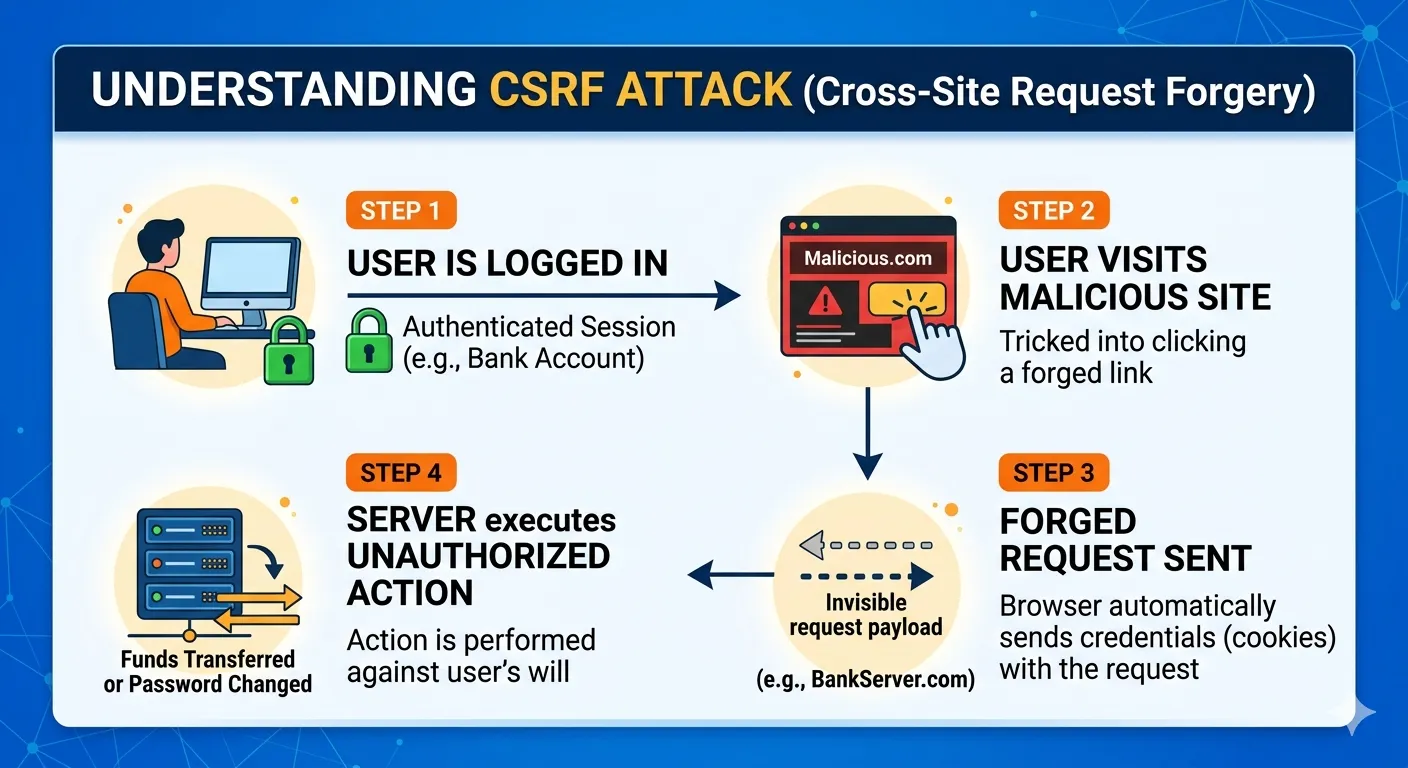
A simplified CSRF attack flow looks like this:
Victim logs in → Session remains active → Victim visits malicious page → Browser sends authenticated request → Vulnerable server accepts request
The attacker does not necessarily need to know the victim's password.
What Does CSRF Mean?
CSRF stands for:
Cross-Site Request Forgery
It is sometimes also called:
-
XSRF
-
Session Riding
-
One-Click Attack
CSRF primarily targets the trust that a web application places in requests coming from an authenticated browser.
CSRF Attack Example
Consider a website that allows users to change their email address through a request such as:
POST /account/change-email
A vulnerable application might only check whether the user has a valid session.
If the application does not verify that the request was intentionally generated by the legitimate website, an attacker may attempt to cause the victim's browser to submit the request.
The important security problem is not that the browser sends the session cookie. Browsers are designed to send applicable cookies automatically.
The problem is that the server may accept a state-changing request without verifying its origin or including another anti-CSRF mechanism.
How CSRF Attacks Work
A typical CSRF attack involves several steps.
Step 1: The User Logs In
The victim authenticates with a website.
The server creates an authenticated session.
For example:
User → Login → Server → Authenticated Session
Step 2: The Session Remains Active
The user does not log out.
The browser continues to hold the authentication cookie.
Step 3: The User Visits Another Website
The victim visits an attacker-controlled or compromised website.
The malicious website attempts to cause a request to be sent to the target application.
Step 4: The Browser Sends the Request
Depending on the browser's cookie policies and request type, authentication credentials such as applicable cookies may accompany the request.
Step 5: The Vulnerable Server Processes the Request
If the application only checks authentication and does not use an appropriate CSRF defense, it may incorrectly treat the request as legitimate.
This can result in an unwanted state-changing action.
CSRF Attack Example: Changing Account Information
Imagine a vulnerable account-management application with an endpoint that changes a user's email address.
A legitimate request might conceptually look like:
POST /account/change-email
email=new@example.com
A properly protected application should verify more than simply whether the user is logged in.
It should also verify that the request contains the required anti-CSRF protection and is consistent with the application's security policy.
If an application accepts sensitive state-changing requests without such protection, it may be vulnerable to CSRF.
CSRF Attack Example: Changing a Password
Password changes are particularly sensitive.
A secure password-change workflow should normally require:
-
Authentication
-
CSRF protection
-
Current password or re-authentication where appropriate
-
Strong password requirements
-
Secure session handling
CSRF protection should be considered part of a broader authentication and account-security strategy.
CSRF Attack Example: Changing an Address
An application may allow users to update:
-
Home address
-
Phone number
-
Email address
-
Profile information
-
Notification preferences
These actions modify account data and should therefore use appropriate request protection.
CSRF Attack Example: Creating an Administrator Account
Administrative functionality requires especially strong protection.
If an application allows privileged users to create accounts or change permissions, those actions should use:
-
CSRF protection
-
Strong authentication
-
Authorization checks
-
MFA where appropriate
-
Audit logging
-
Re-authentication for highly sensitive operations
CSRF protection alone is not a replacement for authorization.
How CSRF Attacks Work in Modern Web Applications
Modern applications may use:
-
Traditional server-rendered forms
-
AJAX requests
-
REST APIs
-
Single-page applications
-
Session cookies
-
Authentication tokens
CSRF risk depends heavily on how authentication and browser credentials are implemented.
Applications using cookie-based authentication should pay particular attention to CSRF defenses.
CSRF Prevention
The best CSRF defense depends on the application's architecture.
Common protections include:
-
CSRF tokens
-
SameSite cookies
-
Origin validation
-
Referer validation where appropriate
-
Re-authentication for sensitive actions
-
Proper authentication architecture
-
Avoiding state-changing GET requests
A layered approach is stronger than relying on a single control.
CSRF Token
A CSRF token is a unique, unpredictable value associated with a user's session or request context.
The application requires the token to be included with a state-changing request.
An attacker generally cannot obtain the legitimate token simply by causing the victim's browser to submit a request from another origin.
A simplified form might look like:
<form method="POST">
    <input type="hidden" name="csrf_token" value="RANDOM_TOKEN">
    <input type="email" name="email">
    <button type="submit">Update Email</button>
</form>
The server validates the token before processing the request.
CSRF Token Example
A secure request conceptually looks like:
POST /account/change-email

email=user@example.com
csrf_token=VALID_RANDOM_TOKEN
The server checks:
-
Is the user authenticated?
-
Is the CSRF token present?
-
Is the token valid?
-
Is the token associated with the appropriate session or request?
-
Is the user authorized to perform the action?
Only after these checks succeed should the application perform the state-changing operation.
CSRF Token Example in PHP
A simplified example can demonstrate the concept.
<?php

session_start();

if (empty($_SESSION['csrf_token'])) {
    $_SESSION['csrf_token'] = bin2hex(random_bytes(32));
}

$csrfToken = $_SESSION['csrf_token'];
?>

<form method="POST">
    <input
        type="hidden"
        name="csrf_token"
        value="<?= htmlspecialchars($csrfToken, ENT_QUOTES, 'UTF-8') ?>"
    >

    <input type="email" name="email" required>

    <button type="submit">Update Email</button>
</form>
On the server, the submitted token should be compared against the expected session token using a safe comparison.
For example:
if (
    empty($_POST['csrf_token']) ||
    empty($_SESSION['csrf_token']) ||
    !hash_equals($_SESSION['csrf_token'], $_POST['csrf_token'])
) {
    http_response_code(403);
    exit('Invalid CSRF token.');
}
This is a simplified educational example. Production applications should also implement appropriate session, authentication, authorization, validation, and error-handling controls.
CSRF Protection in CodeIgniter 4
CodeIgniter 4 provides built-in CSRF protection.
Developers should configure CSRF protection according to the application's requirements rather than creating an unnecessary custom implementation.
For forms, CodeIgniter can generate a CSRF hidden field using:
<?= csrf_field() ?>
A form can therefore include:
<form method="post">

    <?= csrf_field() ?>

    <input
        type="email"
        name="email"
        required
    >

    <button type="submit">
        Update Email
    </button>

</form>
The framework can validate the CSRF token when CSRF protection is enabled and configured correctly.
For AJAX requests, the CSRF token must also be handled according to the application's CodeIgniter configuration and request flow.
CSRF Protection in Laravel
Laravel also provides built-in CSRF protection for applicable web routes.
A Blade form can include:
<form method="POST">

    @csrf

    <input
        type="email"
        name="email"
        required
    >

    <button type="submit">
        Update Email
    </button>

</form>
Laravel then validates the submitted token for protected requests.
SameSite Cookies and CSRF Protection
Modern browsers provide the SameSite cookie attribute as an additional defense against certain cross-site request scenarios.
Common SameSite settings include:
-
Strict
-
Lax
-
None
For example:
SameSite=Lax
can reduce some cross-site cookie transmission.
However, cookie configuration should be chosen based on application requirements.
SameSite cookies are an important additional defense, but applications should not blindly assume that cookie settings alone solve every CSRF problem.
Origin Header Validation
Applications can inspect request headers such as:
Origin
to determine where a request originated.
For sensitive operations, validating the expected origin can provide an additional layer of protection.
For example, an application may only accept requests originating from its trusted domain.
Origin validation should be implemented carefully because legitimate application architectures can involve multiple domains, subdomains, proxies, or APIs.
Referer Header Validation
The Referer header can sometimes provide information about the page that initiated a request.
Applications may use it as an additional signal for CSRF protection.
However, the Referer header may be absent or modified depending on browser and privacy policies.
For this reason, it should generally not be treated as the only CSRF defense.
Avoid State-Changing GET Requests
One useful security principle is:
GET requests should generally retrieve information rather than change server-side state.
Avoid designs such as:
GET /delete-account
or:
GET /change-password
Sensitive state-changing operations should generally use appropriate methods such as POST, PUT, PATCH, or DELETE together with suitable authentication and CSRF protections.
Changing the HTTP method alone does not prevent CSRF, but avoiding state-changing GET requests reduces unnecessary risk.
CSRF vs XSS
CSRF and XSS are different vulnerabilities, although they can sometimes interact.
| CSRF | XSS |
|---|---|
| Tricks a victim's browser into sending an unwanted request | Injects or executes untrusted script in a user's browser |
| Primarily abuses trust in authenticated requests | Primarily abuses trust in content/code rendered by the browser |
| Often depends on authentication cookies or browser credentials | Often depends on unsafe input/output handling |
| CSRF tokens can provide strong protection | Output encoding and CSP help prevent XSS |
| SameSite cookies can reduce some CSRF risk | HttpOnly cookies can reduce some cookie-theft impact |
Simple Difference
CSRF makes the browser perform an unwanted action.
XSS makes the browser execute attacker-controlled script.
A website can have both vulnerabilities, so they should be treated separately.
Can XSS Bypass CSRF Protection?
Potentially, yes.
If an attacker can execute JavaScript within the trusted origin because of an XSS vulnerability, the attacker may be able to interact with the application in ways that undermine some CSRF defenses.
This is why CSRF protection should not be considered a replacement for XSS prevention.
Web applications need protection against both classes of vulnerabilities.
CSRF vs XSS vs SQL Injection
These three vulnerabilities target different parts of a web application.
CSRF
Targets the application's trust in authenticated browser requests.
XSS
Targets the browser through unsafe content or script execution.
SQL Injection
Targets database queries through unsafe handling of untrusted input.
All three require different prevention strategies.
How to Detect CSRF Vulnerabilities
Authorized security testing can review whether state-changing requests require appropriate CSRF protection.
Check:
-
Forms
-
AJAX requests
-
Account settings
-
Password changes
-
Email changes
-
Payment-related actions
-
Administrative functions
-
User-management functions
-
API endpoints using cookie-based authentication
A security review should determine whether sensitive requests can be accepted without the required anti-CSRF mechanism.
CSRF Testing Checklist
When testing your own application, review:
-
State-changing requests use appropriate HTTP methods
-
CSRF tokens are required where applicable
-
Tokens are unpredictable
-
Tokens are validated server-side
-
Invalid tokens are rejected
-
Missing tokens are rejected
-
Tokens are appropriately associated with sessions or requests
-
Sensitive forms are protected
-
AJAX requests are protected
-
Administrative actions are protected
-
SameSite cookie settings are reviewed
-
Origin validation is considered for sensitive operations
-
Sensitive GET requests are avoided
-
Re-authentication is used where appropriate
-
XSS vulnerabilities are addressed separately
Common CSRF Mistakes
Mistake 1: Checking Only Authentication
A valid login session does not prove that a particular state-changing request was intentionally initiated by the user.
Mistake 2: Using Predictable Tokens
CSRF tokens should be generated using a cryptographically secure mechanism.
Mistake 3: Validating Tokens Only in JavaScript
Security validation must happen on the server.
Client-side checks can improve user experience but cannot be trusted as the primary security control.
Mistake 4: Protecting Forms but Not AJAX Requests
Applications often protect traditional forms but forget that AJAX endpoints may also change application state.
Mistake 5: Using GET for Sensitive Actions
State-changing operations should not unnecessarily be exposed through GET requests.
Mistake 6: Assuming HTTPS Prevents CSRF
HTTPS protects communication between the browser and server.
It does not automatically prevent a malicious website from causing a browser to send an unwanted request to another website.
Is CSRF Still Relevant?
Yes.
Modern browsers have introduced stronger cookie protections, and many frameworks provide built-in CSRF defenses.
However, CSRF remains relevant, particularly for applications that:
-
Use cookie-based authentication
-
Modify server-side state
-
Process sensitive account actions
-
Support complex browser workflows
-
Have custom authentication systems
-
Use legacy application architecture
Security controls should be based on the application's actual architecture.
CSRF Protection Best Practices
For most web applications, a strong CSRF defense strategy includes:
-
Use framework-provided CSRF protection where available.
-
Protect state-changing requests.
-
Use unpredictable CSRF tokens.
-
Validate tokens on the server.
-
Configure SameSite cookies appropriately.
-
Use HTTPS everywhere.
-
Avoid state-changing GET requests.
-
Validate authorization separately.
-
Protect AJAX and API workflows appropriately.
-
Re-authenticate users for highly sensitive actions.
-
Prevent XSS vulnerabilities.
-
Test security controls after application changes.
CSRF Security for APIs
CSRF considerations depend on how an API authenticates clients.
APIs using cookies for authentication may require CSRF protection because browsers can automatically attach those cookies under applicable conditions.
APIs using an authorization mechanism that requires the client to explicitly provide a credential, rather than relying on ambient browser cookies, have different CSRF characteristics.
Therefore, developers should evaluate CSRF risk based on the authentication architecture rather than assuming every API requires exactly the same protection.
CSRF Security for Single-Page Applications
Single-page applications often communicate with backend APIs using JavaScript.
Security depends on:
-
Authentication method
-
Cookie configuration
-
API architecture
-
CSRF token strategy
-
CORS configuration
-
Authorization controls
Developers should not assume that using React, Vue, Angular, or another frontend framework automatically eliminates CSRF risk.
CSRF and CORS
CSRF and CORS are related to browser security but solve different problems.
CSRF protection helps prevent unwanted authenticated state-changing requests.
CORS controls whether browser-based JavaScript is allowed to read responses from another origin.
Allowing or denying CORS does not automatically replace CSRF protection.
CSRF Incident Response
If you discover a potential CSRF vulnerability:
-
Identify affected endpoints.
-
Determine which users or roles are affected.
-
Add appropriate server-side protection.
-
Review authentication and session configuration.
-
Check related endpoints.
-
Review logs for suspicious activity.
-
Deploy the fix.
-
Retest the affected functionality.
-
Monitor the application after deployment.
For sensitive systems, involve the appropriate security or incident-response team.
Frequently Asked Questions
What is a CSRF attack?
A CSRF attack attempts to trick an authenticated user's browser into sending an unwanted request to a vulnerable website.
What is a CSRF attack example?
A common example is an attacker attempting to cause a logged-in user's browser to submit an unwanted account-change request to a vulnerable website.
How does a CSRF attack work?
The victim logs into a website, remains authenticated, visits another page, and the malicious page attempts to cause a request to the target application. If the application lacks suitable CSRF defenses, the request may be processed.
How do I prevent CSRF attacks?
Use CSRF tokens, appropriate SameSite cookie settings, origin validation where suitable, secure authentication, HTTPS, and server-side request validation.
What is a CSRF token?
A CSRF token is an unpredictable value that the server expects in protected state-changing requests. The server validates the token before processing the request.
Is CSRF the same as XSS?
No. CSRF tricks an authenticated browser into making an unwanted request, while XSS involves executing attacker-controlled script in the victim's browser.
Does HTTPS prevent CSRF?
No. HTTPS encrypts communication but does not by itself prevent CSRF attacks.
Does SameSite prevent CSRF?
SameSite cookies can reduce certain CSRF risks, but applications should choose an appropriate defense strategy based on their authentication architecture.
Does CodeIgniter 4 support CSRF protection?
Yes. CodeIgniter 4 includes built-in CSRF protection that developers can enable and configure for their application.
Does Laravel support CSRF protection?
Yes. Laravel includes built-in CSRF protection for applicable web routes and forms.
Can CSRF happen without JavaScript?
Yes. CSRF does not inherently require JavaScript. Different types of browser requests can potentially be abused depending on the application's behavior and browser policies.
Can XSS bypass CSRF protection?
An XSS vulnerability in the trusted origin can potentially undermine some CSRF protections because attacker-controlled script may interact with the application from the trusted origin. Therefore, XSS and CSRF must both be addressed.
Final Thoughts
CSRF is an important web security vulnerability that developers should understand when building applications that rely on browser-based authentication.
The core problem is simple: an application may trust an authenticated request without sufficiently verifying that the request was intentionally initiated by the user.
Fortunately, modern frameworks provide strong security features that make CSRF protection easier to implement.
Using framework-provided CSRF protection, secure session management, appropriate SameSite cookie settings, HTTPS, server-side validation, proper authorization, and secure application architecture can significantly reduce CSRF risk.
Developers should also test sensitive forms, AJAX endpoints, account-management functions, administrative actions, and other state-changing operations regularly.
Most importantly, CSRF protection should be part of a broader security strategy. It works alongside XSS prevention, secure authentication, access control, input validation, secure cookies, logging, monitoring, and regular security testing.
A secure web application does not simply authenticate users—it also verifies that sensitive actions are legitimate, authorized, and intentionally requested.
Your email address will not be published. Comments are moderated.
0 Comments on This Post
Leave a Reply
Comments (0)
Spread the Word!
Join Our Developer Community!
Get weekly coding tips, tool updates, and exclusive tutorials straight to your inbox.
Request a Tool
×