Free Tools to Convert Your Images to Black & White or Sepia in Seconds
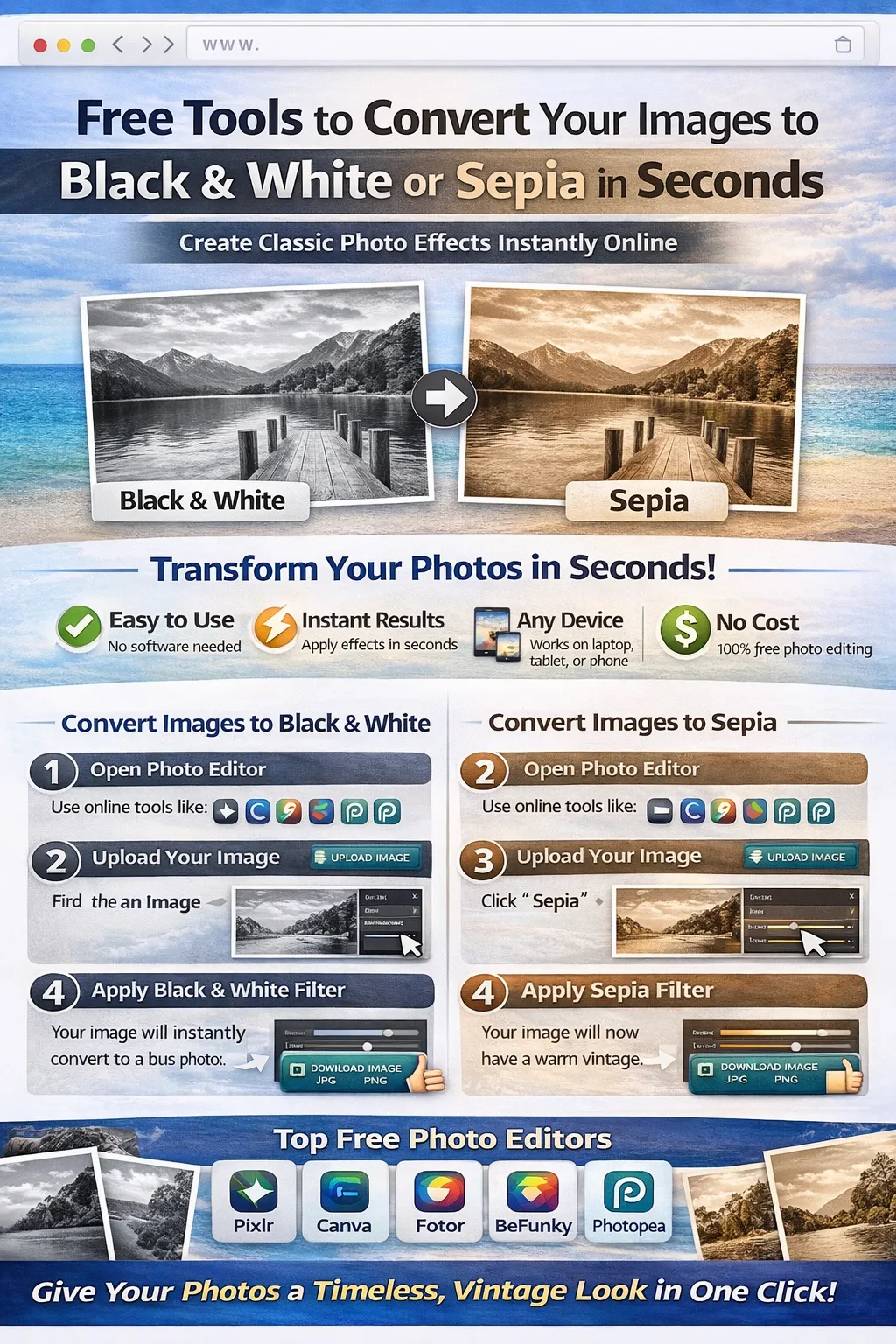
Photo editing allows us to transform ordinary images into visually appealing works of art. Among the most popular photo effects are black & white and sepia filters, which give images a timeless, classic appearance. These effects are commonly used in photography, social media posts, vintage designs, and artistic projects.
In the past, applying such effects required professional editing software. Today, thanks to modern web technology, you can easily convert your images to black & white or sepia using free online tools. These tools work directly in your browser and require no downloads or installations.
In this guide, you will learn how to convert photos to black & white or sepia quickly using the best free online image editors.
What is a Black & White Photo Effect?
A black & white effect removes all colors from an image and displays it in shades of gray. This effect highlights contrast, lighting, and composition, making the photo appear dramatic and artistic.
Black & white photography is often used for:
-
Portrait photography
-
Artistic photography
-
Vintage-style designs
-
Professional photo presentations
-
Social media aesthetics
This style emphasizes the structure and texture of the image rather than color.
What is a Sepia Photo Effect?
Sepia is a warm brown-toned filter that gives photos an antique or vintage appearance. It mimics the look of old photographs printed in the early days of photography.
Sepia effects are popular for:
-
Vintage photography styles
-
Historical themes
-
Wedding photography edits
-
Creative social media posts
-
Artistic photo projects
Sepia tones create a nostalgic mood and timeless feel.
Why Convert Photos to Black & White or Sepia?
Applying these effects can improve the visual impact of your images in several ways.
Create a Classic Look
Black & white and sepia effects give photos a timeless style.
Focus on Composition
Removing colors highlights shapes, shadows, and textures.
Improve Emotional Impact
Monochrome photos often evoke stronger emotional responses.
Perfect for Creative Projects
These effects are widely used in graphic design, posters, and artistic edits.
Step-by-Step Guide to Convert Images to Black & White Online
Follow these simple steps to apply a black & white effect using online tools.
Step 1: Choose an Online Image Editor
First, open a free online photo editing tool.
Popular tools include:
-
Pixlr
-
Canva
-
Fotor
-
BeFunky
-
Photopea
These tools provide filters that convert images to black & white instantly.
Step 2: Upload Your Image
Once you open the editor:
-
Click Upload Image
-
Select the image from your device
-
Wait for the image to load in the editor workspace
Most editors support formats like JPG, PNG, and WebP.
Step 3: Apply the Black & White Filter
Now convert the image.
Steps:
-
Open the Filters or Effects section
-
Find the Black & White or Grayscale filter
-
Apply the effect
The image will instantly convert to a monochrome version.
Step 4: Adjust Contrast and Brightness
To improve the result:
-
Increase contrast for dramatic lighting
-
Adjust brightness to balance shadows
These adjustments help create a professional black & white look.
Step 5: Download the Edited Image
After finishing your edits:
-
Click Download
-
Select JPG or PNG format
-
Save the image to your device
Your black & white photo is now ready.
Step-by-Step Guide to Convert Images to Sepia
Applying a sepia effect is just as simple.
Step 1: Upload Your Image
Open your chosen editor and upload the image you want to edit.
Step 2: Apply the Sepia Filter
Steps:
-
Open the Filters section
-
Choose the Sepia effect
-
Adjust the intensity if available
Your image will now have a warm vintage tone.
Step 3: Fine-Tune the Effect
To enhance the sepia look:
-
Slightly increase contrast
-
Reduce saturation
-
Adjust highlights and shadows
These changes help achieve a more authentic vintage appearance.
Step 4: Export the Final Image
Click Download and save the edited image to your device.
Best Free Tools to Convert Images to Black & White or Sepia
Here are some of the best online tools available.
Pixlr
Pixlr is a powerful browser-based image editor.
Features:
-
Black & white filters
-
Sepia effect
-
Brightness and contrast adjustments
-
Fast editing interface
Pixlr is great for quick edits and beginners.
Canva Photo Editor
Canva provides a simple editing interface.
Features:
-
Black & white filters
-
Vintage sepia effects
-
Easy drag-and-drop editing
-
Social media design templates
Perfect for content creators.
Fotor
Fotor is known for its one-click photo enhancements.
Features:
-
Vintage photo filters
-
Sepia effects
-
AI photo enhancement
Good for fast and automatic editing.
BeFunky
BeFunky offers creative photo editing features.
Features:
-
Artistic black & white filters
-
Sepia and vintage effects
-
Photo retouching tools
Ideal for creative designs.
Photopea
Photopea is a professional-level browser editor.
Features:
-
Advanced color adjustments
-
Layer editing
-
Professional filters
Great for experienced users.
Tips for Creating Better Black & White Photos
Follow these tips for professional results.
Use High-Contrast Images
Images with strong light and shadow work best in black & white.
Adjust Highlights and Shadows
Fine-tuning lighting improves the visual impact.
Avoid Over-Editing
Subtle effects usually look more natural.
Experiment with Filters
Different filters can produce unique artistic styles.
Benefits of Using Online Photo Editors
Online editors offer several advantages.
Fast Editing
Apply effects in seconds.
No Software Installation
Everything works directly in your browser.
Works on Any Device
Edit images on laptops, tablets, or smartphones.
Free Tools Available
Many powerful features are available at no cost.
Conclusion
Black & white and sepia effects are timeless photo editing techniques that can dramatically improve the visual appeal of images. With free online tools like Pixlr, Canva, Fotor, BeFunky, and Photopea, you can easily convert your photos to classic monochrome or vintage sepia styles within seconds.
These browser-based editors allow anyone to enhance photos without installing software or learning complicated editing techniques. Whether you are working on creative photography, social media content, or website visuals, these tools provide a quick and effective solution.
Start experimenting with black & white and sepia effects today and give your photos a stunning classic look.
Your email address will not be published. Comments are moderated.
0 Comments on This Post
Leave a Reply
Comments (0)
Spread the Word!
Join Our Developer Community!
Get weekly coding tips, tool updates, and exclusive tutorials straight to your inbox.
Request a Tool
×