How Web Hosting Works: Shared vs VPS vs Cloud Hosting Explained (Beginner Guide)
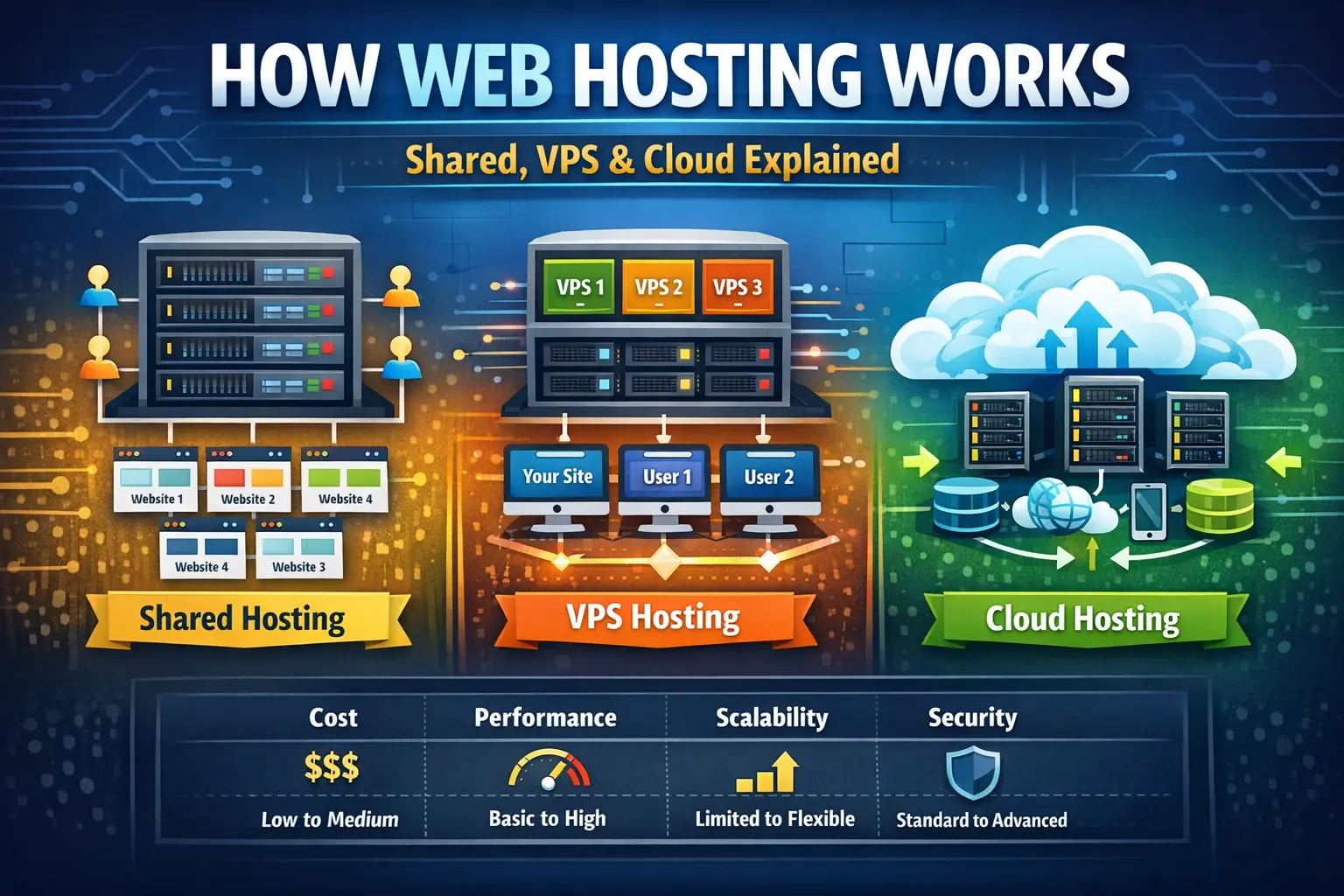
What Is Web Hosting? Complete Guide to Web Hosting, How It Works, Types, Costs, Security & How to Choose the Right Hosting in 2026
Every website you visit on the internet needs somewhere to live.
Whether you are reading a personal blog, shopping from an online store, using a SaaS application, checking a company website, viewing a portfolio, or accessing a web-based tool, the website's files and application data must be stored on computers that are connected to the internet.
Those computers are generally called servers, and the service that allows individuals and businesses to store their websites on those servers and make them available online is called web hosting.
At first, web hosting can sound complicated.
You may come across terms such as:
-
Server
-
Domain name
-
DNS
-
IP address
-
Bandwidth
-
Storage
-
CPU
-
RAM
-
SSL
-
CDN
-
VPS
-
Cloud hosting
-
Dedicated server
-
Managed hosting
-
Uptime
-
Data center
For someone building their first website, all of these terms can feel overwhelming.
But the basic concept is surprisingly simple:
Web hosting is the service that provides a place for your website to live and makes it accessible to people on the internet.
Your website's HTML files, CSS, JavaScript, images, databases, videos, application code, and other resources need to be stored somewhere. A web hosting provider supplies the infrastructure required to store those resources, process visitors' requests, and deliver your website to browsers around the world.
In this complete guide, we will explain web hosting from the ground up.
You will learn:
-
What web hosting is
-
How web hosting works
-
What happens when someone visits a website
-
The difference between a domain name and hosting
-
What a web server is
-
What DNS does
-
What bandwidth and storage mean
-
What CPU and RAM mean for websites
-
Different types of web hosting
-
Shared hosting vs VPS vs cloud hosting
-
Dedicated server hosting
-
Managed hosting
-
WordPress hosting
-
Reseller hosting
-
How hosting affects website speed
-
How hosting affects security
-
How hosting affects SEO
-
How much web hosting costs
-
What uptime really means
-
How SSL and HTTPS work
-
How CDNs improve website delivery
-
How to choose hosting for a new website
-
When you should upgrade your hosting
-
Common hosting mistakes and myths
-
Frequently asked questions about web hosting
By the end, you should have a clear understanding of hosting and be able to choose an appropriate hosting environment for your website, regardless of where you are located.
🏠 What Is Web Hosting?
Web hosting is a service that provides server resources for storing and delivering a website or web application over the internet.
When you create a website, you have files and data that need to be available whenever someone visits your domain.
Depending on the type of website, these resources may include:
-
HTML files
-
CSS files
-
JavaScript files
-
PHP files
-
Node.js applications
-
Images
-
Videos
-
Fonts
-
Documents
-
Databases
-
APIs
-
Configuration files
-
User-generated content
A hosting provider operates servers and related infrastructure that keep these resources available online.
When a visitor requests your website, the hosting environment processes that request and sends the appropriate resources back to the visitor's browser.
A Simple Example
Imagine you build a small business website.
You have:
index.html
style.css
script.js
logo.png
products.jpg
contact.php
database
These files exist on your computer while you are developing the website.
But your personal computer is not normally configured to serve your website reliably to visitors 24 hours a day.
You therefore upload the website to a hosting server.
The hosting server remains connected to the internet and responds when someone visits your website.
That is the fundamental purpose of web hosting.
🏠 Web Hosting Analogy: Think of the Internet Like a City
One of the easiest ways to understand hosting is to compare a website to a physical location.
Think of the internet as a huge city.
Your domain name is like your street address.
Your hosting account or server is like the building located at that address.
Your website files are the contents inside the building.
Your web browser is the visitor trying to reach the building.
For example:
Domain:
example.com
Hosting:
The server where the website files are stored.
Browser:
Chrome, Edge, Firefox, Safari, or another browser.
When someone enters your domain, the internet infrastructure figures out where the server is located and retrieves the website's content.
This is why a domain and hosting are related but not the same thing.
🌐 Domain Name vs Web Hosting
One of the most common mistakes beginners make is thinking that buying a domain automatically creates a website.
It does not.
A domain name and web hosting perform different jobs.
Domain Name
A domain is the human-readable address people use to access your website.
Examples include:
-
example.com
-
mybusiness.co.uk
-
startup.ca
-
website.au
-
company.in
Web Hosting
Hosting provides the server environment where your website's files and application are stored and processed.
Simple Comparison
| Website Component | Simple Explanation |
|---|---|
| Domain | Your website's address |
| Hosting | The place where your website lives |
| DNS | Connects the domain to the correct server |
| Server | Computer that stores/processes website resources |
| Browser | Software visitors use to access your website |
| SSL | Encrypts communication between browser and website |
| CDN | Helps deliver content faster from nearby locations |
You can purchase a domain from one company and hosting from another.
You can also purchase both from the same provider.
They do not have to be from the same company.
⚙️ How Does Web Hosting Work?
When you type a website address into your browser, the process may appear instantaneous.
Behind the scenes, however, several systems work together.
Let's simplify the process.
Step 1: You Enter a Domain Name
Suppose you enter:
https://example.com
into your browser.
The browser needs to determine where example.com is hosted.
Step 2: DNS Resolution Happens
The browser uses the Domain Name System, commonly called DNS.
DNS translates a domain name into information that helps the browser locate the appropriate server.
A simplified example might look like:
example.com
      ↓
DNS
      ↓
203.0.113.10
The actual process can involve DNS caches, recursive resolvers, authoritative name servers, and several other components.
The important idea is:
DNS helps connect a human-friendly domain name with internet infrastructure.
🖥️ Step 3: The Browser Connects to the Server
Once the destination is determined, the browser establishes a connection with the appropriate server.
For HTTPS websites, secure communication is established using TLS encryption.
The browser then sends a request.
For example:
GET /
This essentially tells the server that the browser wants the website's requested resource.
⚙️ Step 4: The Server Processes the Request
The server determines what it needs to return.
For a simple static website, this might involve:
-
HTML
-
CSS
-
JavaScript
-
Images
For a dynamic website, the process may be more complicated.
A PHP application might execute server-side code.
A Node.js application might run JavaScript on the server.
A content management system might query a database.
An eCommerce platform might retrieve product information, prices, inventory, customer information, and other data.
📦 Step 5: The Server Sends the Response
After processing the request, the server sends a response back to the browser.
The browser then downloads the required resources and constructs the webpage.
This can happen extremely quickly.
Modern websites may also use:
-
Browser caching
-
Server caching
-
CDN caching
-
Compression
-
HTTP/2
-
HTTP/3
-
Optimized images
-
Database caching
-
Edge delivery
to reduce loading time.
🌍 Step 6: The Website Appears in the Browser
Finally, the visitor sees the website.
From the visitor's perspective, they simply entered a URL and the page appeared.
Behind that simple action is an entire ecosystem of DNS, networking, servers, databases, security systems, and content delivery infrastructure.
🧱 What Is a Web Server?
A web server is a computer system or software environment designed to receive HTTP/HTTPS requests and deliver web content.
Popular web server software includes:
-
Apache
-
Nginx
-
LiteSpeed
-
Microsoft IIS
A hosting provider may use one or more of these technologies.
A server can be a physical machine or a virtualized environment running on physical infrastructure.
💾 What Is Stored on a Hosting Server?
The exact resources depend on your website.
A basic static website may contain:
HTML
CSS
JavaScript
Images
Fonts
A PHP website may contain:
PHP files
HTML
CSS
JavaScript
Database
Uploads
Configuration files
A modern application could also require:
Node.js
APIs
Redis
Database servers
Background workers
Queues
Object storage
Containers
This is one reason hosting requirements vary significantly between websites.
A small portfolio website and a global SaaS platform should not necessarily use the same hosting architecture.
🚀 Why Is Web Hosting Important?
Hosting is much more than simply storing website files.
The quality and configuration of your hosting environment can influence performance, reliability, security, scalability, and operational complexity.
1. Website Speed
Hosting infrastructure can affect how quickly your server responds to requests.
Fast storage, sufficient CPU resources, optimized software, good networking, caching, and a suitable geographic location can all contribute to better performance.
A slow server can increase waiting time for visitors.
2. Reliability
Your website needs to remain accessible.
If the server frequently becomes unavailable, visitors may see errors instead of your website.
For businesses, downtime can mean:
-
Lost sales
-
Lost leads
-
Reduced trust
-
Customer frustration
-
Missed opportunities
This is why uptime is an important hosting consideration.
3. Security
A responsible hosting environment should provide appropriate security features.
Depending on the provider and plan, these may include:
-
SSL/TLS support
-
Firewall protection
-
Malware scanning
-
Automated backups
-
Security updates
-
Account isolation
-
DDoS protection
-
Access controls
-
Monitoring
However, hosting security is only one layer.
Website owners must also keep applications, plugins, themes, frameworks, dependencies, and credentials secure.
4. Scalability
A website that receives 100 visitors per day has very different requirements from an application receiving hundreds of thousands of requests.
Good hosting architecture should allow you to increase resources as your needs change.
5. Website Availability
A website that is available consistently provides a better experience for visitors, customers, and search engine crawlers.
📊 Important Web Hosting Terms You Should Understand
Before choosing hosting, it helps to understand a few common specifications.
💾 Storage
Storage refers to how much data your hosting account can store.
For example:
-
Website files
-
Images
-
Videos
-
Databases
-
Backups
-
Logs
A simple blog may require relatively little storage.
A photography website or video-heavy website can require substantially more.
Important Tip
Do not choose hosting based only on the largest storage number advertised.
Storage type and performance can also matter.
For example, SSD or NVMe storage can provide much faster access than older storage technologies.
🧠 RAM
RAM is temporary memory used by applications and processes while they are running.
More RAM can help a server handle more simultaneous processes and larger workloads, depending on the application.
RAM becomes particularly important for:
-
Dynamic websites
-
Databases
-
CMS platforms
-
eCommerce applications
-
APIs
-
Development environments
⚡ CPU
CPU resources determine how much computational work a server can perform.
A website that performs complex calculations, image processing, database operations, or application logic may require more CPU resources than a simple static site.
🌐 Bandwidth
Bandwidth describes the amount of data that can be transferred between your website and visitors over a period of time.
For example, if your website serves large images to thousands of visitors, it can consume significant bandwidth.
Bandwidth requirements depend on:
-
Number of visitors
-
Page size
-
Images
-
Videos
-
Downloads
-
API traffic
-
File delivery
📈 Traffic
Traffic generally refers to the number of visitors or requests reaching your website.
Traffic itself is not the only factor.
Two websites with the same number of visitors can have dramatically different resource requirements.
For example:
Website A
A simple blog page containing:
-
Text
-
Small images
-
Minimal JavaScript
Website B
An interactive application containing:
-
Database queries
-
User accounts
-
Real-time updates
-
Large API responses
-
Image processing
Website B may require significantly more server resources despite having the same number of visitors.
⏱️ What Is Hosting Uptime?
Uptime represents the percentage of time a service is available.
Hosting companies often advertise uptime figures such as:
-
99%
-
99.9%
-
99.99%
-
99.999%
At first glance, the difference may appear small.
But even small percentages can represent meaningful downtime over long periods.
For example, 99.9% uptime allows roughly 8 hours and 46 minutes of downtime over a 365-day period.
99.99% is roughly 52 minutes.
99.999% is roughly 5 minutes.
These are mathematical availability targets, not guarantees that every provider will deliver exactly those numbers in real-world conditions.
🏢 Types of Web Hosting
There is no single hosting solution that is perfect for every website.
Different hosting models exist because websites have different requirements.
The major categories include:
-
Shared Hosting
-
VPS Hosting
-
Cloud Hosting
-
Dedicated Server Hosting
-
Managed Hosting
-
WordPress Hosting
-
Reseller Hosting
Let's examine them individually.
🏢 Shared Hosting
Shared hosting is one of the most common starting points for new websites.
Multiple websites use resources on the same physical server infrastructure.
The hosting provider generally handles much of the server administration.
This makes shared hosting attractive to beginners.
💡 Shared Hosting Analogy
Imagine an apartment building.
Many people live in the same building.
The building infrastructure is shared, but each person has their own living space.
Shared hosting works similarly.
Multiple websites use the same underlying server infrastructure.
👍 Advantages of Shared Hosting
Affordable
Shared hosting is usually among the least expensive hosting options.
Beginner Friendly
You generally do not need advanced server administration knowledge.
Easy Management
Many providers offer control panels and one-click installation tools.
Managed Infrastructure
The hosting company typically handles much of the underlying server maintenance.
⚠️ Disadvantages of Shared Hosting
Resource Limits
You share infrastructure with other websites.
Less Control
You usually cannot customize the server as freely as you can with a VPS or dedicated server.
Performance Variability
Depending on provider configuration and resource isolation, activity from other accounts can potentially affect overall server performance.
🎯 Who Should Use Shared Hosting?
Shared hosting can be a good choice for:
-
New blogs
-
Personal websites
-
Portfolios
-
Small business websites
-
Simple informational sites
-
Low-traffic projects
For many beginners, starting with shared hosting is perfectly reasonable.
🖥️ VPS Hosting
VPS means Virtual Private Server.
A physical server is divided into multiple isolated virtual environments using virtualization technology.
Each VPS can have its own operating system, allocated resources, software, and configuration.
🏢 VPS Hosting Analogy
Imagine an apartment building.
The physical building is shared.
But each apartment is separated into its own private space.
That is a useful simplified analogy for VPS hosting.
👍 Advantages of VPS Hosting
More Control
You can generally install and configure more software.
Better Resource Isolation
Resources are more isolated than in traditional shared hosting.
More Performance
A properly configured VPS can handle substantially more demanding workloads.
Flexible Software Stack
Developers can often choose their preferred server software and runtime environment.
⚠️ Disadvantages of VPS Hosting
Higher Cost
VPS hosting normally costs more than basic shared hosting.
Technical Knowledge
An unmanaged VPS can require knowledge of:
-
Linux
-
SSH
-
Firewalls
-
Web servers
-
Databases
-
Backups
-
Security
-
Server updates
Administration Responsibility
With unmanaged VPS hosting, you may be responsible for much of the server configuration and maintenance.
🎯 Who Should Use VPS Hosting?
VPS hosting can be suitable for:
-
Growing websites
-
Medium-sized businesses
-
Developers
-
APIs
-
SaaS applications
-
eCommerce websites
-
Custom applications
-
Websites that have outgrown shared hosting
☁️ Cloud Hosting
Cloud hosting uses distributed infrastructure rather than relying entirely on a single physical server.
Depending on the architecture, applications can use resources from multiple machines or services within a cloud environment.
Large cloud platforms can provide:
-
Virtual machines
-
Containers
-
Managed databases
-
Object storage
-
Load balancers
-
CDN services
-
Auto scaling
-
Monitoring
-
Serverless computing
Cloud hosting is therefore much broader than simply "a website running on multiple servers."
☁️ Cloud Hosting Analogy
Imagine a business that has access to an entire network of warehouses instead of relying on one building.
If demand increases, additional capacity can be added.
If one facility becomes unavailable, systems can potentially redirect workloads elsewhere.
That illustrates the basic idea behind distributed cloud infrastructure.
👍 Advantages of Cloud Hosting
Scalability
Resources can often be increased as demand grows.
High Availability
Distributed infrastructure can reduce dependence on a single machine.
Flexibility
Cloud platforms provide many services beyond basic hosting.
Global Infrastructure
Many cloud providers operate data centers in multiple geographic regions.
⚠️ Disadvantages of Cloud Hosting
Complexity
Cloud infrastructure can become significantly more complicated than shared hosting.
Variable Costs
Some cloud services charge according to usage.
Configuration Responsibility
Depending on the service, you may be responsible for security, monitoring, deployment, and architecture.
🎯 Who Should Use Cloud Hosting?
Cloud infrastructure is useful for:
-
High-traffic websites
-
SaaS products
-
Large eCommerce platforms
-
APIs
-
Startups
-
Enterprise applications
-
Global applications
-
Systems requiring high scalability
🖥️ Dedicated Server Hosting
A dedicated server provides an entire physical server to one customer or organization.
Unlike shared hosting or a VPS, the physical machine is not divided among multiple customers in the same way.
Advantages
-
High performance
-
Full server control
-
Large resource capacity
-
Strong customization
-
Suitable for demanding workloads
Disadvantages
-
Higher cost
-
Requires technical expertise
-
More administration
-
Scaling may require additional infrastructure
Dedicated servers can be useful for large applications, specialized workloads, databases, gaming infrastructure, enterprise applications, and organizations with specific compliance or performance requirements.
🛠️ Managed Hosting
Managed hosting means the provider takes responsibility for some or much of the technical administration.
The exact services differ between providers.
Managed services may include:
-
Server updates
-
Security configuration
-
Backups
-
Monitoring
-
Performance optimization
-
Technical support
-
Server administration
Managed hosting can be particularly useful when you want to focus on your website or business instead of managing servers.
📝 WordPress Hosting
WordPress hosting is hosting optimized specifically for WordPress websites.
It may include:
-
WordPress preinstallation
-
Automatic updates
-
WordPress-specific caching
-
Backups
-
Security features
-
Staging environments
-
WordPress support
WordPress hosting can be convenient for bloggers, publishers, agencies, and businesses using WordPress.
However, not every WordPress website needs a specialized WordPress hosting package.
🔄 Reseller Hosting
Reseller hosting allows an individual or business to purchase hosting resources and provide hosting services to their own customers.
It can be useful for:
-
Web design agencies
-
Freelancers
-
Hosting businesses
-
Digital agencies
For example, a web development agency might build websites for clients and provide hosting as part of a monthly package.
⚖️ Shared Hosting vs VPS vs Cloud vs Dedicated
Here is a simplified comparison:
| Feature | Shared | VPS | Cloud | Dedicated |
|---|---|---|---|---|
| Cost | Low | Medium | Variable | High |
| Control | Low | High | Very High | Very High |
| Scalability | Limited | Good | Excellent | Good |
| Technical Skill | Low | Medium/High | Medium/High | High |
| Performance | Basic | Strong | Strong/Excellent | Excellent |
| Best For | Beginners | Growing sites | Scalable apps | Heavy workloads |
The correct choice depends on the website rather than simply choosing the most powerful option.
🔐 How Hosting Affects Website Security
Security should be considered from multiple layers.
Your hosting provider can offer important infrastructure-level protections, but website security remains a shared responsibility.
Important security practices include:
Use HTTPS
HTTPS encrypts communication between visitors and your website.
Keep Software Updated
Outdated CMS software, frameworks, plugins, libraries, and server software can introduce vulnerabilities.
Use Strong Authentication
Use strong passwords and multi-factor authentication where available.
Maintain Backups
A backup can help recover your website after accidental deletion, corruption, or a security incident.
Restrict Server Access
Do not expose unnecessary services or administrative interfaces.
Use Firewalls
Firewalls can help filter unwanted traffic and protect server resources.
Monitor Logs
Server and application logs can reveal unusual activity.
🔒 What Is SSL/TLS?
SSL is commonly used as a general term, although modern secure web connections use TLS.
HTTPS uses TLS to encrypt communication between the browser and server.
When you see:
https://example.com
the connection is intended to be protected by TLS.
HTTPS helps protect sensitive information such as:
-
Login credentials
-
Payment information
-
Personal information
-
Form submissions
-
Session data
Modern websites should use HTTPS.
🌍 What Is a CDN?
CDN stands for Content Delivery Network.
A CDN uses geographically distributed servers, often called edge locations, to deliver cached content closer to users.
Imagine your primary server is located in North America.
A visitor in Europe may have to communicate across a long geographic distance.
With a CDN, cached assets such as:
-
Images
-
CSS
-
JavaScript
-
Fonts
-
Static files
can potentially be served from an edge location closer to the visitor.
This can improve performance for geographically distributed audiences.
🚀 Hosting and Website Speed
Website performance depends on many factors.
Hosting is important, but it is not the only factor.
Performance can also be affected by:
-
Website code
-
Images
-
JavaScript
-
CSS
-
Database queries
-
Third-party scripts
-
Plugins
-
Fonts
-
Caching
-
CDN configuration
-
Network latency
A powerful server cannot completely fix poorly optimized website code.
Likewise, highly optimized code can still perform poorly if the infrastructure is severely underpowered.
The best results come from optimizing the entire stack.
🔎 Does Web Hosting Affect SEO?
Hosting can indirectly influence SEO.
Search engines evaluate many aspects of a website, including user experience, accessibility, content quality, and performance.
Hosting can influence technical factors such as:
-
Server response time
-
Availability
-
HTTPS
-
Reliability
-
Performance
-
Geographic latency
However, hosting alone does not guarantee higher rankings.
A website with excellent hosting but poor content will not automatically outrank useful competitors.
For SEO, think about hosting as part of your technical foundation.
🌎 Choosing a Data Center Location
Many hosting providers allow customers to select a server region or data center.
The best location often depends on where your visitors are located.
For example:
Primarily United States Visitors
A North American data center may provide lower network latency.
Primarily European Visitors
A European region may be preferable.
Global Audience
A combination of:
-
Good origin infrastructure
-
CDN
-
Caching
-
Optimized assets
can provide better worldwide delivery.
Do not assume that your physical location automatically determines the best server location.
Choose based on your audience and application requirements.
💰 How Much Does Web Hosting Cost?
Hosting prices vary widely.
A basic website can sometimes be hosted for only a few dollars per month, while advanced infrastructure can cost hundreds or thousands of dollars monthly.
The final cost depends on:
-
Hosting type
-
CPU
-
RAM
-
Storage
-
Bandwidth
-
Traffic
-
Backups
-
Managed services
-
Database requirements
-
Geographic regions
-
Support
-
Security services
-
CDN usage
-
Additional infrastructure
Typical Hosting Progression
A new personal website may start with inexpensive shared hosting.
As traffic increases, the website may move to:
Shared Hosting
       ↓
VPS
       ↓
Managed VPS / Cloud
       ↓
Load Balanced Cloud Infrastructure
       ↓
Multi-Region / Enterprise Architecture
Not every website needs to follow this exact path.
Some websites remain on shared hosting for years.
Others move directly to cloud infrastructure.
The correct decision depends on workload and business requirements.
📈 When Should You Upgrade Hosting?
Do not upgrade simply because another hosting plan sounds more powerful.
Upgrade when your current infrastructure is genuinely becoming a limitation.
Warning signs include:
-
Frequent resource exhaustion
-
Slow server response
-
CPU consistently reaching limits
-
Memory shortages
-
Database performance problems
-
Frequent downtime
-
Traffic spikes causing errors
-
Hosting provider resource-limit warnings
-
Increasing application workload
Before upgrading, identify the actual bottleneck.
Sometimes the solution is:
-
Better caching
-
Image optimization
-
Database optimization
-
CDN
-
Code optimization
-
Removing unnecessary plugins
-
Query optimization
rather than buying a larger server.
🧑💻 Hosting for Developers
Developers often have different requirements from ordinary website owners.
A developer may need:
-
SSH access
-
Git
-
Custom PHP versions
-
Node.js
-
Python
-
Docker
-
Cron jobs
-
Redis
-
MySQL/PostgreSQL
-
Custom web server configuration
-
Environment variables
-
CI/CD
-
Staging environments
Shared hosting can be sufficient for basic PHP websites.
However, modern application development may require VPS or cloud infrastructure.
For example:
React Frontend
      ↓
Node.js API
      ↓
Database
      ↓
Redis Cache
      ↓
Object Storage
      ↓
CDN
A traditional shared hosting plan may not be suitable for this architecture.
🛒 Hosting for eCommerce Websites
Online stores have more demanding requirements because they may handle:
-
Product catalogs
-
Customer accounts
-
Shopping carts
-
Payments
-
Inventory
-
Orders
-
Databases
-
Transactional emails
-
Search
-
Analytics
Performance and reliability become particularly important.
For a small store, managed hosting or a well-configured VPS may be sufficient.
For a large international store, cloud infrastructure with caching, load balancing, monitoring, and scalable databases may be more appropriate.
📝 Hosting for Bloggers
Bloggers generally have simpler requirements.
A new blog may need:
-
PHP or another application runtime
-
Database
-
SSL
-
Backups
-
CDN
-
Caching
-
Reliable storage
Shared hosting can be a perfectly reasonable starting point.
As traffic grows, the website can be migrated to a stronger environment.
🏢 Hosting for Small Businesses
A small business website usually does not need an extremely expensive server.
The priorities should generally be:
-
Reliability
-
Security
-
Good performance
-
SSL
-
Backups
-
Support
-
Easy management
-
Room for moderate growth
For many small businesses, managed hosting is valuable because the owner can focus on running the business rather than administering servers.
🌍 Hosting for a Global Audience
If your audience is spread across multiple countries, hosting architecture becomes more important.
A global website might have visitors from:
-
United States
-
Canada
-
United Kingdom
-
Germany
-
France
-
Australia
-
India
-
Singapore
-
UAE
-
Japan
-
Brazil
-
South Africa
In this situation, consider:
CDN
Serve static assets from global edge locations.
Caching
Reduce repeated requests to your origin server.
Data Center Strategy
Choose infrastructure close to major user populations where practical.
Image Optimization
Use modern image formats and responsive image sizes.
Monitoring
Monitor performance from multiple geographic regions.
A single server can still serve a global website, but distributed delivery can significantly improve the experience for distant users.
🧠 Managed vs Unmanaged Hosting
This is an important distinction.
Managed Hosting
The provider handles a larger portion of server administration.
Good for people who want convenience.
Unmanaged Hosting
You receive infrastructure, but you are responsible for much more of the administration.
Good for experienced developers and system administrators.
Choose Managed Hosting If:
-
You are not comfortable managing Linux
-
You want technical support
-
You want less maintenance
-
Your time is more valuable than the cost difference
Choose Unmanaged Hosting If:
-
You know server administration
-
You need full control
-
You can manage security
-
You are comfortable with SSH and Linux
🧰 What Features Should You Look For in a Hosting Provider?
Do not choose a provider solely based on the cheapest promotional price.
Look at the complete offering.
1. Transparent Renewal Pricing
Some providers offer low introductory prices and significantly higher renewal prices.
Check both.
2. Backups
Determine:
-
How often backups are created
-
How long they are retained
-
Whether restoration is easy
-
Whether backups are stored separately
3. SSL
HTTPS should be straightforward to enable.
4. Support
Look at the support channels and response expectations.
5. Server Resources
Understand actual CPU, RAM, storage, and resource limits.
6. Data Center Locations
Choose locations appropriate for your audience.
7. Migration Support
If you already have a website, migration assistance can save time.
8. Control Panel
Beginners may prefer graphical control panels.
Developers may prefer SSH and command-line access.
9. Scalability
Check whether you can upgrade without rebuilding everything.
10. Security
Look for appropriate firewall, monitoring, isolation, and backup capabilities.
⚠️ Common Web Hosting Mistakes
Mistake 1: Choosing Only by Price
The cheapest plan may have limitations that become expensive later.
Mistake 2: Buying More Resources Than Needed
A new website usually does not need enterprise infrastructure.
Start according to your current workload.
Mistake 3: Ignoring Renewal Pricing
Always check what the plan costs after the promotional period.
Mistake 4: Ignoring Backups
Never assume that your hosting provider's backup system is a complete disaster-recovery strategy.
Maintain backups appropriate for the importance of your website.
Mistake 5: Ignoring Security Updates
Hosting cannot protect an outdated application from every possible vulnerability.
Keep your website software updated.
Mistake 6: Using a Server Far Away From Your Main Audience Without a Reason
Geographic distance can increase network latency.
Use a suitable region and CDN strategy.
Mistake 7: Treating Unlimited Resources Literally
"Unlimited" hosting plans normally still have acceptable-use policies and technical limitations.
Read the actual terms.
❌ Common Web Hosting Myths
Myth 1: Expensive Hosting Always Means Better Hosting
Not necessarily.
A small blog does not need the same infrastructure as a global SaaS platform.
Myth 2: Shared Hosting Is Always Bad
Not true.
A good shared hosting plan can be perfectly suitable for a small website.
Myth 3: VPS Is Always Faster
Not automatically.
A poorly configured VPS can perform worse than a well-optimized managed hosting environment.
Myth 4: Cloud Hosting Means Unlimited Resources
Cloud platforms are scalable, but resources still have technical and financial limits.
Myth 5: Hosting Alone Determines SEO
Hosting is one part of technical infrastructure.
Content quality, relevance, crawlability, user experience, internal linking, authority, and many other factors matter.
Myth 6: You Cannot Change Hosting Later
You can migrate websites between hosting providers.
Migration may require planning, but it is absolutely possible.
🔄 How to Move a Website to New Hosting
Website migration typically involves several steps.
Step 1: Purchase the New Hosting
Set up the new environment.
Step 2: Create the Website Environment
Install the required:
-
Web server
-
Runtime
-
Database
-
Applications
Step 3: Transfer Website Files
Move your website files to the new server.
Step 4: Transfer Database
Export and import the database if your application uses one.
Step 5: Test Before Switching DNS
Use a temporary URL, hosts-file testing, staging domain, or another safe method to verify the new environment.
Step 6: Update DNS
Point the domain toward the new hosting environment.
Step 7: Monitor
Check:
-
Pages
-
Forms
-
Login
-
Images
-
APIs
-
Database
-
HTTPS
-
Redirects
-
Email
-
Analytics
A careful migration can minimize downtime.
🛡️ Hosting and Backups
Backups are one of the most important parts of website management.
Imagine accidentally deleting:
-
Your database
-
Customer records
-
Product information
-
Website files
-
Configuration
-
Uploaded images
Without a backup, recovery can become extremely difficult.
A good backup strategy can include:
Website
   ↓
Automated Backup
   ↓
Separate Storage
   ↓
Multiple Restore Points
For critical websites, consider maintaining backups outside your primary hosting environment.
📊 How to Test Your Hosting Performance
You do not have to guess whether your hosting is performing well.
Useful measurements include:
-
Server response time
-
Time to First Byte
-
Page load time
-
Core Web Vitals
-
CPU usage
-
Memory usage
-
Database response time
-
Error rates
-
Uptime
You can use browser developer tools and reputable performance-testing services to identify bottlenecks.
Remember that performance tests can vary based on:
-
Location
-
Network
-
Cache state
-
Time of day
-
Server load
-
Test methodology
Use multiple measurements rather than relying on one score.
🔮 The Future of Web Hosting
Web hosting continues to evolve.
Traditional shared hosting is still useful, but modern applications increasingly use combinations of:
-
Cloud computing
-
Containers
-
Serverless functions
-
Edge computing
-
Managed databases
-
Object storage
-
CDNs
-
Automated deployment
-
Infrastructure as code
-
AI-assisted operations
Instead of thinking about hosting as simply "renting server space," modern web infrastructure is increasingly about assembling multiple services into a reliable application platform.
For example:
User
 ↓
CDN / Edge
 ↓
Load Balancer
 ↓
Application Servers
 ↓
Cache
 ↓
Database
 ↓
Object Storage
Large applications may add:
Monitoring
Logging
Queues
Workers
Search
Analytics
Backup Systems
Disaster Recovery
This architecture allows businesses to scale individual components rather than continually replacing one giant server.
🧭 How to Choose the Right Web Hosting: A Simple Decision Guide
If you are confused about which hosting type to choose, start with these questions.
Question 1: What Type of Website Are You Building?
Personal Blog
Shared hosting is often enough.
Portfolio
Shared or managed hosting may be enough.
Small Business
Shared or managed hosting can work well.
Growing eCommerce Website
Managed VPS or cloud hosting may be appropriate.
Custom SaaS Application
VPS or cloud infrastructure is usually more flexible.
High-Traffic Platform
Cloud or dedicated infrastructure may be appropriate depending on architecture.
Question 2: How Much Technical Knowledge Do You Have?
If you do not want to manage servers:
Choose managed hosting.
If you are comfortable with Linux and server administration:
A VPS or cloud environment gives you more control.
Question 3: Where Are Your Visitors?
Choose infrastructure based on your audience.
For a global audience, combine a suitable origin location with CDN and caching.
Question 4: How Fast Is Your Website Growing?
If traffic is currently low, do not over-engineer.
If growth is rapid, choose infrastructure that can be upgraded easily.
⭐ A Practical Hosting Selection Strategy
For most website owners, this approach works well:
Beginner
Start with:
Shared or managed hosting
Focus on:
-
Website quality
-
Content
-
Security
-
Backups
-
SEO
-
Audience growth
Growing Website
Move toward:
VPS or managed VPS
Focus on:
-
Performance
-
Database optimization
-
Caching
-
CDN
-
Monitoring
High-Traffic Application
Consider:
Cloud or dedicated infrastructure
Focus on:
-
Scalability
-
High availability
-
Load balancing
-
Automated deployments
-
Observability
-
Disaster recovery
Enterprise
Consider:
Distributed cloud architecture
Focus on:
-
Multi-region availability
-
Security
-
Compliance
-
Disaster recovery
-
Infrastructure automation
-
Cost optimization
🌎 Does Your Country Matter When Choosing Hosting?
Your country matters less than your audience.
For example, a website owner living in India might have most customers in the United States.
In that case, hosting decisions should consider the actual user base rather than simply choosing the nearest server to the website owner.
Similarly, a business located in Germany but serving customers across Europe may benefit from a European data center combined with CDN infrastructure.
The correct question is:
Where are my users, and what infrastructure gives them the best reliable experience?
💡 Should You Host a Website From Your Own Computer?
Technically, it is possible to run a web server from a personal computer.
But for most production websites, it is not recommended.
A production hosting environment needs:
-
Reliable internet
-
Static or appropriately configured networking
-
Security controls
-
Backups
-
Monitoring
-
Power reliability
-
Server maintenance
-
DDoS protection
-
Disaster recovery
Professional hosting providers are designed to provide this infrastructure at scale.
For learning and development, however, running a local server is extremely useful.
You can use environments such as:
-
Local PHP servers
-
XAMPP
-
Docker
-
Node.js development servers
-
Local virtual machines
These are excellent for development before deploying to production hosting.
🧑💻 Hosting vs Local Development
It is important to understand the difference.
Local Development
Your website runs on your own computer.
Example:
localhost:8000
Only you or devices on your local network may be able to access it.
Production Hosting
Your website is deployed to internet-connected infrastructure.
Example:
https://yourwebsite.com
Visitors from around the world can access it.
A common development workflow looks like:
Write Code
    ↓
Test Locally
    ↓
Version Control
    ↓
Staging
    ↓
Production Hosting
    ↓
Monitoring
📌 Final Checklist Before Buying Web Hosting
Before purchasing a hosting plan, ask yourself:
-
What type of website am I building?
-
How much traffic do I expect?
-
Where are my visitors located?
-
How much storage do I need?
-
Do I need databases?
-
Do I need PHP, Node.js, Python, or another runtime?
-
Do I need SSH access?
-
Do I need root access?
-
Do I need managed support?
-
Does the provider offer backups?
-
Does the provider support HTTPS?
-
What are the actual CPU and RAM limits?
-
What is the renewal price?
-
Can I upgrade later?
-
Can I migrate away easily?
-
Does the provider have suitable data centers?
-
What security features are included?
-
What happens if the server goes down?
Answering these questions will eliminate much of the confusion.
❓ Frequently Asked Questions About Web Hosting
What is web hosting in simple words?
Web hosting is a service that stores your website's files and provides the server infrastructure required to make your website accessible on the internet.
Is web hosting necessary for a website?
For a publicly accessible website, you need some form of internet-connected hosting infrastructure. A website can technically be served from infrastructure you operate yourself, but most websites use a professional hosting provider.
Is a domain name the same as hosting?
No.
A domain is the address people use to reach your website.
Hosting is the infrastructure where your website is stored and served.
Can I buy a domain without hosting?
Yes.
You can register a domain without immediately purchasing web hosting.
Can I buy hosting without a domain?
Yes.
You can purchase hosting first and connect a domain later.
Which hosting is best for beginners?
Shared hosting or managed hosting is often the easiest starting point for beginners.
Which hosting is best for developers?
Developers often prefer VPS or cloud environments because they provide greater control over software, server configuration, runtimes, databases, and deployment processes.
Is VPS better than shared hosting?
VPS hosting generally provides more control and resource isolation, but that does not mean it is automatically the best choice for every website.
A small website may have no reason to move to a VPS.
Is cloud hosting better than VPS?
It depends on the application.
Cloud platforms can provide powerful scalability and distributed infrastructure, while VPS hosting can be simpler and more predictable for many workloads.
How much hosting do I need?
It depends on your website.
A small blog may require very little.
A large eCommerce application or SaaS platform may require substantially more CPU, RAM, storage, database capacity, and network resources.
Does hosting affect website speed?
Yes, hosting can influence server response time and overall performance.
However, website code, images, caching, databases, CDN configuration, and third-party resources also matter.
Does hosting affect SEO?
Hosting can indirectly influence technical performance, availability, HTTPS, and server response times.
However, hosting by itself does not guarantee better search rankings.
Can I change hosting later?
Yes.
Websites can be migrated between hosting providers.
A migration should be carefully planned to minimize downtime and prevent data loss.
What is the difference between VPS and dedicated hosting?
A VPS is a virtualized environment running on shared physical infrastructure.
A dedicated server gives one customer an entire physical server.
Dedicated hosting generally provides more physical resources and control but also costs more.
What is managed hosting?
Managed hosting means the provider handles some or much of the technical server administration for you.
The exact services depend on the hosting provider.
What is the best hosting for a global website?
There is no universal answer.
For a global audience, consider:
-
Reliable origin infrastructure
-
Appropriate server region
-
CDN
-
Caching
-
Image optimization
-
Monitoring
-
Scalability
Is free hosting good for a real business?
Free hosting can be useful for learning, experiments, or very small projects.
For a serious business website, paid hosting generally provides better control, reliability, support, resources, and professional features.
🚀 Final Thoughts: Web Hosting Made Simple
Web hosting can sound complicated because the industry uses many technical terms.
But the fundamental concept is simple:
Your website needs internet-connected infrastructure where its files, application, and data can live and from which they can be delivered to visitors.
That infrastructure is what web hosting provides.
The best hosting is not necessarily the most expensive server.
It is the hosting environment that matches your website's:
-
Traffic
-
Application
-
Performance requirements
-
Security needs
-
Budget
-
Technical expertise
-
Geographic audience
-
Growth expectations
For a new blog or portfolio, shared hosting may be more than enough.
For a growing application, a VPS can provide a useful balance between cost and control.
For a rapidly scaling or globally distributed application, cloud infrastructure may be a better fit.
For specialized high-performance workloads, dedicated servers can make sense.
The important thing is not to buy infrastructure you do not need.
Start with an appropriate foundation, monitor your website, optimize the application, and upgrade when the workload actually requires it.
A strong hosting environment combined with good code, reliable backups, HTTPS, caching, security practices, and quality content can provide a solid foundation for a successful website.
And once you understand the fundamentals, terms such as DNS, VPS, CDN, bandwidth, RAM, CPU, cloud hosting, and dedicated servers stop being confusing.
They simply become different pieces of the same system:
the infrastructure that keeps the modern web running.
Your email address will not be published. Comments are moderated.
0 Comments on This Post
Leave a Reply
Comments (0)
Spread the Word!
Join Our Developer Community!
Get weekly coding tips, tool updates, and exclusive tutorials straight to your inbox.
Request a Tool
×